字段 (Fields)
快速摘要
字段(或属性)是模式中节点的属性。例如,具有 4 个字段的 User:age、name、username 和 created_at:
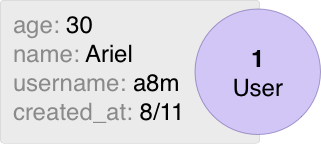
字段可以使用 Fields 方法从模式中检索。例如:
package schema

import (
    "time"

    "entgo.io/ent"
    "entgo.io/ent/schema/field"
)

// User schema.
type User struct {
    ent.Schema
}

// Fields of the user.
func (User) Fields() []ent.Field {
    return []ent.Field{
        field.Int("age"),
        field.String("name"),
        field.String("username").
            Unique(),
        field.Time("created_at").
            Default(time.Now),
    }
}
默认情况下,所有字段都是必需的,但可以使用 Optional 方法将其设置为可选。
类型
当前框架支持以下类型:
- 所有 Go 数值类型。例如
int、uint8、float64等。 boolstringtime.TimeUUID[]byte(仅 SQL)。JSON(仅 SQL)。Enum(仅 SQL)。Other(仅 SQL)。
package schema

import (
    "time"
    "net/url"

    "github.com/google/uuid"
    "entgo.io/ent"
    "entgo.io/ent/schema/field"
)

// User schema.
type User struct {
    ent.Schema
}

// Fields of the user.
func (User) Fields() []ent.Field {
    return []ent.Field{
        field.Int("age").
            Positive(),
        field.Float("rank").
            Optional(),
        field.Bool("active").
            Default(false),
        field.String("name").
            Unique(),
        field.Time("created_at").
            Default(time.Now),
        field.JSON("url", &url.URL{}).
            Optional(),
        field.JSON("strings", []string{}).
            Optional(),
        field.Enum("state").
            Values("on", "off").
            Optional(),
        field.UUID("uuid", uuid.UUID{}).
            Default(uuid.New),
    }
}
欲了解每种类型如何映射到其数据库类型,请参阅 Migration 部分。
ID 字段
id 字段是内置在模式中的,不需要声明。在基于 SQL 的数据库中,其类型默认是 int(但可通过 codegen option 更改),并在数据库中自动递增。
若要将 id 字段配置为全表唯一,可以在运行模式迁移时使用 WithGlobalUniqueID 选项。
若需要为 id 字段使用不同的配置,或在实体创建时由应用程序提供 id(例如 UUID),请重写内置的 id 配置。例如:
// Fields of the Group.
func (Group) Fields() []ent.Field {
    return []ent.Field{
        field.Int("id").
            StructTag(`json:"oid,omitempty"`),
    }
}

// Fields of the Blob.
func (Blob) Fields() []ent.Field {
    return []ent.Field{
        field.UUID("id", uuid.UUID{}).
            Default(uuid.New).
            StorageKey("oid"),
    }
}

// Fields of the Pet.
func (Pet) Fields() []ent.Field {
    return []ent.Field{
        field.String("id").
            MaxLen(25).
            NotEmpty().
            Unique().
            Immutable(),
    }
}
若需要设置自定义生成 ID 的函数,可使用 DefaultFunc 指定一个在资源创建时始终执行的函数。参见 相关 FAQ 获取更多信息。
// Fields of the User.
func (User) Fields() []ent.Field {
    return []ent.Field{
        field.Int64("id").
            DefaultFunc(func() int64 {
                // 一个简单的 ID 生成器示例——请改为生产环境可用的实现。
                return time.Now().Unix() << 8 | atomic.AddInt64(&counter, 1) % 256
            }),
    }
}
数据库类型
每种数据库方言都有自己的 Go 类型到数据库类型的映射。例如,MySQL 方言将 float64 字段映射为数据库中的 double 列。然而,您可以使用 SchemaType 方法覆盖默认行为。
package schema

import (
    "entgo.io/ent"
    "entgo.io/ent/dialect"
    "entgo.io/ent/schema/field"
)

// Card schema.
type Card struct {
    ent.Schema
}

// Fields of the Card.
func (Card) Fields() []ent.Field {
    return []ent.Field{
        field.Float("amount").
            SchemaType(map[string]string{
                dialect.MySQL:    "decimal(6,2)",   // 覆盖 MySQL。
                dialect.Postgres: "numeric",        // 覆盖 Postgres。
            }),
    }
}
Go 类型
字段的默认类型是基本 Go 类型。例如,字符串字段的类型是 string,时间字段的类型是 time.Time。GoType 方法提供了使用自定义类型覆盖默认 ent 类型的选项。
自定义类型必须是可转换为基本 Go 类型的类型,或者实现了 ValueScanner 接口,或具有 External ValueScanner。此外,如果所提供的类型实现了 Validator 接口且未设置任何验证器,则将使用该类型验证器。
package schema

import (
    "database/sql"

    "entgo.io/ent"
    "entgo.io/ent/dialect"
    "entgo.io/ent/schema/field"
    "github.com/shopspring/decimal"
)

// Amount 是一个可转换为基本 float64 类型的自定义 Go 类型。
type Amount float64

// Card schema.
type Card struct {
    ent.Schema
}

// Fields of the Card.
func (Card) Fields() []ent.Field {
    return []ent.Field{
        field.Float("amount").
            GoType(Amount(0)),
        field.String("name").
            Optional().
            // 一个 ValueScanner 类型。
            GoType(&sql.NullString{}),
        field.Enum("role").
            // 可转换为 string 的类型。
            GoType(role.Role("")),
        field.Float("decimal").
            // 混合 SchemaType 的 ValueScanner 类型。
            GoType(decimal.Decimal{}).
            SchemaType(map[string]string{
                dialect.MySQL:    "decimal(6,2)",
                dialect.Postgres: "numeric",
            }),
    }
}
External ValueScanner
Ent 允许为基本或自定义 Go 类型附加外部 ValueScanner。这使得可以使用标准 schema 字段,同时保持对其在数据库中存储方式的控制,而无需实现 ValueScanner 接口。此外,该选项还允许用户使用不实现 ValueScanner 的 GoType,例如 *url.URL。
目前,该选项仅适用于文本和数值字段,但将来会扩展到其他类型。
- TextMarshaller
- BinaryMarshaller
- Functions based
- Custom
具有实现 encoding.TextMarshaller 和 encoding.TextUnmarshaller 接口的自定义 Go 类型的字段可使用 field.TextValueScanner 作为 ValueScanner。该 ValueScanner 在写入和读取数据库字段值时调用 MarshalText 和 UnmarshalText:
field.String("big_int").
    GoType(&big.Int{}).
    ValueScanner(field.TextValueScanner[*big.Int]{})
具有实现 encoding.BinaryMarshaller 和 encoding.BinaryUnmarshaller 接口的自定义 Go 类型的字段可使用 field.BinaryValueScanner 作为 ValueScanner。该 ValueScanner 在写入和读取数据库字段值时调用 MarshalBinary 和 UnmarshalBinary:
field.String("url").
    GoType(&url.URL{}).
    ValueScanner(field.BinaryValueScanner[*url.URL]{})
field.ValueScannerFunc 允许设置两个用于写入和读取数据库值的函数:V 用于 driver.Value,S 用于 sql.Scanner:
field.String("encoded").
    ValueScanner(field.ValueScannerFunc[string, *sql.NullString]{
        V: func(s string) (driver.Value, error) {
            return base64.StdEncoding.EncodeToString([]byte(s)), nil
        },
        S: func(ns *sql.NullString) (string, error) {
            if !ns.Valid {
                return "", nil
            }
            b, err := base64.StdEncoding.DecodeString(ns.String)
            if err != nil {
                return "", err
            }
            return string(b), nil
        },
    })
field.String("prefixed").
    ValueScanner(PrefixedHex{
        prefix: "0x",
    })
// PrefixedHex 是一个实现 TypeValueScanner 接口的自定义类型。
type PrefixedHex struct {
    prefix string
}

// Value implements the TypeValueScanner.Value 方法。
func (p PrefixedHex) Value(s string) (driver.Value, error) {
    return p.prefix + ":" + hex.EncodeToString([]byte(s)), nil
}

// ScanValue implements the TypeValueScanner.ScanValue 方法。
func (PrefixedHex) ScanValue() field.ValueScanner {
    return &sql.NullString{}
}

// FromValue implements the TypeValueScanner.FromValue 方法。
func (p PrefixedHex) FromValue(v driver.Value) (string, error) {
    s, ok := v.(*sql.NullString)
    if !ok {
        return "", fmt.Errorf("unexpected input for FromValue: %T", v)
    }
    if !s.Valid {
        return "", nil
    }
    d, err := hex.DecodeString(strings.TrimPrefix(s.String, p.prefix+":"))
    if err != nil {
        return "", err
    }
    return string(d), nil
}
其他字段
Other 表示不适合任何标准字段类型的字段。例如 PostgreSQL 范围类型或地理空间类型。
package schema

import (
    "entgo.io/ent"
    "entgo.io/ent/dialect"
    "entgo.io/ent/schema/field"

    "github.com/jackc/pgtype"
)

// User schema.
type User struct {
    ent.Schema
}

// Fields of the User.
func (User) Fields() []ent.Field {
    return []ent.Field{
        field.Other("duration", &pgtype.Tstzrange{}).
            SchemaType(map[string]string{
                dialect.Postgres: "tstzrange",
            }),
    }
}
默认值
非唯一 字段支持使用 Default 和 UpdateDefault 方法设置默认值。您也可以指定 DefaultFunc 以使用自定义生成器。
// Fields of the User.
func (User) Fields() []ent.Field {
    return []ent.Field{
        field.Time("created_at").
            Default(time.Now),
        field.Time("updated_at").
            Default(time.Now).
            UpdateDefault(time.Now),
        field.String("name").
            Default("unknown"),
        field.String("cuid").
            DefaultFunc(cuid.New),
        field.JSON("dirs", []http.Dir{}).
            Default([]http.Dir{"/tmp"}),
    }
}
SQL 特定的字面值或表达式(如函数调用)可通过 entsql.Annotation 添加到默认值配置中:
// Fields of the User.
func (User) Fields() []ent.Field {
    return []ent.Field{
        // 添加一个带有 CURRENT_TIMESTAMP
        // 的新字段作为默认值到所有以前的行。
        field.Time("created_at").
            Default(time.Now).
            Annotations(
                entsql.Default("CURRENT_TIMESTAMP"),
            ),
        // 添加一个具有默认值
        // 表达式的新字段,适用于所有方言。
        field.String("field").
            Optional().
            Annotations(
                entsql.DefaultExpr("lower(other_field)"),
            ),
        // 为每种方言添加自定义默认值
        // 表达式的新字段。
        field.String("default_exprs").
            Optional().
            Annotations(
                entsql.DefaultExprs(map[string]string{
                    dialect.MySQL:    "TO_BASE64('ent')",
                    dialect.SQLite:   "hex('ent')",
                    dialect.Postgres: "md5('ent')",
                }),
            ),
    }
}
如果您的 DefaultFunc 也会返回错误,建议使用 schema-hooks 正确处理。参见 此 FAQ 获取更多信息。
验证器
字段验证器是一个函数 func(T) error,在模式中使用 Validate 方法定义,并在创建或更新实体前应用于字段值。
支持的字段验证器类型为 string 和所有数值类型。
package schema

import (
    "errors"
    "regexp"
    "strings"
    "time"

    "entgo.io/ent"
    "entgo.io/ent/schema/field"
)


// Group schema.
type Group struct {
    ent.Schema
}

// Fields of the group.
func (Group) Fields() []ent.Field {
    return []ent.Field{
        field.String("name").
            Match(regexp.MustCompile("[a-zA-Z_]+$")).
            Validate(func(s string) error {
                if strings.ToLower(s) == s {
                    return errors.New("group name must begin with uppercase")
                }
                return nil
            }),
    }
}
下面是写一个可重用验证器的另一个例子:
import (
    "entgo.io/ent/dialect/entsql"
    "entgo.io/ent/schema/field"
)

// MaxRuneCount 使用 unicode/utf8 包验证字符串的 rune 长度。
func MaxRuneCount(maxLen int) func(s string) error {
    return func(s string) error {
        if utf8.RuneCountInString(s) > maxLen {
            return errors.New("value is more than the max length")
        }
        return nil
    }
}

field.String("name").
    // 若使用 SQL 数据库:将底层数据类型改为 varchar(10)。
    Annotations(entsql.Annotation{
        Size: 10,
    }).
    Validate(MaxRuneCount(10))
field.String("nickname").
    // 若使用 SQL 数据库:将底层数据类型改为 varchar(20)。
    Annotations(entsql.Annotation{
        Size: 20,
    }).
    Validate(MaxRuneCount(20))
内置验证器
框架为每种类型提供了一些内置验证器:
- 数值类型:
Positive()Negative()NonNegative()Min(i)- 验证给定值是否 > i。Max(i)- 验证给定值是否 < i。Range(i, j)- 验证给定值是否在区间 [i, j] 内。
stringMinLen(i)MaxLen(i)Match(regexp.Regexp)NotEmpty
[]byteMaxLen(i)MinLen(i)NotEmpty
可选
可选字段不是实体创建时必需的,将在数据库中设置为可空字段。与边不同,字段默认是必需的,需要明确使用 Optional 方法将其设置为可选。
// Fields of the user.
func (User) Fields() []ent.Field {
    return []ent.Field{
        field.String("required_name"),
        field.String("optional_name").
            Optional(),
    }
}
可空
有时您需要区分字段的零值和 nil。例如,若数据库列包含 0 或 NULL。Nillable 选项正是为此设计。
若您有一个类型为 T 的 Optional 字段,将其设置为 Nillable 将生成一个类型为 *T 的结构体字段。因此,若数据库返回此字段为 NULL,结构体字段将为 nil;否则会包含指向实际值的指针。
例如,给定以下模式:
// Fields of the user.
func (User) Fields() []ent.Field {
    return []ent.Field{
        field.String("required_name"),
        field.String("optional_name").
            Optional(),
        field.String("nillable_name").
            Optional().
            Nillable(),
    }
}
生成的 User 实体结构体如下:
package ent

// User entity.
type User struct {
    RequiredName string `json:"required_name,omitempty"`
    OptionalName string `json:"optional_name,omitempty"`
    NillableName *string `json:"nillable_name,omitempty"`
}
Nillable 必需字段
Nillable 字段也可帮助避免在查询未 Select 的字段中进行 JSON marshaling 时出现零值。例如,time.Time 字段。
// Fields of the task.
func (Task) Fields() []ent.Field {
    return []ent.Field{
        field.Time("created_at").
            Default(time.Now),
        field.Time("nillable_created_at").
            Default(time.Now).
            Nillable(),
    }
}
生成的 Task 实体结构体如下:
package ent

// Task entity.
type Task struct {
    // CreatedAt holds the value of the "created_at" field.
    CreatedAt time.Time `json:"created_at,omitempty"`
    // NillableCreatedAt holds the value of the "nillable_created_at" field.
    NillableCreatedAt *time.Time `json:"nillable_created_at,omitempty"`
}
json.Marshal 的结果为:
b, _ := json.Marshal(Task{})
fmt.Printf("%s\n", b)
// {"created_at":"0001-01-01T00:00:00Z"}

now := time.Now()
b, _ = json.Marshal(Task{CreatedAt: now, NillableCreatedAt: &now})
fmt.Printf("%s\n", b)
// {"created_at":"2009-11-10T23:00:00Z","nillable_created_at":"2009-11-10T23:00:00Z"}
不可变
不可变字段只能在实体创建时设置,即不会为更新构建器生成 setter。
// Fields of the user.
func (User) Fields() []ent.Field {
    return []ent.Field{
        field.Time("created_at").
            Default(time.Now).
            Immutable(),
    }
}
唯一
字段可以通过 Unique 方法定义为唯一。请注意,唯一字段不能具有默认值。
// Fields of the user.
func (User) Fields() []ent.Field {
    return []ent.Field{
        field.String("nickname").
            Unique(),
    }
}
注释
可以使用 .Comment() 方法为字段添加注释。此注释会出现在生成实体代码中字段之前。支持换行,可使用 \n 转义序列。
// Fields of the user.
func (User) Fields() []ent.Field {
    return []ent.Field{
        field.String("name").
            Default("John Doe").
            Comment("Name of the user.\n If not specified, defaults to \"John Doe\"."),
    }
}
已废弃字段
使用 Deprecated 方法可将字段标记为已废弃。已废弃字段默认不在查询中选择,其结构体字段在生成代码中会被标注为 Deprecated。
// Fields of the user.
func (User) Fields() []ent.Field {
    return []ent.Field{
        field.String("name").
            Deprecated("use `full_name` instead"),
    }
}
存储键
可以使用 StorageKey 方法自定义存储名称。它映射到 SQL 方言中的列名,以及 Gremlin 中的属性名。
// Fields of the user.
func (User) Fields() []ent.Field {
    return []ent.Field{
        field.String("name").
            StorageKey("old_name"),
    }
}
索引
索引可定义在多字段和某些边类型上。但请注意,这目前是 SQL 独占的功能。
有关更多信息,请参阅 Indexes 部分。
结构体标签
可以使用 StructTag 方法向生成的实体添加自定义结构体标签。请注意,如果未提供该选项,或提供时不包含 json 标签,则默认会添加 json 标签与字段名。
// Fields of the user.
func (User) Fields() []ent.Field {
    return []ent.Field{
        field.String("name").
            StructTag(`gqlgen:"gql_name"`),
    }
}
额外结构体字段
默认情况下,ent 生成的实体模型包含 schema.Fields 方法配置的字段。例如,给定以下模式配置:
// User schema.
type User struct {
    ent.Schema
}

// Fields of the user.
func (User) Fields() []ent.Field {
    return []ent.Field{
        field.Int("age").
            Optional().
            Nillable(),
        field.String("name").
            StructTag(`gqlgen:"gql_name"`),
    }
}
生成的模型如下:
// User is the model entity for the User schema.
type User struct {
    // Age holds the value of the "age" field.
    Age  *int    `json:"age,omitempty"`
    // Name holds the value of the "name" field.
    Name string `json:"name,omitempty" gqlgen:"gql_name"`
}
若想为生成的结构体添加其他字段(但不存储在数据库中),请使用 external templates。例如:
{{ define "model/fields/additional" }}
    {{- if eq $.Name "User" }}
        // StaticField defined by template.
        StaticField string `json:"static,omitempty"`
    {{- end }}
{{ end }}
生成的模型如下:
// User is the model entity for the User schema.
type User struct {
    // Age holds the value of the "age" field.
    Age  *int    `json:"age,omitempty"`
    // Name holds the value of the "name" field.
    Name string `json:"name,omitempty" gqlgen:"gql_name"`
    // StaticField defined by template.
    StaticField string `json:"static,omitempty"`
}
敏感字段
字符串字段可通过 Sensitive 方法定义为敏感。敏感字段不会被打印,并且在编码时会被省略。
请注意,敏感字段不能有结构体标签。
// User schema.
type User struct {
    ent.Schema
}

// Fields of the user.
func (User) Fields() []ent.Field {
    return []ent.Field{
        field.String("password").
            Sensitive(),
    }
}
枚举字段
Enum 构造器允许使用一组允许的值创建枚举字段。
// Fields of the User.
func (User) Fields() []ent.Field {
    return []ent.Field{
        field.String("first_name"),
        field.String("last_name"),
        field.Enum("size").
            Values("big", "small"),
    }
}
默认情况下,Ent 使用简单的字符串类型在 PostgreSQL 和 SQLite 中表示枚举值。然而,在某些情况下,您可能希望使用数据库提供的本地枚举类型。请参阅 enum migration guide 获取更多信息。
当使用自定义 GoType 时,必须是可转换为基本 string 类型,或实现 ValueScanner 接口。
EnumValues 接口同样是自定义 Go 类型所需的,用于告知 Ent 枚举的允许值。
以下示例展示如何定义具有可转换为 string 的自定义 Go 类型的枚举字段:
// Fields of the User.
func (User) Fields() []ent.Field {
    return []ent.Field{
        field.String("first_name"),
        field.String("last_name"),
        // 可转换为 string 的类型。
        field.Enum("shape").
            GoType(property.Shape("")),
    }
}
实现 EnumValues 接口。
package property

type Shape string

const (
    Triangle Shape = "TRIANGLE"
    Circle   Shape = "CIRCLE"
)

// Values provides list valid values for Enum.
func (Shape) Values() (kinds []string) {
    for _, s := range []Shape{Triangle, Circle} {
        kinds = append(kinds, string(s))
    }
    return
}
以下示例展示如何定义一个不可转换为 string,但实现了 ValueScanner 接口的自定义 Go 类型枚举字段:
// Fields of the User.
func (User) Fields() []ent.Field {
    return []ent.Field{
        field.String("first_name"),
        field.String("last_name"),
        // 添加字符串转换
        field.Enum("level").
            GoType(property.Level(0)),
    }
}
实现 ValueScanner 接口。
package property

import "database/sql/driver"

type Level int

const (
    Unknown Level = iota
    Low
    High
)

func (p Level) String() string {
    switch p {
    case Low:
        return "LOW"
    case High:
        return "HIGH"
    default:
        return "UNKNOWN"
    }
}

// Values provides list valid values for Enum.
func (Level) Values() []string {
    return []string{Unknown.String(), Low.String(), High.String()}
}

// Value provides the DB a string from int.
func (p Level) Value() (driver.Value, error) {
    return p.String(), nil
}

// Scan tells our code how to read the enum into our type.
func (p *Level) Scan(val any) error {
    var s string
    switch v := val.(type) {
    case nil:
        return nil
    case string:
        s = v
    case []uint8:
        s = string(v)
    }
    switch s {
    case "LOW":
        *p = Low
    case "HIGH":
        *p = High
    default:
        *p = Unknown
    }
    return nil
}
组合起来:
// Fields of the User.
func (User) Fields() []ent.Field {
    return []ent.Field{
        field.String("first_name"),
        field.String("last_name"),
        field.Enum("size").
            Values("big", "small"),
        // 可转换为 string 的类型。
        field.Enum("shape").
            GoType(property.Shape("")),
        // 添加字符串转换。
        field.Enum("level").
            GoType(property.Level(0)),
    }
}
使用生成后非常简单:
client.User.Create().
    SetFirstName("John").
    SetLastName("Dow").
    SetSize(user.SizeSmall).
    SetShape(property.Triangle).
    SetLevel(property.Low).
    SaveX(context.Background())

john := client.User.Query().FirstX(context.Background())
fmt.Println(john)
// User(id=1, first_name=John, last_name=Dow, size=small, shape=TRIANGLE, level=LOW)
注解
Annotations 用于在代码生成中为字段对象附加任意元数据。模板扩展可检索此元数据并在其模板中使用。
请注意,元数据对象必须可序列化为 JSON 原始值(如结构体、map 或 slice)。
// User schema.
type User struct {
    ent.Schema
}

// Fields of the user.
func (User) Fields() []ent.Field {
    return []ent.Field{
        field.Time("creation_date").
            Annotations(entgql.Annotation{
                OrderField: "CREATED_AT",
            }),
    }
}
有关注解及其在模板中的使用方式,请参阅 template doc。
命名约定
惯例上字段名应使用 snake_case。ent 生成的相应结构体字段遵循 Go 的 PascalCase 约定。在需要 PascalCase 的情况下,可以通过 StorageKey 或 StructTag 方法实现。