跳到主要内容

· 阅读需 11 分钟

Ariel 在一月底发布了 Ent v0.10.0 时,他 引入 了一个基于另一个开源项目 Atlas 的新的迁移引擎。

Initially, Atlas支持一种我们称之为“声明式迁移”的数据库模式管理方式。使用声明式迁移时,数据库模式的期望状态作为输入提供给迁移引擎,迁移引擎随后规划并执行一系列操作将数据库变更为期望状态。这一方法已被云原生基础设施领域的项目(如 Kubernetes 和 Terraform)推广。它在许多情况下效果良好,事实上在过去几年里对 Ent 框架也做得非常好。然而,数据库迁移是一个非常敏感的话题,许多项目需要更受控的方式。

因此,大多数行业标准解决方案,如 FlywayLiquibase,或 golang-migrate/migrate(在 Go 生态系统中很常见),都支持它们称为“版本化迁移”的工作流。

使用版本化迁移(有时也称为“基于变更”的迁移),你不再描述期望状态(“数据库应该是什么样子”),而是描述变更本身(“如何达到该状态”)。大多数情况通过创建一组包含所需语句的 SQL 文件来完成。每个文件被分配一个唯一的版本和描述变更的说明。上述工具随后能够解释迁移文件并在正确的顺序中应用(部分)它们,以过渡到期望的数据库结构。

在本帖中,我想展示一种最近添加到 Atlas 和 Ent 的新型迁移工作流。我们称之为“版本化迁移编写”,它尝试将声明式方法的简洁与表达力与版本化迁移的安全和明确性相结合。使用版本化迁移编写,用户仍然会声明期望状态,并使用 Atlas 引擎规划一条从现有状态到新状态的安全迁移。然而,而不是将规划与执行耦合在一起,这一步骤会被写入文件,文件可以提交到源控制、手动微调并在正常的代码评审流程中审查。

举例来说,我将使用 golang-migrate/migrate 演示该工作流。

开始使用

第一件事是确保你拥有最新的 Ent 版本:

go get -u entgo.io/ent@master

Ent 生成模式变更迁移文件有两种方式。第一种是使用实例化的 Ent 客户端,第二种则是根据解析后的模式图生成变更。本篇文章将采用第二种方法,如果你想了解第一种方法,请查看 文档

生成版本化迁移文件

既然我们已经启用了版本化迁移功能,让我们创建一个小的模式并生成初始的迁移文件集合。以下是新建 Ent 项目的示例模式:

ent/schema/user.go
package schema

import (
"entgo.io/ent"
"entgo.io/ent/schema/field"
"entgo.io/ent/schema/index"
)

// User holds the schema definition for the User entity.
type User struct {
ent.Schema
}

// Fields of the User.
func (User) Fields() []ent.Field {
return []ent.Field{
field.String("username"),
}
}

// Indexes of the User.
func (User) Indexes() []ent.Index {
return []ent.Index{
index.Fields("username").Unique(),
}
}

正如我之前提到的,我们想使用解析后的模式图来计算我们的模式与已连接数据库之间的差异。以下是一个(半)持久化的 MySQL Docker 容器示例,如果你想跟着操作可以使用:

docker run --rm --name ent-versioned-migrations --detach --env MYSQL_ROOT_PASSWORD=pass --env MYSQL_DATABASE=ent -p 3306:3306 mysql

完成后,你可以通过 docker stop ent-versioned-migrations 停止并移除所有资源。

现在,让我们创建一个小函数来加载模式图并生成迁移文件。创建一个名为 main.go 的 Go 文件,并复制以下内容:

main.go
package main

import (
"context"
"log"
"os"

"ariga.io/atlas/sql/migrate"
"entgo.io/ent/dialect/sql"
"entgo.io/ent/dialect/sql/schema"
"entgo.io/ent/entc"
"entgo.io/ent/entc/gen"
_ "github.com/go-sql-driver/mysql"
)

func main() {
// We need a name for the new migration file.
if len(os.Args) < 2 {
log.Fatalln("no name given")
}
// Create a local migration directory.
dir, err := migrate.NewLocalDir("migrations")
if err != nil {
log.Fatalln(err)
}
// Load the graph.
graph, err := entc.LoadGraph("./ent/schema", &gen.Config{})
if err != nil {
log.Fatalln(err)
}
tbls, err := graph.Tables()
if err != nil {
log.Fatalln(err)
}
// Open connection to the database.
drv, err := sql.Open("mysql", "root:pass@tcp(localhost:3306)/ent")
if err != nil {
log.Fatalln(err)
}
// Inspect the current database state and compare it with the graph.
m, err := schema.NewMigrate(drv, schema.WithDir(dir))
if err != nil {
log.Fatalln(err)
}
if err := m.NamedDiff(context.Background(), os.Args[1], tbls...); err != nil {
log.Fatalln(err)
}
}

现在我们只需要创建迁移目录并执行上述 Go 文件:

mkdir migrations
go run -mod=mod main.go initial

你会在 migrations 目录下看到两个新文件:<timestamp>_initial.down.sql<timestamp>_initial.up.sqlx.up.sql 用于创建数据库版本 x,而 x.down.sql 用于回滚到之前的版本。

<timestamp>_initial.up.sql
CREATE TABLE `users` (`id` bigint NOT NULL AUTO_INCREMENT, `username` varchar(191) NOT NULL, PRIMARY KEY (`id`), UNIQUE INDEX `user_username` (`username`)) CHARSET utf8mb4 COLLATE utf8mb4_bin;
<timestamp>_initial.down.sql
DROP TABLE `users`;

迁移应用

要在数据库上应用这些迁移,先像文档里那样安装 golang-migrate/migrate 工具,然后运行以下命令检查一切是否正常。

migrate -help
Usage: migrate OPTIONS COMMAND [arg...]
migrate [ -version | -help ]

Options:
-source Location of the migrations (driver://url)
-path Shorthand for -source=file://path
-database Run migrations against this database (driver://url)
-prefetch N Number of migrations to load in advance before executing (default 10)
-lock-timeout N Allow N seconds to acquire database lock (default 15)
-verbose Print verbose logging
-version Print version
-help Print usage

Commands:
create [-ext E] [-dir D] [-seq] [-digits N] [-format] NAME
Create a set of timestamped up/down migrations titled NAME, in directory D with extension E.
Use -seq option to generate sequential up/down migrations with N digits.
Use -format option to specify a Go time format string.
goto V Migrate to version V
up [N] Apply all or N up migrations
down [N] Apply all or N down migrations
drop Drop everything inside database
force V Set version V but don't run migration (ignores dirty state)
version Print current migration version

现在我们可以执行初始迁移并将数据库与模式同步:

migrate -source 'file://migrations' -database 'mysql://root:pass@tcp(localhost:3306)/ent' up
<timestamp>/u initial (349.256951ms)

工作流

为了演示使用版本化迁移的常规工作流,我们将同时编辑模式图并为其生成迁移变更,还手动创建一组迁移文件以向数据库注入一些数据。首先,我们会添加一个 Group 模式并为现有 User 模式建立多对多关系,然后创建一个包含 admin User 的 admin Group。请按如下所示修改:

ent/schema/user.go
package schema

import (
"entgo.io/ent"
"entgo.io/ent/schema/edge"
"entgo.io/ent/schema/field"
"entgo.io/ent/schema/index"
)

// User holds the schema definition for the User entity.
type User struct {
ent.Schema
}

// Fields of the User.
func (User) Fields() []ent.Field {
return []ent.Field{
field.String("username"),
}
}

// Edges of the User.
func (User) Edges() []ent.Edge {
return []ent.Edge{
edge.From("groups", Group.Type).
Ref("users"),
}
}

// Indexes of the User.
func (User) Indexes() []ent.Index {
return []ent.Index{
index.Fields("username").Unique(),
}
}
ent/schema/group.go
package schema

import (
"entgo.io/ent"
"entgo.io/ent/schema/edge"
"entgo.io/ent/schema/field"
"entgo.io/ent/schema/index"
)

// Group holds the schema definition for the Group entity.
type Group struct {
ent.Schema
}

// Fields of the Group.
func (Group) Fields() []ent.Field {
return []ent.Field{
field.String("name"),
}
}

// Edges of the Group.
func (Group) Edges() []ent.Edge {
return []ent.Edge{
edge.To("users", User.Type),
}
}

// Indexes of the Group.
func (Group) Indexes() []ent.Index {
return []ent.Index{
index.Fields("name").Unique(),
}
}

更新完模式后,运行下面的命令生成新的迁移文件:

go run -mod=mod main.go add_group_schema

再一次,你将在 migrations 目录下看到两个新文件:<timestamp>_add_group_schema.down.sql<timestamp>_add_group_schema.up.sql

<timestamp>_add_group_schema.up.sql
CREATE TABLE `groups` (`id` bigint NOT NULL AUTO_INCREMENT, `name` varchar(191) NOT NULL, PRIMARY KEY (`id`), UNIQUE INDEX `group_name` (`name`)) CHARSET utf8mb4 COLLATE utf8mb4_bin;
CREATE TABLE `group_users` (`group_id` bigint NOT NULL, `user_id` bigint NOT NULL, PRIMARY KEY (`group_id`, `user_id`), CONSTRAINT `group_users_group_id` FOREIGN KEY (`group_id`) REFERENCES `groups` (`id`) ON DELETE CASCADE, CONSTRAINT `group_users_user_id` FOREIGN KEY (`user_id`) REFERENCES `users` (`id`) ON DELETE CASCADE) CHARSET utf8mb4 COLLATE utf8mb4_bin;
<timestamp>_add_group_schema.down.sql
DROP TABLE `group_users`;
DROP TABLE `groups`;

现在,你可以编辑生成的文件来添加种子数据,也可以为此创建新的文件。我选择后者:

migrate create -format unix -ext sql -dir migrations seed_admin
[...]/ent-versioned-migrations/migrations/<timestamp>_seed_admin.up.sql
[...]/ent-versioned-migrations/migrations/<timestamp>_seed_admin.down.sql

现在你可以编辑这些文件,添加创建 admin Group 和 User 的语句:

migrations/<timestamp>_seed_admin.up.sql
INSERT INTO `groups` (`id`, `name`) VALUES (1, 'Admins');
INSERT INTO `users` (`id`, `username`) VALUES (1, 'admin');
INSERT INTO `group_users` (`group_id`, `user_id`) VALUES (1, 1);
migrations/<timestamp>_seed_admin.down.sql
DELETE FROM `group_users` where `group_id` = 1 and `user_id` = 1;
DELETE FROM `groups` where id = 1;
DELETE FROM `users` where id = 1;

再次应用迁移,然后完成:

migrate -source file://migrations -database 'mysql://root:pass@tcp(localhost:3306)/ent' up
<timestamp>/u add_group_schema (417.434415ms)
<timestamp>/u seed_admin (674.189872ms)

结束语

在本帖中,我们演示了使用 golang-migrate/migrate 的 Ent 版本化迁移的一般工作流。我们创建了一个小的示例模式,生成了相应的迁移文件,并学习了如何应用它们。现在你已了解工作流以及如何添加自定义迁移文件。

如有疑问?需要入门帮助?欢迎加入我们的 Discord 服务器Slack 频道

关注更多 Ent 新闻与更新:

· 阅读需 14 分钟

2021 年底,我们宣布 Ent 新增了一个官方扩展,用于生成完全符合 OpenAPI 规范 的文档:entoas

今天,我们非常高兴地宣布,又一个与 entoas 配套的新扩展诞生了:ogent。它利用 ogen (官网) 的强大能力,为 entoas 生成的 OpenAPI 规范文档提供了类型安全且无需反射的实现。

ogen 是一个基于 OpenAPI Specification v3 文档的强约定 Go 代码生成器。它能为给定的 OpenAPI 规范文档同时生成服务器和客户端实现。用户唯一需要做的就是实现一个接口来访问应用程序的数据层。ogen 拥有许多炫酷的特性,其中之一是与 OpenTelemetry 的集成。请务必查看并给予支持。

本文介绍的扩展充当了 Ent 与 ogen 生成代码之间的桥梁。它使用 entoas 的配置来生成 ogen 代码的缺失部分。

下图展示了 Ent 如何与扩展 entoasogent 交互,以及 ogen 是如何参与其中的。

架构图

架构图

如果您是 Ent 的新手,想了解更多关于它的信息,例如如何连接不同类型的数据库、运行迁移或操作实体,请前往 设置教程

本文中的代码可在模块的 示例 中找到。

开始使用

备注

虽然 Ent 支持 Go 1.16+ 版本,但 ogen 要求您至少使用 1.17 版本。

要使用 ogent 扩展,请按照 此处 所述使用 entc (ent 代码生成) 包。首先将 entoasogent 扩展安装到您的 Go 模块中:

go get ariga.io/ogent@main

现在按照以下两个步骤启用它们并配置 Ent 以使用这些扩展:

1. 创建一个名为 ent/entc.go 的新 Go 文件,并粘贴以下内容:

ent/entc.go
//go:build ignore

package main

import (
"log"

"ariga.io/ogent"
"entgo.io/contrib/entoas"
"entgo.io/ent/entc"
"entgo.io/ent/entc/gen"
"github.com/ogen-go/ogen"
)

func main() {
spec := new(ogen.Spec)
oas, err := entoas.NewExtension(entoas.Spec(spec))
if err != nil {
log.Fatalf("creating entoas extension: %v", err)
}
ogent, err := ogent.NewExtension(spec)
if err != nil {
log.Fatalf("creating ogent extension: %v", err)
}
err = entc.Generate("./schema", &gen.Config{}, entc.Extensions(ogent, oas))
if err != nil {
log.Fatalf("running ent codegen: %v", err)
}
}

2. 编辑 ent/generate.go 文件以执行 ent/entc.go 文件:

ent/generate.go
package ent

//go:generate go run -mod=mod entc.go

完成这些步骤后,一切就绪,可以从您的模式(schema)生成 OAS 文档并实现服务器代码了!

生成 CRUD HTTP API 服务器

构建 HTTP API 服务器的第一步是创建一个 Ent 模式图(schema graph)。为简洁起见,这里使用一个示例模式:

ent/schema/todo.go
package schema

import (
"entgo.io/ent"
"entgo.io/ent/schema/field"
)

// Todo 持有 Todo 实体的模式定义。
type Todo struct {
ent.Schema
}

// Todo 的字段。
func (Todo) Fields() []ent.Field {
return []ent.Field{
field.String("title"),
field.Bool("done"),
}
}

上面的代码是描述模式图的 "Ent 方式"。在这个特定的例子中,我们创建了一个 todo 实体。

现在运行代码生成器:

go generate ./...

您应该看到由 Ent 代码生成器生成的一堆文件。名为 ent/openapi.json 的文件是由 entoas 扩展生成的。以下是其预览:

ent/openapi.json
{
"info": {
"title": "Ent Schema API",
"description": "This is an auto generated API description made out of an Ent schema definition",
"termsOfService": "",
"contact": {},
"license": {
"name": ""
},
"version": "0.0.0"
},
"paths": {
"/todos": {
"get": {
[...]
Swagger 编辑器示例

Swagger 编辑器示例

然而,本文重点在于服务器实现部分,因此我们对名为 ent/ogent 的目录感兴趣。所有以 _gen.go 结尾的文件都是由 ogen 生成的。名为 oas_server_gen.go 的文件包含了 ogen 用户需要实现的接口,以便运行服务器。

ent/ogent/oas_server_gen.go
// Handler 处理 OpenAPI v3 规范描述的操作。
type Handler interface {
// CreateTodo 实现 createTodo 操作。
//
// 创建新的 Todo 并持久化到存储。
//
// POST /todos
CreateTodo(ctx context.Context, req CreateTodoReq) (CreateTodoRes, error)
// DeleteTodo 实现 deleteTodo 操作。
//
// 删除具有指定 ID 的 Todo。
//
// DELETE /todos/{id}
DeleteTodo(ctx context.Context, params DeleteTodoParams) (DeleteTodoRes, error)
// ListTodo 实现 listTodo 操作。
//
// 列出 Todos。
//
// GET /todos
ListTodo(ctx context.Context, params ListTodoParams) (ListTodoRes, error)
// ReadTodo 实现 readTodo 操作。
//
// 查找具有指定 ID 的 Todo 并返回。
//
// GET /todos/{id}
ReadTodo(ctx context.Context, params ReadTodoParams) (ReadTodoRes, error)
// UpdateTodo 实现 updateTodo 操作。
//
// 更新 Todo 并将更改持久化到存储。
//
// PATCH /todos/{id}
UpdateTodo(ctx context.Context, req UpdateTodoReq, params UpdateTodoParams) (UpdateTodoRes, error)
}

ogent 在文件 ogent.go 中为该处理程序添加了一个实现。要了解如何定义要生成的路由以及要急切加载(eager load)的边(edges),请前往 entoas文档

以下展示了一个生成的读取(READ)路由示例:

// ReadTodo 处理 GET /todos/{id} 请求。
func (h *OgentHandler) ReadTodo(ctx context.Context, params ReadTodoParams) (ReadTodoRes, error) {
q := h.client.Todo.Query().Where(todo.IDEQ(params.ID))
e, err := q.Only(ctx)
if err != nil {
switch {
case ent.IsNotFound(err):
return &R404{
Code: http.StatusNotFound,
Status: http.StatusText(http.StatusNotFound),
Errors: rawError(err),
}, nil
case ent.IsNotSingular(err):
return &R409{
Code: http.StatusConflict,
Status: http.StatusText(http.StatusConflict),
Errors: rawError(err),
}, nil
default:
// 让服务器处理错误。
return nil, err
}
}
return NewTodoRead(e), nil
}

运行服务器

下一步是创建一个 main.go 文件,并连接所有部分以创建一个应用服务器来提供 Todo-API。以下 main 函数初始化了一个 SQLite 内存数据库,运行迁移以创建所有需要的表,并在 localhost:8080 上提供 ent/openapi.json 文件中描述的 API:

main.go
package main

import (
"context"
"log"
"net/http"

"entgo.io/ent/dialect"
"entgo.io/ent/dialect/sql/schema"
"<your-project>/ent"
"<your-project>/ent/ogent"
_ "github.com/mattn/go-sqlite3"
)

func main() {
// 创建 ent 客户端。
client, err := ent.Open(dialect.SQLite, "file:ent?mode=memory&cache=shared&_fk=1")
if err != nil {
log.Fatal(err)
}
// 运行迁移。
if err := client.Schema.Create(context.Background(), schema.WithAtlas(true)); err != nil {
log.Fatal(err)
}
// 开始监听。
srv, err := ogent.NewServer(ogent.NewOgentHandler(client))
if err != nil {
log.Fatal(err)
}
if err := http.ListenAndServe(":8080", srv); err != nil {
log.Fatal(err)
}
}

使用 go run -mod=mod main.go 运行服务器后,您就可以使用 API 了。

首先,让我们创建一个新的 Todo。出于演示目的,我们不发送请求体:

curl -X POST -H "Content-Type: application/json" localhost:8080/todos
{
"error_message": "body required"
}

如您所见,ogen 为您处理了这种情况,因为 entoas 在尝试创建新资源时将请求体标记为必需。让我们再试一次,但这次提供一个请求体:

curl -X POST -H "Content-Type: application/json" -d '{"title":"Give ogen and ogent a Star on GitHub"}'  localhost:8080/todos
{
"error_message": "decode CreateTodo:application/json request: invalid: done (field required)"
}

哎呀!出了什么问题?ogen 为您提供了保障:字段 done 是必需的。要解决此问题,请转到您的模式定义并将 done 字段标记为可选:

ent/schema/todo.go
package schema

import (
"entgo.io/ent"
"entgo.io/ent/schema/field"
)

// Todo 持有 Todo 实体的模式定义。
type Todo struct {
ent.Schema
}

// Todo 的字段。
func (Todo) Fields() []ent.Field {
return []ent.Field{
field.String("title"),
field.Bool("done").
Optional(),
}
}

由于我们对配置进行了更改,必须重新运行代码生成并重启服务器:

go generate ./...
go run -mod=mod main.go

现在,如果我们再次尝试创建 Todo,看看会发生什么:

curl -X POST -H "Content-Type: application/json" -d '{"title":"Give ogen and ogent a Star on GitHub"}'  localhost:8080/todos
{
"id": 1,
"title": "Give ogen and ogent a Star on GitHub",
"done": false
}

瞧,数据库中有一个新的 Todo 项目了!

假设您已经完成了您的 Todo 并且给 ogenogent 点了星(您真的应该点!),通过发起 PATCH 请求将 todo 标记为完成:

curl -X PATCH -H "Content-Type: application/json" -d '{"done":true}'  localhost:8080/todos/1
{
"id": 1,
"title": "Give ogen and ogent a Star on GitHub",
"done": true
}

添加自定义端点

如您所见,Todo 现在被标记为完成。不过,如果有一个额外的路由来标记 Todo 为完成状态会更酷:PATCH todos/:id/done。要实现这一点,我们必须做两件事:在我们的 OAS 文档中记录新路由,并实现该路由。我们可以使用 entoas 的变更构建器(mutation builder)来解决第一个问题。编辑您的 ent/entc.go 文件并添加路由描述:

ent/entc.go
//go:build ignore

package main

import (
"log"

"entgo.io/contrib/entoas"
"entgo.io/ent/entc"
"entgo.io/ent/entc/gen"
"github.com/ariga/ogent"
"github.com/ogen-go/ogen"
)

func main() {
spec := new(ogen.Spec)
oas, err := entoas.NewExtension(
entoas.Spec(spec),
entoas.Mutations(func(_ *gen.Graph, spec *ogen.Spec) error {
spec.AddPathItem("/todos/{id}/done", ogen.NewPathItem().
SetDescription("标记项目为完成").
SetPatch(ogen.NewOperation().
SetOperationID("markDone").
SetSummary("将 todo 项目标记为完成。").
AddTags("Todo").
AddResponse("204", ogen.NewResponse().SetDescription("项目标记为完成")),
).
AddParameters(ogen.NewParameter().
InPath().
SetName("id").
SetRequired(true).
SetSchema(ogen.Int()),
),
)
return nil
}),
)
if err != nil {
log.Fatalf("creating entoas extension: %v", err)
}
ogent, err := ogent.NewExtension(spec)
if err != nil {
log.Fatalf("creating ogent extension: %v", err)
}
err = entc.Generate("./schema", &gen.Config{}, entc.Extensions(ogent, oas))
if err != nil {
log.Fatalf("running ent codegen: %v", err)
}
}

运行代码生成器 (go generate ./...) 后,ent/openapi.json 文件中应该有一个新条目:

"/todos/{id}/done": {
"description": "标记项目为完成",
"patch": {
"tags": [
"Todo"
],
"summary": "将 todo 项目标记为完成。",
"operationId": "markDone",
"responses": {
"204": {
"description": "项目标记为完成"
}
}
},
"parameters": [
{
"name": "id",
"in": "path",
"schema": {
"type": "integer"
},
"required": true
}
]
}
自定义端点

自定义端点

上述由 ogen 生成的 ent/ogent/oas_server_gen.go 文件也会反映这些更改:

ent/ogent/oas_server_gen.go
// Handler 处理 OpenAPI v3 规范描述的操作。
type Handler interface {
// CreateTodo 实现 createTodo 操作。
//
// 创建新的 Todo 并持久化到存储。
//
// POST /todos
CreateTodo(ctx context.Context, req CreateTodoReq) (CreateTodoRes, error)
// DeleteTodo 实现 deleteTodo 操作。
//
// 删除具有指定 ID 的 Todo。
//
// DELETE /todos/{id}
DeleteTodo(ctx context.Context, params DeleteTodoParams) (DeleteTodoRes, error)
// ListTodo 实现 listTodo 操作。
//
// 列出 Todos。
//
// GET /todos
ListTodo(ctx context.Context, params ListTodoParams) (ListTodoRes, error)
// MarkDone 实现 markDone 操作。
//
// PATCH /todos/{id}/done
MarkDone(ctx context.Context, params MarkDoneParams) (MarkDoneNoContent, error)
// ReadTodo 实现 readTodo 操作。
//
// 查找具有指定 ID 的 Todo 并返回。
//
// GET /todos/{id}
ReadTodo(ctx context.Context, params ReadTodoParams) (ReadTodoRes, error)
// UpdateTodo 实现 updateTodo 操作。
//
// 更新 Todo 并将更改持久化到存储。
//
// PATCH /todos/{id}
UpdateTodo(ctx context.Context, req UpdateTodoReq, params UpdateTodoParams) (UpdateTodoRes, error)
}

如果您现在尝试运行服务器,Go 编译器会报错,因为 ogent 代码生成器不知道如何实现新路由。您必须手动完成。将当前的 main.go 替换为以下文件以实现新方法。

main.go
package main

import (
"context"
"log"
"net/http"

"entgo.io/ent/dialect"
"entgo.io/ent/dialect/sql/schema"
"github.com/ariga/ogent/example/todo/ent"
"github.com/ariga/ogent/example/todo/ent/ogent"
_ "github.com/mattn/go-sqlite3"
)

type handler struct {
*ogent.OgentHandler
client *ent.Client
}

func (h handler) MarkDone(ctx context.Context, params ogent.MarkDoneParams) (ogent.MarkDoneNoContent, error) {
return ogent.MarkDoneNoContent{}, h.client.Todo.UpdateOneID(params.ID).SetDone(true).Exec(ctx)
}

func main() {
// 创建 ent 客户端。
client, err := ent.Open(dialect.SQLite, "file:ent?mode=memory&cache=shared&_fk=1")
if err != nil {
log.Fatal(err)
}
// 运行迁移。
if err := client.Schema.Create(context.Background(), schema.WithAtlas(true)); err != nil {
log.Fatal(err)
}
// 创建处理程序。
h := handler{
OgentHandler: ogent.NewOgentHandler(client),
client: client,
}
// 开始监听。
srv := ogent.NewServer(h)
if err := http.ListenAndServe(":8180", srv); err != nil {
log.Fatal(err)
}
}

如果您重启服务器,则可以发起以下请求来标记一个 todo 项目为完成状态:

curl -X PATCH localhost:8180/todos/1/done

未来计划

ogent 计划进行一些改进,最显著的是为 LIST 路由添加过滤功能,提供代码生成、类型安全的方式。我们想先听听您的反馈。

总结

在本文中,我们宣布了 ogent,它是 entoas 生成的 OpenAPI 规范文档的官方实现生成器。该扩展利用 ogen(一个非常强大且功能丰富的 OpenAPI v3 文档 Go 代码生成器)的能力,提供了一个即用型、可扩展的 RESTful HTTP API 服务器。

请注意,ogenentoas/ogent 都尚未达到第一个主要版本,目前仍在开发中。不过,API 可以被认为是稳定的。

有疑问吗?需要入门帮助?欢迎加入我们的 Discord 服务器Slack 频道

了解更多 Ent 新闻和更新:

· 阅读需 7 分钟

亲爱的社区,

我很高兴宣布 Ent 的下一版本 v0.10 已发布。它自 v0.9.1 以来已经过去近六个月,因而在本次发布中自然包含了大量新内容。

尽管如此,我想花时间介绍我们过去几个月一直在努力的重大改进:全新的迁移引擎。

进入: Atlas

Ent 现有的迁移引擎非常出色,它完成了一些非常实用的工作,社区已经在生产环境使用多年。但随着时间推移,一些我们无法通过现有架构解决的问题开始堆积。再者,我们认为现有数据库迁移框架尚有许多不足。行业在过去十年里对安全管理生产系统变更的原则(如基础设施即代码、声明式配置管理)有了大量经验,而这些在大多数此类项目创立时并不存在。

鉴于这些问题相对通用且与应用无论使用何种框架或编程语言相关,我们看到了将其作为任何项目都可使用的公共基础设施进行修复的机会。因此,除了重写 Ent 的迁移引擎外,我们决定将该解决方案提取为新的开源项目,[Atlas]

Atlas 以 CLI 工具形式发布,使用基于 HCL(类似 Terraform)的新 [DDL],但也可以作为 [Go 包] 使用。
与 Ent 一样,Atlas 采用 Apache License 2.0 许可。

最终,在大量工作和测试后,Atlas 与 Ent 的集成已可供使用。对于许多在现有迁移系统中无法充分解决的用户(如 #1652、#1631、#1625、#1546 和 #1845),这无疑是好消息;现在他们的问题已通过 Atlas 引擎得到解决。

像任何重大变更一样,当前使用 Atlas 作为迁移引擎是可选的。未来我们将切换为默认使用,并最终废弃现有引擎。此过程将逐步推进,我们会根据社区的正面反馈来加速。

开始使用 Atlas 迁移(Ent)

首先,将 Ent 升级到最新版本:

go get entgo.io/ent@v0.10.0
package main
import (
"context"
"log"
"<project>/ent"
"<project>/ent/migrate"
"entgo.io/ent/dialect/sql/schema"
)
func main() {
client, err := ent.Open("mysql", "root:pass@tcp(localhost:3306)/test")
if err != nil {
log.Fatalf("连接到 MySQL 失败: %v", err)
}
defer client.Close()
ctx := context.Background()
// 运行迁移。
err = client.Schema.Create(ctx, schema.WithAtlas(true))
if err != nil {
log.Fatalf("创建模式资源失败: %v", err)
}
}

就这么完事了!

Atlas 引擎相较于现有 Ent 代码的一个显著优势是其分层结构,能够清晰地区分 Inspection(了解数据库的当前状态)、Diffing(计算当前与期望状态之间的差异)、Planning(计算具体的修复计划)和 Applying(执行应用)。
atlas-migration-process

除了标准选项(如 WithDropColumnWithGlobalUniqueID)外,Atlas 集成还提供了额外选项,用于钩入架构迁移步骤。

下面给出两个示例,展示如何钩入 Atlas 的 DiffApply 步骤。

package main
import (
"context"
"log"
"<project>/ent"
"<project>/ent/migrate"
"ariga.io/atlas/sql/migrate"
atlas "ariga.io/atlas/sql/schema"
"entgo.io/ent/dialect"
"entgo.io/ent/dialect/sql/schema"
)
func main() {
client, err := ent.Open("mysql", "root:pass@tcp(localhost:3306)/test")
if err != nil {
log.Fatalf("连接到 MySQL 失败: %v", err)
}
defer client.Close()
ctx := context.Background()
// 运行迁移。
err := client.Schema.Create(
ctx,
// 钩住 Atlas Diff 过程。
schema.WithDiffHook(func(next schema.Differ) schema.Differ {
return schema.DiffFunc(func(current, desired *atlas.Schema) ([]atlas.Change, error) {
// 在计算更改之前。
changes, err := next.Diff(current, desired)
if err != nil {
return nil, err
}
// diff后,可以过滤
// 更改或返回新更改。
return changes, nil
})
}),
// 钩住 Atlas Apply 过程。
schema.WithApplyHook(func(next schema.Applier) schema.Applier {
return schema.ApplyFunc(func(ctx context.Context, conn dialect.ExecQuerier, plan *migrate.Plan) error {
// 示例:钩住应用过程,或实现
// 自定义应用器。例如,写入文件。
//
// for _, c := range plan.Changes {
// fmt.Printf("%s: %s", c.Comment, c.Cmd)
// if err := conn.Exec(ctx, c.Cmd, c.Args, nil); err != nil {
// return err
// }
// }
//
return next.Apply(ctx, conn, plan)
})
}),
)
if err != nil {
log.Fatalf("创建模式资源失败: %v", err)
}
}

接下来是什么:v0.11

我知道我们花了一段时间才把这个版本推出,但下一个版本正近在咫尺。以下是 v0.11 的内容:

  • 为边缘/关系模式添加支持 - 支持在关系中附加元数据字段。
  • 重新实现 GraphQL 集成,以完全兼容 Relay 规范。
  • 为“迁移编写”添加支持:Atlas 库提供了用于创建“版本化”迁移目录的基础设施,这在许多迁移框架(如 Flyway、Liquibase、go-migrate 等)中常见。许多用户已为此类系统构建集成方案,我们计划利用 Atlas 提供稳固的基础设施。
  • 查询钩子(拦截器) - 目前仅为 Mutations 提供钩子。许多用户也请求为读取操作添加支持。
  • 多态边缘 - 关于为多态添加支持的问题已开放超过一年。随着 Go 泛型类型支持在 1.18 中推出,我们想重新开启关于使用它们实现的讨论。

收尾

除了关于新迁移引擎的激动人心的宣布之外,本次发布在规模和内容上都非常庞大,包含 199 次提交来自 42 位独特贡献者。Ent 是一次社区协作,凭借大家的努力日益完善。因此,向所有参与此次发布的成员致以衷心感谢与无限赞誉(按字母顺序):

attackordie,
bbkane,
bodokaiser,
cjraa,
dakimura,
dependabot,
EndlessIdea,
ernado,
evanlurvey,
freb,
genevieve,
giautm,
grevych,
hedwigz,
heliumbrain,
hilakashai,
HurSungYun,
idc77,
isoppp,
JeremyV2014,
Laconty,
lenuse,
masseelch,
mattn,
mookjp,
msal4,
naormatania,
odeke-em,
peanut-cc,
posener,
RiskyFeryansyahP,
rotemtam,
s-takehana,
sadmansakib,
sashamelentyev,
seiichi1101,
sivchari,
storyicon,
tarrencev,
ThinkontrolSY,
timoha,
vecpeng,
yonidavidson, 以及
zeevmoney

祝好,
Ariel

更多 Ent 新闻与更新:

· 阅读需 21 分钟

GraphQL 是一种用于 HTTP API 的查询语言,提供了静态类型接口,可方便地表示当今复杂的数据层次结构。 使用 GraphQL 的一种方式是导入实现 GraphQL 服务器的库,并向其注册实现数据库接口的自定义解析器。 另一种方式是使用 GraphQL 云服务来实现 GraphQL 服务器,并注册无服务器云函数作为解析器。 云服务的众多好处中,最大的实际优势之一是解析器的独立性和可组合性。 例如,我们可以编写一个解析器连接到关系数据库,另一个连接到搜索数据库。

下面我们将考虑使用 Amazon Web Services (AWS) 的此类设置。具体来说,我们使用 AWS AppSync 作为 GraphQL 云服务,使用 AWS Lambda 运行关系数据库解析器,该解析器使用 GoEnt 作为实体框架实现。 与 AWS Lambda 最流行的运行时 Nodejs 相比,Go 提供了更快的启动时间、更高的性能,并且在我看来,提供了更好的开发体验。 作为额外的补充,Ent 提出了一种创新方法,用于对关系数据库进行类型安全访问,我认为这在 Go 生态系统中是无与伦比的。 总之,将 Ent 与 AWS Lambda 作为 AWS AppSync 解析器一起运行,是应对当今苛刻 API 需求的极其强大的设置。

在接下来的部分中,我们将设置 AWS AppSync 中的 GraphQL 和运行 Ent 的 AWS Lambda 函数。 随后,我们提出一个集成 Ent 和 AWS Lambda 事件处理程序的 Go 实现,然后对 Ent 函数进行快速测试。 最后,我们将其注册为 AWS AppSync API 的数据源,并配置解析器,这些解析器定义了从 GraphQL 请求到 AWS Lambda 事件的映射。 请注意,本教程需要 AWS 账户和可公开访问的 Postgres 数据库的 URL,这可能会产生费用。

设置 AWS AppSync 架构

要在 AWS AppSync 中设置 GraphQL 架构,请登录您的 AWS 账户并通过导航栏选择 AppSync 服务。 AppSync 服务的登录页面应显示一个“Create API”按钮,点击该按钮可进入“Getting Started”页面:

从头开始使用 AWS AppSync 的截图

从头开始使用 AWS AppSync

在显示“Customize your API or import from Amazon DynamoDB”的上方面板中,选择“Build from scratch”选项,并点击该面板所属的“Start”按钮。 您现在应该看到一个表单,可以在其中插入 API 名称。 对于本教程,我们输入“Todo”,参见下面的截图,然后点击“Create”按钮。

创建新的 AWS AppSync API 资源的截图

在 AWS AppSync 中创建新的 API 资源

创建 AppSync API 后,您应该看到一个登录页面,显示定义架构的面板、查询 API 的面板以及将 AppSync 集成到您的应用程序中的面板,如下面的截图所示。

AWS AppSync API 登录页面的截图

AWS AppSync API 的登录页面

点击第一个面板中的“Edit Schema”按钮,并将之前的架构替换为以下 GraphQL 架构:

input AddTodoInput {
title: String!
}

type AddTodoOutput {
todo: Todo!
}

type Mutation {
addTodo(input: AddTodoInput!): AddTodoOutput!
removeTodo(input: RemoveTodoInput!): RemoveTodoOutput!
}

type Query {
todos: [Todo!]!
todo(id: ID!): Todo
}

input RemoveTodoInput {
todoId: ID!
}

type RemoveTodoOutput {
todo: Todo!
}

type Todo {
id: ID!
title: String!
}

schema {
query: Query
mutation: Mutation
}

替换架构后,会运行一个简短的验证,您应该能够点击右上角的“Save Schema”按钮,并看到以下视图:

AWS AppSync:AWS AppSync API 的最终 GraphQL 架构截图

AWS AppSync API 的最终 GraphQL 架构

如果我们向 AppSync API 发送 GraphQL 请求,由于没有解析器附加到架构,API 将返回错误。 我们将在通过 AWS Lambda 部署 Ent 函数后配置解析器。

详细解释当前的 GraphQL 架构超出了本教程的范围。 简而言之,GraphQL 架构通过 Query.todos 实现列表 todos 操作,通过 Query.todo 实现单个读取 todo 操作,通过 Mutation.createTodo 实现创建 todo 操作,通过 Mutation.deleteTodo 实现删除操作。 GraphQL API 类似于 /todos 资源的简单 REST API 设计,其中我们将使用 GET /todosGET /todos/:idPOST /todosDELETE /todos/:id。 有关 GraphQL 架构设计的详细信息,例如 QueryMutation 对象的参数和返回,我遵循 GitHub GraphQL API 的实践。

设置 AWS Lambda

有了 AppSync API,我们的下一站是运行 Ent 的 AWS Lambda 函数。 为此,我们通过导航栏导航到 AWS Lambda 服务,这将引导我们到列出函数的 AWS Lambda 服务登录页面:

列出函数的 AWS Lambda 登录页面截图

显示函数的 AWS Lambda 登录页面。

我们点击右上角的“Create function”按钮,并在上方面板中选择“Author from scratch”。 此外,我们将函数命名为“ent”,将运行时设置为“Go 1.x”,然后点击底部的“Create function”按钮。 然后我们应该看到“ent”函数的登录页面:

列出函数的 AWS Lambda 登录页面截图

Ent 函数的 AWS Lambda 函数概述。

在审查 Go 代码并上传编译后的二进制文件之前,我们需要调整“ent”函数的一些默认设置。 首先,我们将默认处理程序名称从 hello 更改为 main,这等于编译后的 Go 二进制文件的文件名:

列出函数的 AWS Lambda 登录页面截图

Ent 函数的 AWS Lambda 运行时设置。

其次,我们添加一个环境变量 DATABASE_URL,用于编码数据库网络参数和凭据:

列出函数的 AWS Lambda 登录页面截图

Ent 函数的 AWS Lambda 环境变量设置。

要打开到数据库的连接,请传入 DSN,例如 postgres://username:password@hostname/dbname。 默认情况下,AWS Lambda 会加密环境变量,使它们成为提供数据库连接参数的快速安全机制。 或者,可以使用 AWS Secretsmanager 服务并在 Lambda 函数的冷启动期间动态请求凭据,从而允许(除其他外)轮换凭据。 第三种选择是使用 AWS IAM 来处理数据库授权。

如果您在 AWS RDS 中创建了 Postgres 数据库,默认用户名和数据库名是 postgres。 可以通过修改 AWS RDS 实例来重置密码。

设置 Ent 并部署 AWS Lambda

我们现在审查、编译并将数据库 Go 二进制文件部署到“ent”函数。 您可以在 bodokaiser/entgo-aws-appsync 找到完整的源代码。

首先,我们创建一个空目录并切换到该目录:

mkdir entgo-aws-appsync
cd entgo-aws-appsync

其次,我们初始化一个新的 Go 模块来包含我们的项目:

go mod init entgo-aws-appsync

第三,我们在引入 ent 依赖的同时创建 Todo 架构:

go run -mod=mod entgo.io/ent/cmd/ent new Todo

并添加 title 字段:

ent/schema/todo.go
package schema

import (
"entgo.io/ent"
"entgo.io/ent/schema/field"
)

// Todo 保存 Todo 实体的架构定义。
type Todo struct {
ent.Schema
}

// Todo 的字段。
func (Todo) Fields() []ent.Field {
return []ent.Field{
field.String("title"),
}
}

// Todo 的边。
func (Todo) Edges() []ent.Edge {
return nil
}

最后,我们执行 Ent 代码生成:

go generate ./ent

使用 Ent,我们编写了一组解析器函数,这些函数实现了对 todos 的创建、读取和删除操作:

internal/handler/resolver.go
package resolver

import (
"context"
"fmt"
"strconv"

"entgo-aws-appsync/ent"
"entgo-aws-appsync/ent/todo"
)

// TodosInput 是 Todos 查询的输入。
type TodosInput struct{}

// Todos 查询所有 todos。
func Todos(ctx context.Context, client *ent.Client, input TodosInput) ([]*ent.Todo, error) {
return client.Todo.
Query().
All(ctx)
}

// TodoByIDInput 是 TodoByID 查询的输入。
type TodoByIDInput struct {
ID string `json:"id"`
}

// TodoByID 通过 id 查询单个 todo。
func TodoByID(ctx context.Context, client *ent.Client, input TodoByIDInput) (*ent.Todo, error) {
tid, err := strconv.Atoi(input.ID)
if err != nil {
return nil, fmt.Errorf("failed parsing todo id: %w", err)
}
return client.Todo.
Query().
Where(todo.ID(tid)).
Only(ctx)
}

// AddTodoInput 是 AddTodo 变异的输入。
type AddTodoInput struct {
Title string `json:"title"`
}

// AddTodoOutput 是 AddTodo 变异的输出。
type AddTodoOutput struct {
Todo *ent.Todo `json:"todo"`
}

// AddTodo 添加一个 todo 并返回它。
func AddTodo(ctx context.Context, client *ent.Client, input AddTodoInput) (*AddTodoOutput, error) {
t, err := client.Todo.
Create().
SetTitle(input.Title).
Save(ctx)
if err != nil {
return nil, fmt.Errorf("failed creating todo: %w", err)
}
return &AddTodoOutput{Todo: t}, nil
}

// RemoveTodoInput 是 RemoveTodo 变异的输入。
type RemoveTodoInput struct {
TodoID string `json:"todoId"`
}

// RemoveTodoOutput 是 RemoveTodo 变异的输出。
type RemoveTodoOutput struct {
Todo *ent.Todo `json:"todo"`
}

// RemoveTodo 删除一个 todo 并返回它。
func RemoveTodo(ctx context.Context, client *ent.Client, input RemoveTodoInput) (*RemoveTodoOutput, error) {
t, err := TodoByID(ctx, client, TodoByIDInput{ID: input.TodoID})
if err != nil {
return nil, fmt.Errorf("failed querying todo with id %q: %w", input.TodoID, err)
}
err = client.Todo.
DeleteOne(t).
Exec(ctx)
if err != nil {
return nil, fmt.Errorf("failed deleting todo with id %q: %w", input.TodoID, err)
}
return &RemoveTodoOutput{Todo: t}, nil
}

对解析器函数使用输入结构允许映射 GraphQL 请求参数。 使用输出结构允许为更复杂的操作返回多个对象。

为了将 Lambda 事件映射到解析器函数,我们实现了一个处理程序,该处理程序根据事件中的 action 字段执行映射:

internal/handler/handler.go
package handler

import (
"context"
"encoding/json"
"fmt"
"log"

"entgo-aws-appsync/ent"
"entgo-aws-appsync/internal/resolver"
)

// Action 指定事件类型。
type Action string

// 支持的事件操作列表。
const (
ActionMigrate Action = "migrate"

ActionTodos = "todos"
ActionTodoByID = "todoById"
ActionAddTodo = "addTodo"
ActionRemoveTodo = "removeTodo"
)

// Event 是事件处理程序的参数。
type Event struct {
Action Action `json:"action"`
Input json.RawMessage `json:"input"`
}

// Handler 处理支持的事件。
type Handler struct {
client *ent.Client
}

// 返回一个新的事件处理程序。
func New(c *ent.Client) *Handler {
return &Handler{
client: c,
}
}

// Handle 实现按操作处理事件。
func (h *Handler) Handle(ctx context.Context, e Event) (interface{}, error) {
log.Printf("action %s with payload %s\n", e.Action, e.Input)

switch e.Action {
case ActionMigrate:
return nil, h.client.Schema.Create(ctx)
case ActionTodos:
var input resolver.TodosInput
return resolver.Todos(ctx, h.client, input)
case ActionTodoByID:
var input resolver.TodoByIDInput
if err := json.Unmarshal(e.Input, &input); err != nil {
return nil, fmt.Errorf("failed parsing %s params: %w", ActionTodoByID, err)
}
return resolver.TodoByID(ctx, h.client, input)
case ActionAddTodo:
var input resolver.AddTodoInput
if err := json.Unmarshal(e.Input, &input); err != nil {
return nil, fmt.Errorf("failed parsing %s params: %w", ActionAddTodo, err)
}
return resolver.AddTodo(ctx, h.client, input)
case ActionRemoveTodo:
var input resolver.RemoveTodoInput
if err := json.Unmarshal(e.Input, &input); err != nil {
return nil, fmt.Errorf("failed parsing %s params: %w", ActionRemoveTodo, err)
}
return resolver.RemoveTodo(ctx, h.client, input)
}

return nil, fmt.Errorf("invalid action %q", e.Action)
}

除了解析器操作,我们还添加了一个迁移操作,这是公开数据库迁移的一种便捷方式。

最后,我们需要将 Handler 类型的实例注册到 AWS Lambda 库。

lambda/main.go
package main

import (
"database/sql"
"log"
"os"

"entgo.io/ent/dialect"
entsql "entgo.io/ent/dialect/sql"

"github.com/aws/aws-lambda-go/lambda"
_ "github.com/jackc/pgx/v4/stdlib"

"entgo-aws-appsync/ent"
"entgo-aws-appsync/internal/handler"
)

func main() {
// 使用 pgx 驱动程序打开数据库连接
db, err := sql.Open("pgx", os.Getenv("DATABASE_URL"))
if err != nil {
log.Fatalf("failed opening database connection: %v", err)
}

// 为 Postgres 数据库初始化 ent 数据库客户端
client := ent.NewClient(ent.Driver(entsql.OpenDB(dialect.Postgres, db)))
defer client.Close()

// 注册我们的事件处理程序以侦听 Lambda 事件
lambda.Start(handler.New(client).Handle)
}

每当 AWS Lambda 执行冷启动时,都会执行 main 的函数体。 冷启动后,Lambda 函数被认为是“热”的,只有事件处理程序代码被执行,这使得 Lambda 执行非常高效。

要编译和部署 Go 代码,我们运行:

GOOS=linux go build -o main ./lambda
zip function.zip main
aws lambda update-function-code --function-name ent --zip-file fileb://function.zip

第一个命令创建一个名为 main 的编译二进制文件。 第二个命令将二进制文件压缩为 ZIP 存档,这是 AWS Lambda 所需的。 第三个命令用新的 ZIP 存档替换名为 ent 的 AWS Lambda 的函数代码。 如果您使用多个 AWS 账户,您可能需要使用 --profile <your aws profile> 开关。

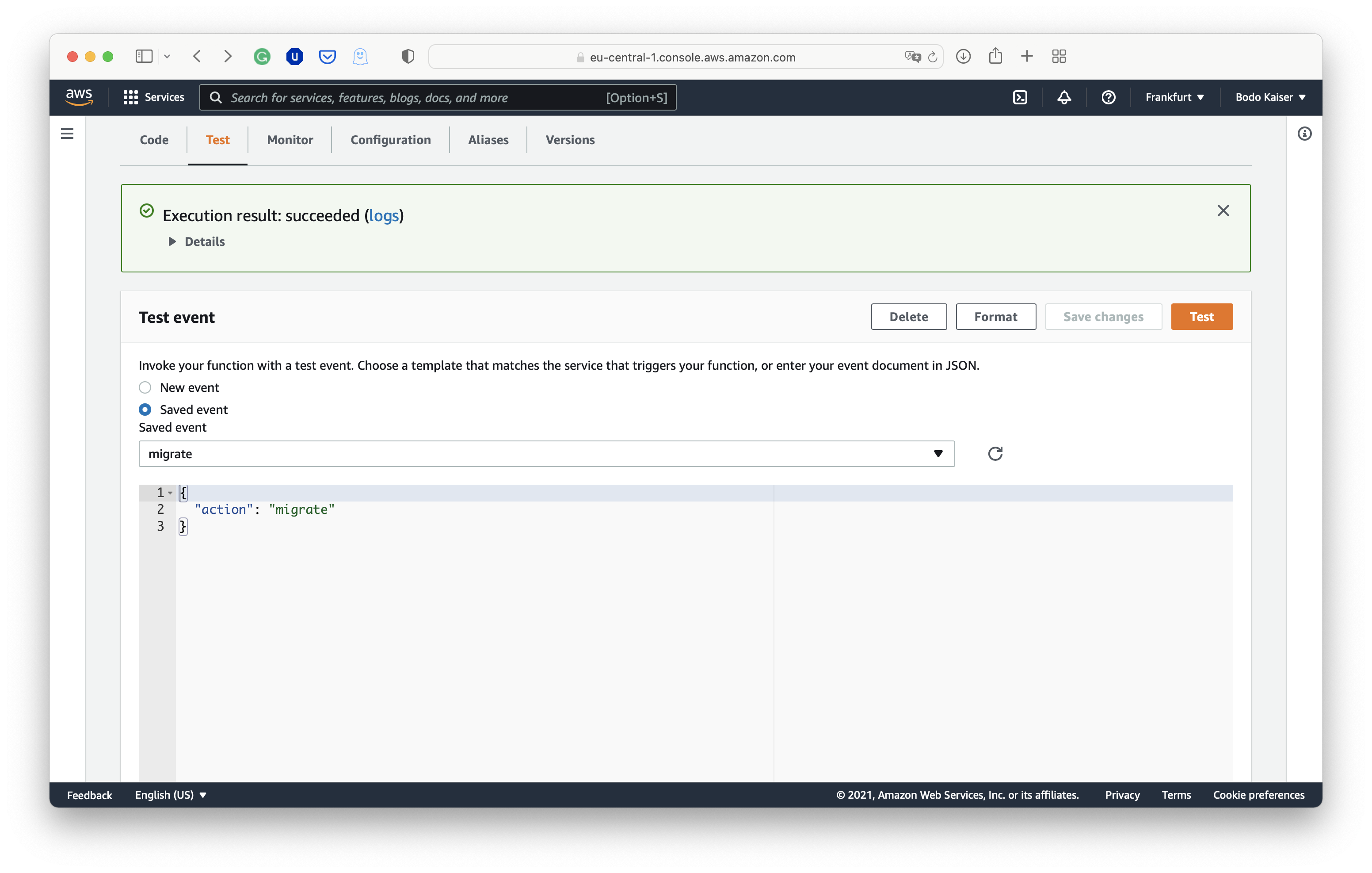
成功部署 AWS Lambda 后,在 Web 控制台中打开“ent”函数的“Test”选项卡,并使用“migrate”操作调用它:

使用迁移操作调用 Ent Lambda 的截图

使用“migrate”操作调用 Lambda

成功后,您应该收到绿色反馈框,并测试“todos”操作的结果:

使用 todos 操作调用 Ent Lambda 的截图

使用“todos”操作调用 Lambda

如果测试执行失败,您很可能遇到数据库连接问题。

配置 AWS AppSync 解析器

成功部署“ent”函数后,我们还需要将 ent Lambda 注册为 AppSync API 的数据源,并配置架构解析器以将 AppSync 请求映射到 Lambda 事件。 首先,在 Web 控制台中打开我们的 AWS AppSync API,并移动到“Data Sources”,您可以在左侧的导航窗格中找到它。

注册到 AWS AppSync API 的数据源列表截图

注册到 AWS AppSync API 的数据源列表

点击右上角的“Create data source”按钮,开始将“ent”函数注册为数据源:

将 ent Lambda 注册为 AWS AppSync API 数据源的截图

将 ent Lambda 注册为 AWS AppSync API 的数据源

现在,打开 AppSync API 的 GraphQL 架构,并在右侧的侧边栏中搜索 Query 类型。 点击 Query.Todos 类型旁边的“Attach”按钮:

在 AWS AppSync API 中为 Query 类型附加解析器的截图

在 AWS AppSync API 中为 todos Query 附加解析器

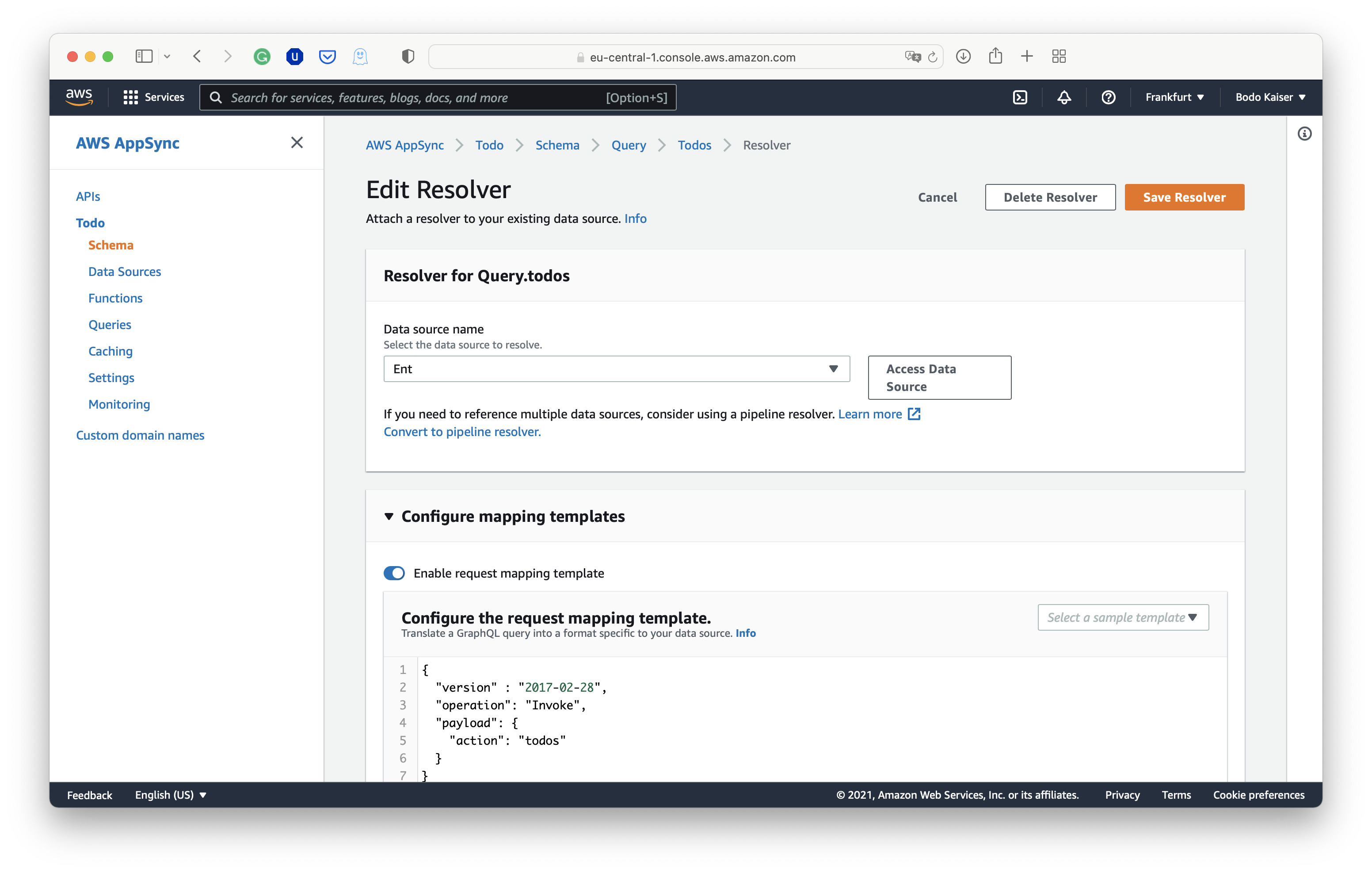
Query.todos 的解析器视图中,选择 Lambda 函数作为数据源,启用请求映射模板选项,

在 AWS AppSync API 中配置 todos Query 解析器映射的截图

在 AWS AppSync API 中配置 todos Query 的解析器映射

并复制以下模板:

Query.todos
{
"version" : "2017-02-28",
"operation": "Invoke",
"payload": {
"action": "todos"
}
}

对其余的 QueryMutation 类型重复相同的过程:

Query.todo
{
"version" : "2017-02-28",
"operation": "Invoke",
"payload": {
"action": "todo",
"input": $util.toJson($context.args.input)
}
}
Mutation.addTodo
{
"version" : "2017-02-28",
"operation": "Invoke",
"payload": {
"action": "addTodo",
"input": $util.toJson($context.args.input)
}
}
Mutation.removeTodo
{
"version" : "2017-02-28",
"operation": "Invoke",
"payload": {
"action": "removeTodo",
"input": $util.toJson($context.args.input)
}
}

请求映射模板让我们构造用于调用 Lambda 函数的事件对象。 通过 $context 对象,我们可以访问 GraphQL 请求和身份验证会话。 此外,可以顺序排列多个解析器,并通过 $context 对象引用各自的输出。 原则上,也可以定义响应映射模板。 然而,在大多数情况下,返回响应对象“原样”就足够了。

使用查询浏览器测试 AppSync

测试 API 的最简单方法是使用 AWS AppSync 中的查询浏览器。 或者,可以在其 AppSync API 的设置中注册一个 API 密钥,并使用任何标准的 GraphQL 客户端。

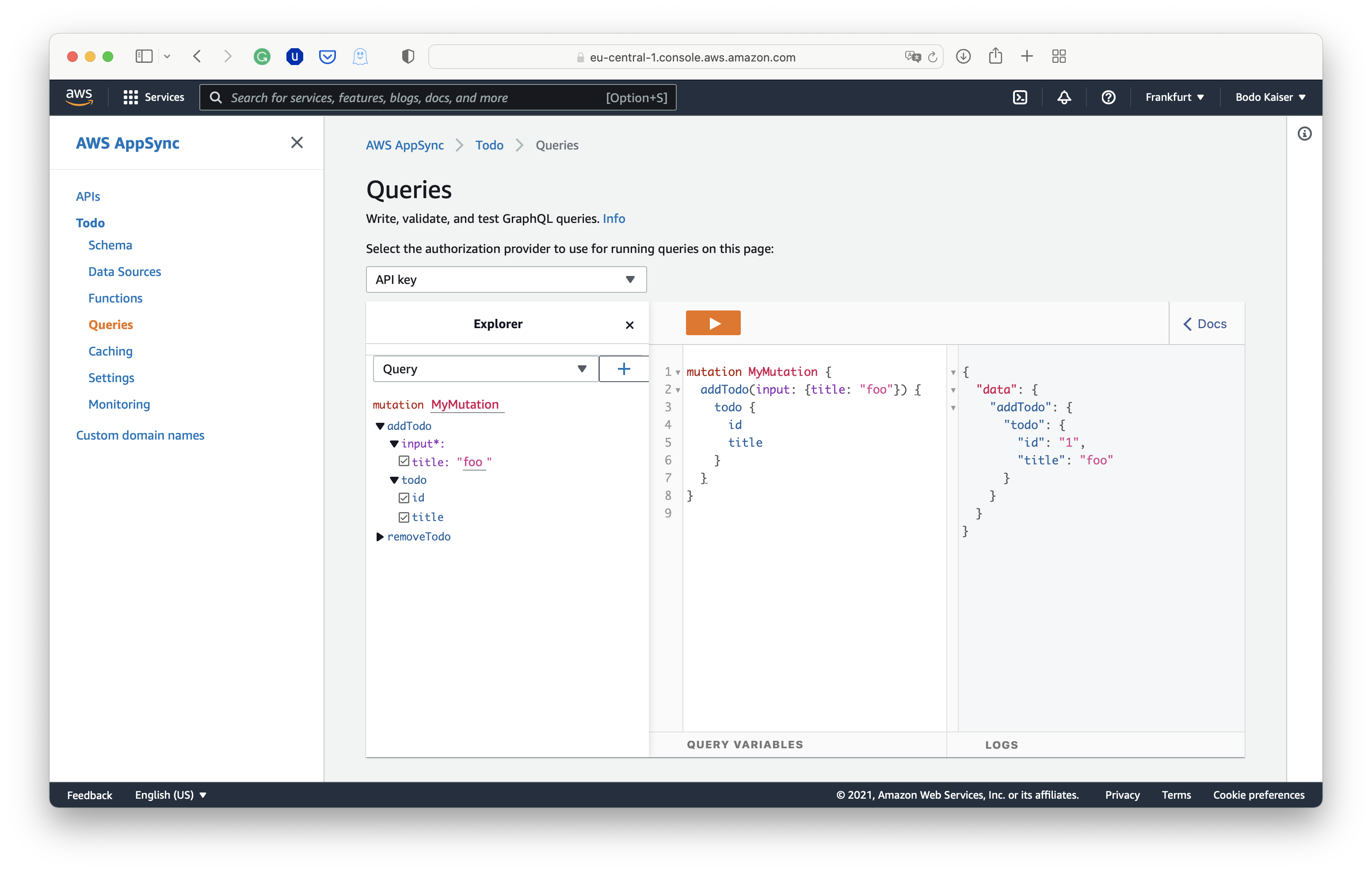
首先让我们创建一个标题为 foo 的 todo:

mutation MyMutation {
addTodo(input: { title: "foo" }) {
todo {
id
title
}
}
}
使用 AppSync 查询浏览器执行 addTodo 变异的截图

使用 AppSync 查询浏览器执行“addTodo”变异

请求 todos 列表应返回一个标题为 foo 的 todo:

query MyQuery {
todos {
title
id
}
}
使用 AppSync 查询浏览器执行 addTodo 变异的截图

使用 AppSync 查询浏览器执行“addTodo”变异

通过 id 请求 foo todo 也应该工作:

query MyQuery {
todo(id: "1") {
title
id
}
}
使用 AppSync 查询浏览器执行 addTodo 变异的截图

使用 AppSync 查询浏览器执行“addTodo”变异

总结

我们成功部署了一个无服务器 GraphQL API,用于使用 AWS AppSync、AWS Lambda 和 Ent 管理简单的 todos。 特别是,我们提供了通过 Web 控制台配置 AWS AppSync 和 AWS Lambda 的分步说明。 此外,我们还讨论了如何构建 Go 代码的建议。

我们没有涵盖在 AWS 中测试和设置数据库基础设施。 这些方面在无服务器范式中比传统范式更具挑战性。 例如,当许多 Lambda 函数并行冷启动时,我们很快会耗尽数据库的连接池,需要一些数据库代理。 此外,我们需要重新思考测试,因为我们只能访问本地和端到端测试,因为我们无法轻松地隔离运行云服务。

尽管如此,所提出的 GraphQL 服务器很好地扩展到了现实世界应用程序的复杂需求,受益于无服务器基础设施和 Ent 愉快的开发体验。

有问题吗?需要入门帮助?欢迎加入我们的 Discord 服务器Slack 频道

更多 Ent 新闻和更新:

· 阅读需 10 分钟

I've been writing software for years, but, until recently, I didn't know what an ORM was. I learned many things obtaining my B.S. in Computer Engineering, but Object-Relational Mapping was not one of those; I was too focused on building things out of bits and bytes to be bothered with something that high-level. It shouldn't be too surprising then, that when I found myself tasked with helping to build a distributed web application, I ended up outside my comfort zone.

One of the difficulties with developing software for someone else is, that you aren't able to see inside their head. The requirements aren't always clear and asking questions only helps you understand so much of what they are looking for. Sometimes, you just have to build a prototype and demonstrate it to get useful feedback.

The issue with this approach, of course, is that it takes time to develop prototypes, and you need to pivot frequently. If you were like me and didn't know what an ORM was, you would waste a lot of time doing simple, but time-consuming tasks:

  1. Re-define the data model with new customer feedback.
  2. Re-create the test database.
  3. Re-write the SQL statements for interfacing with the database.
  4. Re-define the gRPC interface between the backend and frontend services.
  5. Re-design the frontend and web interface.
  6. Demonstrate to customer and get feedback
  7. Repeat

Hundreds of hours of work only to find out that everything needs to be re-written. So frustrating! I think you can imagine my relief (and also embarrassment), when a senior developer asked me why I wasn't using an ORM like Ent.

Discovering Ent

It only took one day to re-implement our current data model with Ent. I couldn't believe I had been doing all this work by hand when such a framework existed! The gRPC integration through entproto was the icing on the cake! I could perform basic CRUD operations over gRPC just by adding a few annotations to my schema. This allows me to skip all the steps between data model definition and re-designing the web interface! There was, however, just one problem for my use case: How do you get the details of entities over the gRPC interface if you don't know their IDs ahead of time? I see that Ent can query all, but where is the GetAll method for entproto?

Becoming an Open-Source Contributor

I was surprised to find it didn't exist! I could have added it to my project by implementing the feature in a separate service, but it seemed like a generic enough method to be generally useful. For years, I had wanted to find an open-source project that I could meaningfully contribute to; this seemed like the perfect opportunity!

So, after poking around entproto's source into the early morning hours, I managed to hack the feature in! Feeling accomplished, I opened a pull request and headed off to sleep, not realizing the learning experience I had just signed myself up for.

In the morning, I awoke to the disappointment of my pull request being closed by Rotem, but with an invitation to collaborate further to refine the idea. The reason for closing the request was obvious, my implementation of GetAll was dangerous. Returning an entire table's worth of data is only feasible if the table is small. Exposing this interface on a large table could have disastrous results!

Optional Service Method Generation

My solution was to make the GetAll method optional by passing an argument into entproto.Service(). This provides control over whether this feature is exposed. We decided that this was a desirable feature, but that it should be more generic. Why should GetAll get special treatment just because it was added last? It would be better if all methods could be optionally generated. Something like:

entproto.Service(entproto.Methods(entproto.Create | entproto.Get))

However, to keep everything backwards-compatible, an empty entproto.Service() annotation would also need to generate all methods. I'm not a Go expert, so the only way I knew of to do this was with a variadic function:

func Service(methods ...Method)

The problem with this approach is that you can only have one argument type that is variable length. What if we wanted to add additional options to the service annotation later on? This is where I was introduced to the powerful design pattern of functional options:

// ServiceOption configures the entproto.Service annotation.
type ServiceOption func(svc *service)

// Service annotates an ent.Schema to specify that protobuf service generation is required for it.
func Service(opts ...ServiceOption) schema.Annotation {
s := service{
Generate: true,
}
for _, apply := range opts {
apply(&s)
}
// Default to generating all methods
if s.Methods == 0 {
s.Methods = MethodAll
}
return s
}

This approach takes in a variable number of functions that are called to set options on a struct, in this case, our service annotation. With this approach, we can implement any number of other options functions aside from Methods. Very cool!

List: The Superior GetAll

With optional method generation out of the way, we could return our focus to adding GetAll. How could we implement this method in a safe fashion? Rotem suggested we base the method off of Google's API Improvement Proposal (AIP) for List, AIP-132. This approach allows a client to retrieve all entities, but breaks the retrieval up into pages. As an added bonus, it also sounds better than "GetAll"!

List Request

With this design, a request message would look like:

message ListUserRequest {
int32 page_size = 1;

string page_token = 2;

View view = 3;

enum View {
VIEW_UNSPECIFIED = 0;

BASIC = 1;

WITH_EDGE_IDS = 2;
}
}

Page Size

The page_size field allows the client to specify the maximum number of entries they want to receive in the response message, subject to a maximum page size of 1000. This eliminates the issue of returning more results than the client can handle in the initial GetAll implementation. Additionally, the maximum page size was implemented to prevent a client from overburdening the server.

Page Token

The page_token field is a base64-encoded string utilized by the server to determine where the next page begins. An empty token means that we want the first page.

View

The view field is used to specify whether the response should return the edge IDs associated with the entities.

List Response

The response message would look like:

message ListUserResponse {
repeated User user_list = 1;

string next_page_token = 2;
}

List

The user_list field contains page entities.

Next Page Token

The next_page_token field is a base64-encoded string that can be utilized in another List request to retrieve the next page of entities. An empty token means that this response contains the last page of entities.

Pagination

With the gRPC interface determined, the challenge of implementing it began. One of the most critical design decisions was how to implement the pagination. The naive approach would be to use LIMIT/OFFSET pagination to skip over the entries we've already seen. However, this approach has massive drawbacks; the most problematic being that the database has to fetch all the rows it is skipping to get the rows we want.

Keyset Pagination

Rotem proposed a much better approach: keyset pagination. This approach is slightly more complicated since it requires the use of a unique column (or combination of columns) to order the rows. But in exchange we gain a significant performance improvement. This is because we can take advantage of the sorted rows to select only entries with unique column(s) values that are greater (ascending order) or less (descending order) than / equal to the value(s) in the client-provided page token. Thus, the database doesn't have to fetch the rows we want to skip over, significantly speeding up queries on large tables!

With keyset pagination selected, the next step was to determine how to order the entities. The most straightforward approach for Ent was to use the id field; every schema will have this, and it is guaranteed to be unique for the schema. This is the approach we chose to use for the initial implementation. Additionally, a decision needed to be made regarding whether ascending or descending order should be employed. Descending order was chosen for the initial release.

Usage

Let's take a look at how to actually use the new List feature:

package main

import (
"context"
"log"

"ent-grpc-example/ent/proto/entpb"
"google.golang.org/grpc"
"google.golang.org/grpc/status"
)

func main() {
// Open a connection to the server.
conn, err := grpc.Dial(":5000", grpc.WithInsecure())
if err != nil {
log.Fatalf("failed connecting to server: %s", err)
}
defer conn.Close()
// Create a User service Client on the connection.
client := entpb.NewUserServiceClient(conn)
ctx := context.Background()
// Initialize token for first page.
pageToken := ""
// Retrieve all pages of users.
for {
// Ask the server for the next page of users, limiting entries to 100.
users, err := client.List(ctx, &entpb.ListUserRequest{
PageSize: 100,
PageToken: pageToken,
})
if err != nil {
se, _ := status.FromError(err)
log.Fatalf("failed retrieving user list: status=%s message=%s", se.Code(), se.Message())
}
// Check if we've reached the last page of users.
if users.NextPageToken == "" {
break
}
// Update token for next request.
pageToken = users.NextPageToken
log.Printf("users retrieved: %v", users)
}
}

Looking Ahead

The current implementation of List has a few limitations that can be addressed in future revisions. First, sorting is limited to the id column. This makes List compatible with any schema, but it isn't very flexible. Ideally, the client should be able to specify what columns to sort by. Alternatively, the sort column(s) could be defined in the schema. Additionally, List is restricted to descending order. In the future, this could be an option specified in the request. Finally, List currently only works with schemas that use int32, uuid, or string type id fields. This is because a separate conversion method to/from the page token must be defined for each type that Ent supports in the code generation template (I'm only one person!).

Wrap-up

I was pretty nervous when I first embarked on my quest to contribute this functionality to entproto; as a newbie open-source contributor, I didn't know what to expect. I'm happy to share that working on the Ent project was a ton of fun! I got to work with awesome, knowledgeable people while helping out the open-source community. From functional options and keyset pagination to smaller insights gained through PR review, I learned so much about Go (and software development in general) in the process! I'd highly encourage anyone thinking they might want to contribute something to take that leap! You'll be surprised with how much you gain from the experience.

Have questions? Need help with getting started? Feel free to join our Discord server or Slack channel.

For more Ent news and updates:

· 阅读需 8 分钟

OpenAPI 规范(OAS,之前称为 Swagger 规范)是一份技术规范,用于为 REST API 定义一个标准的、与语言无关的接口描述。这使人类和自动化工具能够在没有实际源代码或额外文档的情况下理解所描述的服务。结合 Swagger Tooling,您只需传入 OAS 文档,即可为 20 多种语言生成服务器端和客户端模板代码。

在先前的 博客文章 中,我们向您介绍了 Ent 扩展 elk 的一个新功能:一个完全符合规范的 OpenAPI 规范 文档生成器。

今天,我们非常高兴地宣布,规范生成器已成为 Ent 项目的官方扩展,并已迁移到 ent/contrib 仓库。此外,我们聆听了社区的反馈,并对生成器进行了修改,希望您会喜欢。

入门

要使用 entoas 扩展,请按 这里 的说明使用 entc(ent 代码生成器)包。首先将扩展安装到您的 Go 模块中:

go get entgo.io/contrib/entoas

现在按照下面两个步骤启用并配置 Ent 与 entoas 扩展:

1. 创建一个名为 ent/entc.go 的新 Go 文件,并粘贴以下内容:

// +build ignore

package main

import (
"log"

"entgo.io/contrib/entoas"
"entgo.io/ent/entc"
"entgo.io/ent/entc/gen"
)

func main() {
ex, err := entoas.NewExtension()
if err != nil {
log.Fatalf("创建 entoas 扩展时出错: %v", err)
}
err = entc.Generate("./schema", &gen.Config{}, entc.Extensions(ex))
if err != nil {
log.Fatalf("运行 ent 代码生成时出错: %v", err)
}
}

2. 编辑 ent/generate.go 文件以执行 ent/entc.go

package ent

//go:generate go run -mod=mod entc.go

完成上述步骤后,您已准备好从 Schema 生成 OAS 文档!如果您是 Ent 新手,并想了解其如何连接到不同类型的数据库、运行迁移或处理实体,请前往 设置教程

生成 OAS 文档

创建 Ent Schema 图是我们的首个步骤。这里给出一个简短示例 Schema 用于演示:

ent/schema/schema.go
// Fridge 代表 Fridge 实体的 schema 定义。
package schema

import (
"entgo.io/ent"
"entgo.io/ent/schema/edge"
"entgo.io/ent/schema/field"
)

// Fridge 代表 Fridge 实体的 schema 定义。
type Fridge struct {
ent.Schema
}

// Fridge 的字段。
func (Fridge) Fields() []ent.Field {
return []ent.Field{
field.String("title"),
}
}

// Fridge 的边。
func (Fridge) Edges() []ent.Edge {
return []ent.Edge{
edge.To("compartments", Compartment.Type),
}
}

// Compartment 代表 Compartment 实体的 schema 定义。
type Compartment struct {
ent.Schema
}

// Compartment 的字段。
func (Compartment) Fields() []ent.Field {
return []ent.Field{
field.String("name"),
}
}

// Compartment 的边。
func (Compartment) Edges() []ent.Edge {
return []ent.Edge{
edge.From("fridge", Fridge.Type).
Ref("compartments").
Unique(),
edge.To("contents", Item.Type),
}
}

// Item 代表 Item 实体的 schema 定义。
type Item struct {
ent.Schema
}

// Item 的字段。
func (Item) Fields() []ent.Field {
return []ent.Field{
field.String("name"),
}
}

// Item 的边。
func (Item) Edges() []ent.Edge {
return []ent.Edge{
edge.From("compartment", Compartment.Type).
Ref("contents").
Unique(),
}
}

上述代码是 Ent 描述 Schema 图的方式。在本例中,我们创建了三个实体:Fridge、Compartment 和 Item,并为图添加了一些边:Fridge 可以拥有多个 Compartment,Compartment 可以包含多个 Item。

现在运行代码生成器:

go generate ./...

除 Ent 通常生成的文件之外,还会创建一个名为 ent/openapi.json 的文件。以下是该文件的一览:

ent/openapi.json
{
"info": {
"title": "Ent 图谱 API",
"description": "这是基于 Ent schema 定义自动生成的 API 描述",
"termsOfService": "",
"contact": {},
"license": {
"name": ""
},
"version": "0.0.0"
},
"paths": {
"/compartments": {
"get": {
[...]

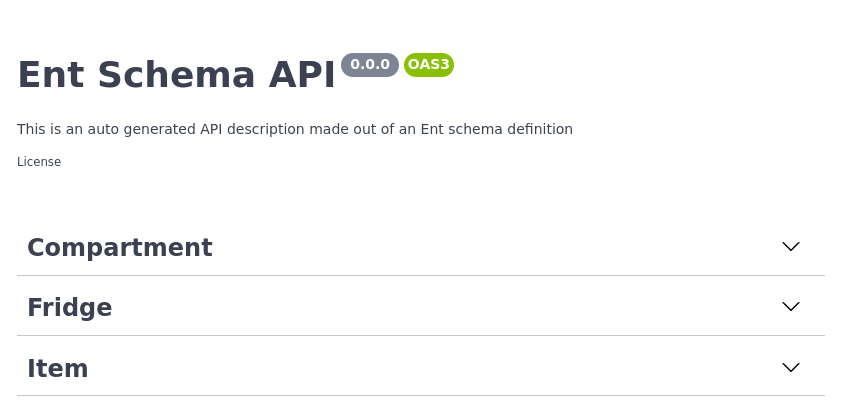
如果您想尝试一下,可以将其内容复制并粘贴到 Swagger Editor。它应该会如下面所示:

Swagger 编辑器

Swagger 编辑器

基本配置

我们的 API 描述尚未准确反映它的功能,但 entoas 让您可以更改!打开 ent/entc.go,传入更新后的标题和描述:

ent/entc.go
//go:build ignore
// +build ignore

package main

import (
"log"

"entgo.io/contrib/entoas"
"entgo.io/ent/entc"
"entgo.io/ent/entc/gen"
)

func main() {
ex, err := entoas.NewExtension(
entoas.SpecTitle("冰箱 CMS"),
entoas.SpecDescription("API 用于管理冰箱及其冷藏内容。**ICY!**"),
entoas.SpecVersion("0.0.1"),
)
if err != nil {
log.Fatalf("创建 entoas 扩展时出错: %v", err)
}
err = entc.Generate("./schema", &gen.Config{}, entc.Extensions(ex))
if err != nil {
log.Fatalf("运行 ent 代码生成时出错: %v", err)
}
}

重新运行代码生成器将生成更新后的 OAS 文档:

ent/openapi.json
{
"info": {
"title": "冰箱 CMS",
"description": "API 用于管理冰箱及其冷藏内容。**ICY!**",
"termsOfService": "",
"contact": {},
"license": {
"name": ""
},
"version": "0.0.1"
},
"paths": {
"/compartments": {
"get": {
[...]

操作配置

有时您不想为每个节点的每个操作都生成端点。幸运的是,entoas 让我们配置需要生成哪些端点,哪些忽略。entoas 的默认策略是公开所有路由。您可以将此行为改为仅公开显式请求的路由,或仅通过 entoas.Annotation 排除特定操作。策略也可用于开启/关闭子资源操作的生成:

ent/schema/fridge.go
// Fridge 的边。
func (Fridge) Edges() []ent.Edge {
return []ent.Edge{
edge.To("compartments", Compartment.Type).
// 不生成 POST /fridges/{id}/compartments 端点
Annotations(
entoas.CreateOperation(
entoas.OperationPolicy(entoas.PolicyExclude),
),
),
}
}

// Fridge 的注解。
func (Fridge) Annotations() []schema.Annotation {
return []schema.Annotation{
// 不生成 DELETE /fridges/{id} 端点
entoas.DeleteOperation(entoas.OperationPolicy(entoas.PolicyExclude)),
}
}

完成!操作已被移除。

如需了解 entoas 的策略工作原理和可做的事情,请查看 godoc

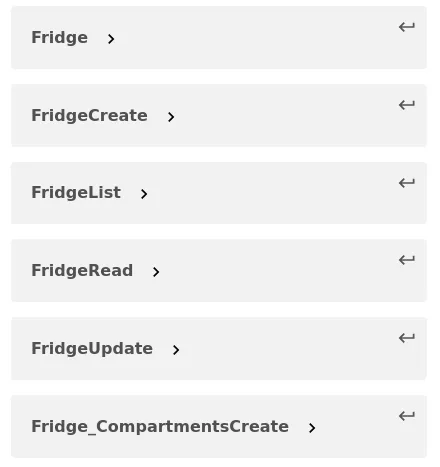
简单模型

默认情况下,entoas 为每个端点生成一个响应 schema。了解命名策略,请查看 godoc

每端点一个 Schema

每端点一个 Schema

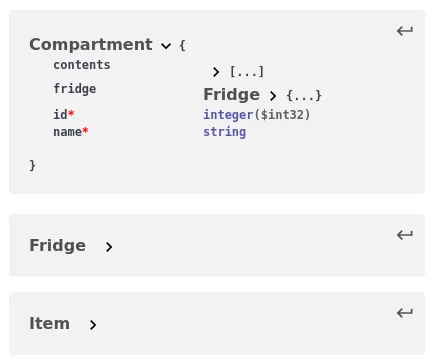
许多用户请求将此行为改为直接将 Ent schema 映射到 OAS 文档。现在,您可以这样配置 entoas

ex, err := entoas.NewExtension(
entoas.SpecTitle("冰箱 CMS"),
entoas.SpecDescription("API 用于管理冰箱及其冷藏内容。**ICY!**"),
entoas.SpecVersion("0.0.1"),
entoas.SimpleModels(),
)
简单 Schema

简单 Schema

小结

在本文中我们宣布了 entoas,即前 elk OpenAPI 规范生成器与 Ent 的官方集成。此功能将 Ent 的代码生成能力与 OpenAPI/Swagger 丰富的工具生态系统相结合。

有问题吗?需要帮助入门吗?请随时加入我们的 Discord 服务器Slack 频道

更多 Ent 新闻与更新:
  • 订阅我们的新闻通讯
  • 在 Twitter 上关注我们
  • 加入 Gophers Slack 上的 #ent
  • 加入 Ent Discord 服务器

· 阅读需 9 分钟

Ent 社区常见的问题之一是如何将 Ent 应用程序(例如 MySQL 或 PostgreSQL)背后的对象或引用与外部服务同步。例如,用户想在 Ent 创建或删除用户时,在 CRM 内部创建或删除记录,实体更新时发布消息到 Pub/Sub 系统,或者验证对象存储(如 AWS S3 或 Google Cloud Storage)中 blobs 的引用。

确保两个独立数据系统之间的一致性并不简单。当我们想要将例如一系统中记录的删除传播到另一系统时,没有明显的方法能保证两侧最终处于同步状态,因为其中一个可能失败,或它们之间的网络链接可能慢或中断。说了这些,尤其在微服务架构盛行之下,这些问题变得更常见,分布式系统研究者提出了多种解决模式,例如 Saga Pattern

这些模式的应用通常很复杂且困难,因此在许多情况下,架构师并不会追求“完美”的设计,而是追求更简单的方案,例如接受系统间的一定不一致或后台调和流程。

本文不讨论如何为 Ent 实现分布式事务或 Saga 模式,而是聚焦于研究如何在 Ent 变异发生前后钩入并执行自定义逻辑。

将变异传播到外部系统

在本例中,我们将创建一个简单的 User 模式,包含两个不变字符串字段,"name""avatar_url"。让我们运行 ent init 命令为我们的 User 创建一个骨架模式:

go run entgo.io/ent/cmd/ent new User

然后,添加 nameavatar_url 字段,并运行 go generate 生成资产。

ent/schema/user.go
type User struct {
ent.Schema
}

func (User) Fields() []ent.Field {
return []ent.Field{
field.String("name").
Immutable(),
field.String("avatar_url").
Immutable(),
}
}
go generate ./ent

问题

avatar_url 字段定义了指向我们对象存储桶中图片的 URL(例如 AWS S3)。为此讨论,我们想确保:

  • 当用户被创建时,URL 所指向的图片在我们的桶中存在。
  • 垃圾图片在用户被删除后被清除。也就是说,当系统中删除用户后,其头像图片也应被删除。

为操作 blobs,我们使用 gocloud.dev/blob 包。该包为读取、写入、删除与列举桶中 blobs 提供抽象。类似于 database/sql 包,它允许通过配置驱动 URL 以相同 API 与多种对象存储交互。例如:

// 打开一个内存桶。 
if bucket, err := blob.OpenBucket(ctx, "mem://photos/"); err != nil {
log.Fatal("打开内存桶失败:", err)
}

// 打开名为 photos 的 S3 桶。
if bucket, err := blob.OpenBucket(ctx, "s3://photos"); err != nil {
log.Fatal("打开 S3 桶失败:", err)
}

// 打开名为 photos 的 Google Cloud Storage 桶。
if bucket, err := blob.OpenBucket(ctx, "gs://my-bucket"); err != nil {
log.Fatal("打开 GCS 桶失败:", err)
}

模式钩子

Hooks 是 Ent 的强大功能,允许在变异操作前后添加自定义逻辑。

钩子可以通过 client.Use 动态定义(称为“运行时钩子”),也可以显式在模式上定义(称为“模式钩子”),如下所示:

// User 的 Hooks
func (User) Hooks() []ent.Hook {
return []ent.Hook{
EnsureImageExists(),
DeleteOrphans(),
}
}

如你所料,EnsureImageExists 钩子将负责确保当用户创建时其头像 URL 在桶中存在,DeleteOrphans 钩子将确保删除垃圾图片。让我们开始编写它们。

ent/schema/hooks.go
func EnsureImageExists() ent.Hook {
hk := func(next ent.Mutator) ent.Mutator {
return hook.UserFunc(func(ctx context.Context, m *ent.UserMutation) (ent.Value, error) {
avatarURL, exists := m.AvatarURL()
if !exists {
return nil, errors.New("avatar 字段缺失")
}
// TODO:
// 1. 验证 "avatarURL" 指向桶中实际存在的对象。
// 2. 否则,失败。
return next.Mutate(ctx, m)
})
}
// 将钩子仅限于 "Create" 操作。
return hook.On(hk, ent.OpCreate)
}

func DeleteOrphans() ent.Hook {
hk := func(next ent.Mutator) ent.Mutator {
return hook.UserFunc(func(ctx context.Context, m *ent.UserMutation) (ent.Value, error) {
id, exists := m.ID()
if !exists {
return nil, errors.New("id 字段缺失")
}
// TODO:
// 1. 获取被删除用户的 AvatarURL 字段。
// 2. 将删除操作级联到对象存储。
return next.Mutate(ctx, m)
})
}
// 将钩子仅限于 "DeleteOne" 操作。
return hook.On(hk, ent.OpDeleteOne)
}

现在,你可能会问:我们如何从变异钩子访问 blob 客户端?下一节你将了解到。

注入依赖

entc.Dependency 选项允许通过结构体字段扩展生成的构造器,并提供在客户端初始化时注入它们的选项。

要将 blob.Bucket 注入并可在钩子中使用,我们可以参照网站外部依赖教程,并将 gocloud.dev/blob.Bucket 作为依赖:

ent/entc.go
func main() {
opts := []entc.Option{
entc.Dependency(
entc.DependencyName("Bucket"),
entc.DependencyType(&blob.Bucket{}),
),
}
if err := entc.Generate("./schema", &gen.Config{}, opts...); err != nil {
log.Fatalf("运行 ent 代码生成时出错: %v", err)
}
}

接着重新运行代码生成:

go generate ./ent

我们现在可以从所有生成的构造器访问 Bucket API。让我们完成上述钩子的实现。

ent/schema/hooks.go
// EnsureImageExists 确保 avatar_url 指向桶中的实际对象。
func EnsureImageExists() ent.Hook {
hk := func(next ent.Mutator) ent.Mutator {
return hook.UserFunc(func(ctx context.Context, m *ent.UserMutation) (ent.Value, error) {
avatarURL, exists := m.AvatarURL()
if !exists {
return nil, errors.New("avatar 字段缺失")
}
switch exists, err := m.Bucket.Exists(ctx, avatarURL); {
case err != nil:
return nil, fmt.Errorf("检查键存在性: %w", err)
case !exists:
return nil, fmt.Errorf("键 %q 在桶中不存在", avatarURL)
default:
return next.Mutate(ctx, m)
}
})
}
return hook.On(hk, ent.OpCreate)
}

// DeleteOrphans 将用户删除级联到桶中。
func DeleteOrphans() ent.Hook {
hk := func(next ent.Mutator) ent.Mutator {
return hook.UserFunc(func(ctx context.Context, m *ent.UserMutation) (ent.Value, error) {
id, exists := m.ID()
if !exists {
return nil, errors.New("id 字段缺失")
}
u, err := m.Client().User.Get(ctx, id)
if err != nil {
return nil, fmt.Errorf("获取已删除用户时出错: %w", err)
}
if err := m.Bucket.Delete(ctx, u.AvatarURL); err != nil {
return nil, fmt.Errorf("从桶中删除用户头像时出错: %w", err)
}
return next.Mutate(ctx, m)
})
}
return hook.On(hk, ent.OpDeleteOne)
}

现在,是时候测试我们的钩子了!让我们编写一个可测试的示例来验证我们的 2 个钩子是否按预期工作。

package main

import (
"context"
"fmt"
"log"

"github.com/a8m/ent-sync-example/ent"
_ "github.com/a8m/ent-sync-example/ent/runtime"

"entgo.io/ent/dialect"
_ "github.com/mattn/go-sqlite3"
"gocloud.dev/blob"
_ "gocloud.dev/blob/memblob"
)

func Example_SyncCreate() {
ctx := context.Background()
// 打开一个内存桶。
bucket, err := blob.OpenBucket(ctx, "mem://photos/")
if err != nil {
log.Fatal("打开桶失败:", err)
}
client, err := ent.Open(
dialect.SQLite,
"file:ent?mode=memory&cache=shared&_fk=1",
// 在客户端初始化时注入 blob.Bucket
ent.Bucket(bucket),
)
if err != nil {
log.Fatal("打开 sqlite 连接失败:", err)
}
defer client.Close()
if err := client.Schema.Create(ctx); err != nil {
log.Fatal("创建 schema 资源失败:", err)
}
if err := client.User.Create().SetName("a8m").SetAvatarURL("a8m.png").Exec(ctx); err == nil {
log.Fatal("期望创建用户失败,因为图像不存在于桶中")
}
if err := bucket.WriteAll(ctx, "a8m.png", []byte{255, 255, 255}, nil); err != nil {
log.Fatalf("上传图像到桶中失败: %v", err)
}
fmt.Printf("%q\n", keys(ctx, bucket))

// 由于图像已上传至桶中,用户创建应成功。
u := client.User.Create().SetName("a8m").SetAvatarURL("a8m.png").SaveX(ctx)

// 删除用户时,应同时删除其图像。
client.User.DeleteOne(u).ExecX(ctx)
fmt.Printf("%q\n", keys(ctx, bucket))

// Output:
// ["a8m.png"]
// []
}

结束语

太棒了!我们已配置 Ent 扩展生成的代码并注入 blob.Bucket 为一个 外部依赖。接下来,我们定义了两个变异钩子,并使用 blob.Bucket API 来满足我们的业务约束。

此示例的完整代码可在 github.com/a8m/ent-sync-example 获取。

了解更多 Ent 新闻与更新:

· 阅读需 7 分钟

Ent 是一个强大的实体框架,可帮助开发者编写简洁的代码,这些代码会被转换为(可能复杂的)数据库查询。随着应用程序使用量的增长,很快你就会遇到数据库性能问题。 排查数据库性能问题 notoriously 困难,尤其是在没有合适工具的情况下。

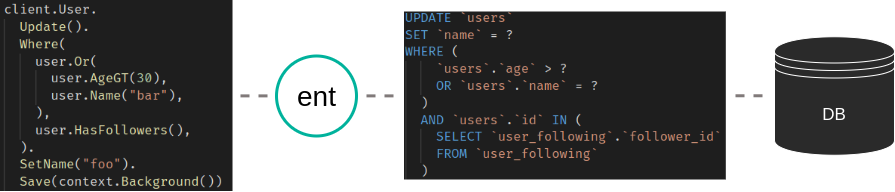
以下示例展示了 Ent 查询代码如何转换为 SQL 查询。

ent 示例 1

示例 1 - ent 代码被转换为 SQL 查询

传统上,将性能低下的数据库查询与生成它们的应用程序代码关联起来一直非常困难。数据库性能分析工具可以通过分析数据库服务器日志来指出慢查询,但如何将它们追溯回应用程序呢?

Sqlcommenter

今年早些时候,Google 推出了 Sqlcommenter。Sqlcommenter 是

一个开源库,旨在弥合 ORM 库与理解数据库性能之间的差距。Sqlcommenter 让应用开发者能够洞察哪些应用程序代码生成了慢查询,并将应用追踪与数据库查询计划映射起来

换句话说,Sqlcommenter 向 SQL 查询添加了应用程序上下文元数据。这些信息随后可用于提供有意义的洞察。它通过向查询添加 SQL 注释来实现这一点,这些注释携带元数据,但在查询执行期间会被数据库忽略。 例如,以下查询包含一个注释,该注释携带了有关发起查询的应用程序(users-mgr)、触发查询的控制器和路由(分别为 usersuser_rename)以及所使用的数据库驱动程序(ent:v0.9.1)的元数据:

update users set username = ‘hedwigz’ where id = 88
/*application='users-mgr',controller='users',route='user_rename',db_driver='ent:v0.9.1'*/

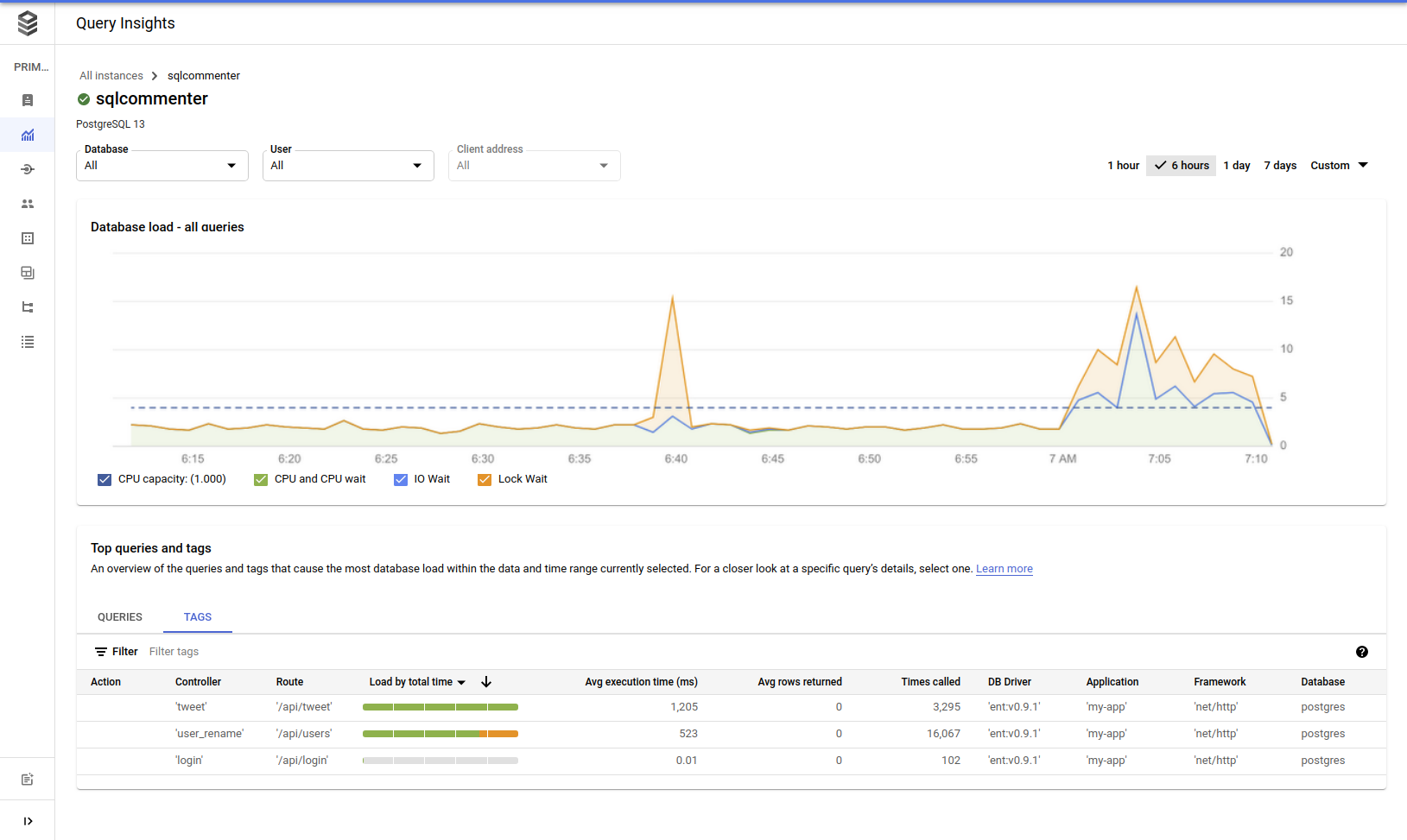
要体验从 Sqlcommenter 元数据收集的分析如何帮助我们更好地理解应用程序的性能问题,请考虑以下示例:Google Cloud 最近推出了 Cloud SQL Insights,这是一个基于云的 SQL 性能分析产品。在下图中,我们看到 Cloud SQL Insights 仪表板的截图,显示 HTTP 路由 'api/users' 正在数据库上引发许多锁。我们还可以看到,在过去 6 小时内该查询被调用了 16,067 次。

Cloud SQL insights

Cloud SQL Insights 仪表板截图

这就是 SQL 标签的力量——它们提供了应用程序级信息与数据库监视器之间的关联。

sqlcomment

sqlcomment 是一个 Ent 驱动程序,它遵循 sqlcommenter 规范使用注释向 SQL 查询添加元数据。通过使用 sqlcomment 包装现有的 Ent 驱动程序,用户可以利用任何支持该标准的工具来排查查询性能问题。 事不宜迟,让我们看看 sqlcomment 的实际应用。

首先,运行以下命令安装 sqlcomment:

go get ariga.io/sqlcomment

sqlcomment 包装了一个底层的 SQL 驱动程序,因此,我们需要使用 ent 的 sql 模块打开 SQL 连接,而不是使用 Ent 流行的辅助函数 ent.Open

信息

请确保在以下代码片段中导入 entgo.io/ent/dialect/sql

// 创建数据库驱动程序。
db, err := sql.Open("sqlite3", "file:ent?mode=memory&cache=shared&_fk=1")
if err != nil {
log.Fatalf("Failed to connect to database: %v", err)
}

// 创建包装 sqlite 驱动程序的 sqlcomment 驱动程序。
drv := sqlcomment.NewDriver(db,
sqlcomment.WithDriverVerTag(),
sqlcomment.WithTags(sqlcomment.Tags{
sqlcomment.KeyApplication: "my-app",
sqlcomment.KeyFramework: "net/http",
}),
)

// 创建并配置 ent 客户端。
client := ent.NewClient(ent.Driver(drv))

现在,每当我们执行查询时,sqlcomment 都会在我们设置的 SQL 查询后附加标签。如果我们运行以下查询:

client.User.
Update().
Where(
user.Or(
user.AgeGT(30),
user.Name("bar"),
),
user.HasFollowers(),
).
SetName("foo").
Save()

Ent 将输出以下带注释的 SQL 查询:

UPDATE `users`
SET `name` = ?
WHERE (
`users`.`age` > ?
OR `users`.`name` = ?
)
AND `users`.`id` IN (
SELECT `user_following`.`follower_id`
FROM `user_following`
)
/*application='my-app',db_driver='ent:v0.9.1',framework='net%2Fhttp'*/

如您所见,Ent 输出了一个 SQL 查询,末尾带有一个注释,包含与该查询关联的所有相关信息。

sqlcomment 支持更多标签,并与 OpenTelemetryOpenCensus 集成。 要查看更多示例和场景,请访问 github 仓库

总结

在这篇文章中,我展示了使用 SQL 注释向查询添加元数据如何帮助关联源代码和数据库查询。接着,我介绍了 sqlcomment——一个向所有查询添加 SQL 标签的 Ent 驱动程序。最后,我通过安装并使用 Ent 配置 sqlcomment 来实际体验了它的功能。如果您喜欢这个代码和/或想贡献代码——请随时查看 GitHub 上的项目

有问题吗?需要入门帮助?欢迎加入我们的 Discord 服务器Slack 频道

更多 Ent 新闻和更新:

· 阅读需 10 分钟

在为 Ariga 的运营数据图查询引擎工作时,我们看到通过构建一个稳健的缓存库,可以显著提升许多用例的性能。作为 Ent 的重度用户,自然会将此层实现为 Ent 的扩展。在本文中,我将简要说明缓存是什么、它们如何融入软件架构,并介绍 entcache——Ent 的缓存驱动。

缓存是提升应用性能的流行策略。它基于这样一个观察:使用不同介质检索数据的速度可能相差几个数量级。Jeff Dean 在关于《大型分布式系统构建经验的软工程建议》的一场演讲中,著名地展示了以下数字:

缓存数字

这些数字展示了有经验的软件工程师直觉上了解的事实:内存读取比磁盘读取更快,从同一数据中心检索数据比通过互联网获取更快。再者,某些计算既昂贵又慢,获取预计算结果往往比每次重新计算更快(且成本更低)。

Wikipedia 的集体智慧告诉我们,缓存是“硬件或软件组件,用于存储数据,以便未来对该数据的请求能更快得到响应”。换句话说,如果我们能把查询结果存储在 RAM 中,就能比通过网络访问数据库、读取磁盘、执行计算,再将结果返回给我们(通过网络)更快地满足依赖它的请求。

然而,作为软件工程师,我们必须记住缓存是一个臭名昭著的复杂主题。正如早期 Netscape 工程师 Phil Karlton 所说:'计算机科学中只有两件难事:缓存失效和命名问题'。举例来说,在依赖强一致性的系统中,缓存条目可能会变为陈旧,导致系统行为错误。因此,在将缓存设计到系统架构中时必须格外小心,关注细节。

介绍 entcache

entcache 包为用户提供了一个新的 Ent 驱动,可以包装现有的任何 SQL 驱动。总体而言,它会装饰所给驱动的 Query 方法,并在每一次调用时:

  1. 根据其参数(即语句和参数)生成缓存键(即哈希值)。

  2. 检查缓存中是否已有此查询的结果。如果已有(即缓存命中),则跳过数据库,直接从内存返回结果。

  3. 若缓存中不存在此查询条目,则将查询传递给数据库。

  4. 查询执行后,驱动记录返回行的原始值(sql.Rows),并使用生成的缓存键将其存储到缓存。

该包提供多种选项来配置缓存条目的 TTL、控制哈希函数、提供自定义及多级缓存存储、驱逐以及跳过缓存条目。完整文档请参阅 https://pkg.go.dev/ariga.io/entcache。

正如之前提到的,正确配置应用的缓存是一项微妙的任务,entcache 为开发者提供了可使用的不同缓存层级:

  • 基于 context.Context 的缓存。通常附加到一次请求中,无法与其他缓存层级共同使用。它用于消除同一请求执行的重复查询。
  • ent.Client 使用的驱动级缓存。应用通常为每个数据库创建一个驱动,因此我们将其视为进程级缓存。
  • 远程缓存。例如,一个 Redis 数据库提供持久化层,用于在多个进程之间存储和共享缓存条目。远程缓存层对应用部署变更或故障具有弹性,并能减少不同进程在数据库上执行的相同查询次数。
  • 缓存层次结构,或多级缓存,允许以分层方式构建缓存。缓存存储的层次结构主要基于访问速度和缓存容量。例如,一个两层缓存,第一层是应用内存中的 LRU 缓存,第二层是 backed by a Redis 数据库的远程缓存。

让我们通过解释基于 context.Context 的缓存来展示这一点。

上下文级缓存

ContextLevel 选项将驱动配置为使用基于 context.Context 的缓存。该上下文通常随请求(如 *http.Request)附加,并在多级模式下不可用。当此选项被用作缓存存储时,附加的 context.Context 载有一个 LRU 缓存(可按需不同配置),驱动在执行查询时将条目存储并在 LRU 缓存中搜索。

此选项非常适合需要强一致性的应用,但又想避免在同一请求中执行重复数据库查询的场景。例如,给定以下 GraphQL 查询:

query($ids: [ID!]!) {
nodes(ids: $ids) {
... on User {
id
name
todos {
id
owner {
id
name
}
}
}
}
}

对上述查询的朴素解决方案会执行:1 次获取 N 个用户,另外 N 次获取每个用户的待办事项,再为每个待办事项查询一次获取其所有者(详细见 N+1 问题)。

然而,Ent 为此类查询提供了独特的解决方案(详见 Ent 官方网站),因此此例中只会执行 3 次查询:1 次获取 N 个用户,1 次获取所有用户的待办事项,和 1 次获取所有待办事项的所有者。

使用 entcache,查询次数可进一步减少到 2 次,因为首尾查询相同(参见代码示例)。

上下文级缓存

各层级的详细解释请参阅仓库 README。

入门

如果你还不熟悉如何设置新的 Ent 项目,请先完成 Ent 设置教程。

首先,使用以下命令 go get 获取该包。

go get ariga.io/entcache

安装完 entcache 后,你可以轻松地将其添加到项目中,示例如下:

// 打开数据库连接。
db, err := sql.Open(dialect.SQLite, "file:ent?mode=memory&cache=shared&_fk=1")
if err != nil {
log.Fatal("打开数据库", err)
}
// 用 entcache.Driver 装饰 sql.Driver。
drv := entcache.NewDriver(db)
// 创建一个 ent.Client。
client := ent.NewClient(ent.Driver(drv))

// 告诉 entcache.Driver 在运行模式迁移时跳过缓存层
// 运行模式迁移时。
if client.Schema.Create(entcache.Skip(ctx)); err != nil {
log.Fatal("运行模式迁移", err)
}

// 运行查询。
if u, err := client.User.Get(ctx, id); err != nil {
log.Fatal("查询用户", err)
}
// 以下查询已被缓存。
if u, err := client.User.Get(ctx, id); err != nil {
log.Fatal("查询用户", err)
}

要查看更多高级示例,请前往仓库的 examples 目录

结束语

在本文中,我介绍了 “entcache”,一种新的 Ent 缓存驱动,我在 Ariga 的运营数据图查询引擎工作时开发。我们先简要提到了在软件系统中实现缓存的动机,随后描述了 entcache 的特性与能力,并给出了一个简短示例,说明如何在你的应用中设置它。

我们正在开发一些功能,并希望继续完善,但需要社区帮助来正确设计它们(缓存失效的解决方案,谁来帮忙? ;))。如果你有兴趣贡献,欢迎在 Ent Slack 频道与我联系。

更多 Ent 消息与更新:

· 阅读需 12 分钟

几个月前,Ent 项目宣布了Schema Import Initiative,其目标是帮助支持许多从外部资源生成 Ent 模式的用例。今天,我很高兴分享一个我一直在工作的项目:entimport——一个 importent(双关)命令行工具,旨在从现有 SQL 数据库创建 Ent 模式。此功能已被社区多次请求,因此我希望许多人会觉得它很有用。它可以帮助简化从其他语言或 ORM 转移到 Ent 的现有设置,并可用于在不同平台(如自动同步)之间访问相同数据的用例。

第一个版本同时支持 MySQL 和 PostgreSQL 数据库,并在下文中描述了一些限制。对其他关系型数据库(如 SQLite)的支持正在进行中。

Getting Started

为了让您了解 entimport 的工作方式,我想分享一个使用 MySQL 数据库的端到端示例。在大致上,我们要做的是:

  1. 创建数据库和模式——我们将展示如何让 entimport 为现有数据库生成 Ent 模式。我们将先创建数据库,然后定义一些可以导入 Ent 的表。
  2. 初始化 Ent 项目——我们将使用 Ent CLI 创建所需的目录结构和 Ent 模式代码生成脚本。
  3. 安装 entimport
  4. 运行 entimport 并导入我们的演示数据库——随后我们将把刚创建的数据库模式导入 Ent 项目。
  5. 说明如何在 Ent 中使用生成的模式

Create a Database

我们将从创建数据库开始。我个人更喜欢使用 Docker 容器来完成这一步。我们将使用 docker-compose,它会自动向 MySQL 容器传递所有必要参数。

在名为 entimport-example 的新目录中开始项目。创建一个名为 docker-compose.yaml 的文件,并粘贴以下内容:

version: "3.7"

services:

mysql8:
platform: linux/amd64
image: mysql
environment:
MYSQL_DATABASE: entimport
MYSQL_ROOT_PASSWORD: pass
healthcheck:
test: mysqladmin ping -ppass
ports:
- "3306:3306"

此文件包含 MySQL Docker 容器的服务配置。使用以下命令运行:

docker-compose up -d

接下来,我们将创建一个简单的模式。本示例使用两个实体之间的关联:

  • User
  • Car

使用 MySQL Shell 连接到数据库,您可以使用以下命令完成此操作:

确保从项目根目录运行。

docker-compose exec mysql8 mysql --database=entimport -ppass
create table users
(
id bigint auto_increment primary key,
age bigint not null,
name varchar(255) not null,
last_name varchar(255) null comment 'surname'
);

create table cars
(
id bigint auto_increment primary key,
model varchar(255) not null,
color varchar(255) not null,
engine_size mediumint not null,
user_id bigint null,
constraint cars_owners foreign key (user_id) references users (id) on delete set null
);

验证已创建上述表,在 MySQL Shell 中运行:

show tables;
+---------------------+
| Tables_in_entimport |
+---------------------+
| cars |
| users |
+---------------------+

我们应该能看到两个表:users & cars

Initialize Ent Project

现在我们已经创建了数据库和演示的基本模式,需要创建一个基于 Ent 的 Go 项目。本阶段我将解释如何操作。由于最终我们想使用导入的模式,必须创建 Ent 目录结构。

在名为 entimport-example 的目录下初始化一个新的 Go 项目:

go mod init entimport-example

运行 Ent Init:

go run -mod=mod entgo.io/ent/cmd/ent new 

项目结构应如下:

├── docker-compose.yaml
├── ent
│ ├── generate.go
│ └── schema
└── go.mod

Install entimport

好的,开始真正的工作!我们终于准备好安装 entimport 并查看其效果。
让我们先运行 entimport

go run -mod=mod ariga.io/entimport/cmd/entimport -h

entimport 将被下载,命令将打印:

Usage of entimport:
-dialect string
database dialect (default "mysql")
-dsn string
data source name (connection information)
-schema-path string
output path for ent schema (default "./ent/schema")
-tables value
comma-separated list of tables to inspect (all if empty)

Run entimport

我们现在已准备好将 MySQL 模式导入 Ent!

我们将使用以下命令执行:

该命令将导入我们模式中的所有表,也可通过 -tables 标志限制特定表。

go run ariga.io/entimport/cmd/entimport -dialect mysql -dsn "root:pass@tcp(localhost:3306)/entimport"

与许多 Unix 工具一样,entimport 在成功运行后不会打印任何内容。为验证它已正常完成,我们将检查文件系统,尤其是 ent/schema 目录:

├── docker-compose.yaml
├── ent
│ ├── generate.go
│ └── schema
│ ├── car.go
│ └── user.go
├── go.mod
└── go.sum

看看这到底生成了什么——记住我们有两个模式:users 模式和一个一对多关系的 cars 模式。让我们看一下 entimport 的效果。

entimport-example/ent/schema/user.go
type User struct {
ent.Schema
}

func (User) Fields() []ent.Field {
return []ent.Field{field.Int("id"), field.Int("age"), field.String("name"), field.String("last_name").Optional().Comment("surname")}
}
func (User) Edges() []ent.Edge {
return []ent.Edge{edge.To("cars", Car.Type)}
}
func (User) Annotations() []schema.Annotation {
return nil
}
entimport-example/ent/schema/car.go
type Car struct {
ent.Schema
}

func (Car) Fields() []ent.Field {
return []ent.Field{field.Int("id"), field.String("model"), field.String("color"), field.Int32("engine_size"), field.Int("user_id").Optional()}
}
func (Car) Edges() []ent.Edge {
return []ent.Edge{edge.From("user", User.Type).Ref("cars").Unique().Field("user_id")}
}
func (Car) Annotations() []schema.Annotation {
return nil
}

entimport 成功创建了实体及其关系!

到此为止,一切看起来不错。接下来让我们实际尝试它们。首先需要生成 Ent 模式。我们之所以这样做,是因为 Ent 是一个 schema first ORM,能够为不同数据库生成 Go 代码来进行交互。

运行 Ent 代码生成:

go generate ./ent

查看我们的 ent 目录:

...
├── ent
│ ├── car
│ │ ├── car.go
│ │ └── where.go
...
│ ├── schema
│ │ ├── car.go
│ │ └── user.go
...
│ ├── user
│ │ ├── user.go
│ │ └── where.go
...

Ent Example

快速运行一个示例来验证我们的模式是否正常工作:

在项目根目录中创建名为 example.go 的文件,内容如下:

本例的示例可在此处查看:part1/example.go

entimport-example/example.go
package main

import (
"context"
"fmt"
"log"

"entimport-example/ent"

"entgo.io/ent/dialect"
_ "github.com/go-sql-driver/mysql"
)

func main() {
client, err := ent.Open(dialect.MySQL, "root:pass@tcp(localhost:3306)/entimport?parseTime=True")
if err != nil {
log.Fatalf("failed opening connection to mysql: %v", err)
}
defer client.Close()
ctx := context.Background()
example(ctx, client)
}

尝试添加一个用户,在文件末尾写入以下代码:

entimport-example/example.go
func example(ctx context.Context, client *ent.Client) {
// Create a User.
zeev := client.User.
Create().
SetAge(33).
SetName("Zeev").
SetLastName("Manilovich").
SaveX(ctx)
fmt.Println("用户已创建:", zeev)
}

然后运行:

go run example.go

输出应为:

用户已创建: User(id=1, age=33, name=Zeev, last_name=Manilovich)

通过查询数据库确认用户已成功添加:

SELECT *
FROM users
WHERE name = 'Zeev';

+--+---+----+----------+
|id|age|name|last_name |
+--+---+----+----------+
|1 |33 |Zeev|Manilovich|
+--+---+----+----------+

太好了!现在让我们使用 Ent 进一步添加关系,随后在 example() 函数末尾加入以下代码:

确保在 import() 声明中添加 "entimport-example/ent/user"

entimport-example/example.go
// Create Car.
vw := client.Car.
Create().
SetModel("volkswagen").
SetColor("blue").
SetEngineSize(1400).
SaveX(ctx)
fmt.Println("第一次汽车已创建:", vw)

// Update the user - add the car relation.
client.User.Update().Where(user.ID(zeev.ID)).AddCars(vw).SaveX(ctx)

// Query all cars that belong to the user.
cars := zeev.QueryCars().AllX(ctx)
fmt.Println("用户的车辆:", cars)

// Create a second Car.
delorean := client.Car.
Create().
SetModel("delorean").
SetColor("silver").
SetEngineSize(9999).
SaveX(ctx)
fmt.Println("第二辆车已创建:", delorean)

// Update the user - add another car relation.
client.User.Update().Where(user.ID(zeev.ID)).AddCars(delorean).SaveX(ctx)

// Traverse the sub-graph.
cars = delorean.
QueryUser().
QueryCars().
AllX(ctx)
fmt.Println("用户的车辆:", cars)

本例的示例可在此处查看:part2/example.go

现在执行 go run example.go。运行上述代码后,数据库中应包含一个用户及其关联的两辆车,形成一对多关系。

SELECT *
FROM users;

+--+---+----+----------+
|id|age|name|last_name |
+--+---+----+----------+
|1 |33 |Zeev|Manilovich|
+--+---+----+----------+

SELECT *
FROM cars;

+--+----------+------+-----------+-------+
|id|model |color |engine_size|user_id|
+--+----------+------+-----------+-------+
|1 |volkswagen|blue |1400 |1 |
|2 |delorean |silver|9999 |1 |
+--+----------+------+-----------+-------+

Syncing DB changes

既然我们想保持数据库同步,我们希望 entimport 能在数据库变更后修改模式。让我们看看它的工作方式。

执行以下 SQL 代码,在 users 表中添加一个 phone 列并创建唯一索引:

alter table users
add phone varchar(255) null;

create unique index users_phone_uindex
on users (phone);

表结构应如下所示:

describe users;
+-----------+--------------+------+-----+---------+----------------+
| Field | Type | Null | Key | Default | Extra |
+-----------+--------------+------+-----+---------+----------------+
| id | bigint | NO | PRI | NULL | auto_increment |
| age | bigint | NO | | NULL | |
| name | varchar(255) | NO | | NULL | |
| last_name | varchar(255) | YES | | NULL | |
| phone | varchar(255) | YES | UNI | NULL | |
+-----------+--------------+------+-----+---------+----------------+

再次运行 entimport 以获取数据库的最新模式:

go run -mod=mod ariga.io/entimport/cmd/entimport -dialect mysql -dsn "root:pass@tcp(localhost:3306)/entimport"

我们可以看到 user.go 文件已被修改:

entimport-example/ent/schema/user.go
func (User) Fields() []ent.Field {
return []ent.Field{field.Int("id"), ..., field.String("phone").Optional().Unique()}
}

现在我们可以再次运行 go generate ./ent 并使用新模式向 User 实体添加 phone 字段。

Future Plans

如上所述,初始版本支持 MySQL 和 PostgreSQL 数据库,并且支持所有类型的 SQL 关系。我计划进一步升级该工具,并增加诸如缺失的 PostgreSQL 字段、默认值等功能。

Wrapping Up

在本文中,我介绍了 entimport,这是一款多次被 Ent 社区期待并请求的工具。我演示了如何将其与 Ent 一起使用。此工具是 Ent 模式导入工具的又一次补充,旨在使 ent 的集成更为便捷。若有讨论和支持需求,请 创建问题。完整示例可在此处查看:entimport-example。希望你觉得这篇博客文章有用!

更多 Ent 新闻与更新: