跳到主要内容

· 阅读需 10 分钟

在上一篇博客文章中,我们为你展示了 elk — 一个为 Ent 设计的扩展,能够让你根据 schema 生成完善的 Go CRUD HTTP API。今天,我想向你介绍一个刚刚加入 elk 的闪亮新功能:一个完全符合规范的 OpenAPI Specification (OAS) 生成器。

OAS(以前称为 Swagger 规范)是一种技术规范,用来定义 REST API 的标准、与语言无关的接口描述。这样,既可以让人类,也可以让自动化工具在没有源码或额外文档的情况下理解所描述的服务。结合 Swagger Tooling,你只需传入 OAS 文件,就能为 20 多种语言生成服务器和客户端样板代码。

Getting Started

第一步是将 elk 包添加到你的项目中:

go get github.com/masseelch/elk@latest

elk 使用 Ent 的 Extension API 与 Ent 的代码生成集成。这要求我们使用 entc(ent 代码生成)包,如同 这里 所述,来为我们的项目生成代码。按照接下来的两步来启用它,并配置 Ent 以配合 elk 扩展:

1. 创建一个名为 ent/entc.go 的 Go 文件,并粘贴以下内容:

// +build ignore

package main

import (
"log"

"entgo.io/ent/entc"
"entgo.io/ent/entc/gen"
"github.com/masseelch/elk"
)

func main() {
ex, err := elk.NewExtension(
elk.GenerateSpec("openapi.json"),
)
if err != nil {
log.Fatalf("创建 elk 扩展失败: %v", err)
}
err = entc.Generate("./schema", &gen.Config{}, entc.Extensions(ex))
if err != nil {
log.Fatalf("运行 ent 代码生成失败: %v", err)
}
}

2. 编辑 ent/generate.go 文件,以执行 ent/entc.go

package ent

//go:generate go run -mod=mod entc.go

完成上述步骤后,你就可以从 schema 生成 OAS 文件了!如果你是 Ent 新手,想了解如何连接不同类型的数据库、运行迁移或处理实体,请查看 Setup Tutorial

Generate an OAS file

我们生成 OAS 文件的第一步是创建一个 Ent schema 图:

go run -mod=mod entgo.io/ent/cmd/ent new Fridge Compartment Item

为演示 elk 的 OAS 生成能力,我们将共同构建一个示例应用程序。假设我有多台冰箱,里面有多个隔层,我和我的另一半想随时了解其中的内容。为此,我们将创建一个具备 RESTful API 的 Go 服务器。为了简化与服务器通信的客户端应用程序的开发,我们将创建一份描述其 API 的 OpenAPI 规范文件。获取到文件后,你可以使用 Swagger Codegen 为你选择的语言构建前端来管理冰箱和内容!你可以在此处找到利用 Docker 生成客户端的示例。

让我们来创建 schema:

ent/fridge.go
package schema

import (
"entgo.io/ent"
"entgo.io/ent/schema/edge"
"entgo.io/ent/schema/field"
)

// Fridge holds the schema definition for the Fridge entity.
type Fridge struct {
ent.Schema
}

// Fields of the Fridge.
func (Fridge) Fields() []ent.Field {
return []ent.Field{
field.String("title"),
}
}

// Edges of the Fridge.
func (Fridge) Edges() []ent.Edge {
return []ent.Edge{
edge.To("compartments", Compartment.Type),
}
}
ent/compartment.go
package schema

import (
"entgo.io/ent"
"entgo.io/ent/schema/edge"
"entgo.io/ent/schema/field"
)

// Compartment holds the schema definition for the Compartment entity.
type Compartment struct {
ent.Schema
}

// Fields of the Compartment.
func (Compartment) Fields() []ent.Field {
return []ent.Field{
field.String("name"),
}
}

// Edges of the Compartment.
func (Compartment) Edges() []ent.Edge {
return []ent.Edge{
edge.From("fridge", Fridge.Type).
Ref("compartments").
Unique(),
edge.To("contents", Item.Type),
}
}
ent/item.go
package schema

import (
"entgo.io/ent"
"entgo.io/ent/schema/edge"
"entgo.io/ent/schema/field"
)

// Item holds the schema definition for the Item entity.
type Item struct {
ent.Schema
}

// Fields of the Item.
func (Item) Fields() []ent.Field {
return []ent.Field{
field.String("name"),
}
}

// Edges of the Item.
func (Item) Edges() []ent.Edge {
return []ent.Edge{
edge.From("compartment", Compartment.Type).
Ref("contents").
Unique(),
}
}

现在,生成 Ent 代码和 OAS 文件:

go generate ./...

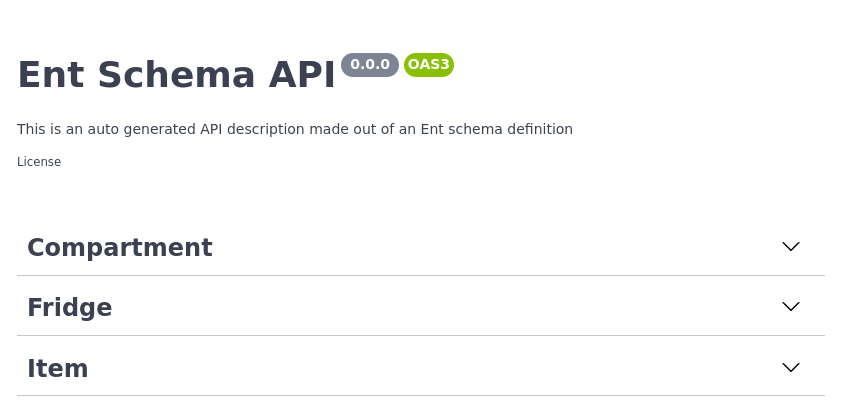
除了 Ent 通常生成的文件,系统还会生成一个名为 openapi.json 的文件。你可以将其内容复制粘贴到 Swagger Editor 中。你会看到三个组:CompartmentItemFridge

Swagger Editor Example

Swagger Editor 示例

如果你打开 Fridge 组的 POST 操作标签页,你会看到预期请求数据的描述以及所有可能的响应。不错!

POST operation on Fridge

Fridge 的 POST 操作

Basic Configuration

我们的 API 描述尚未反映它的真正功能,让我们进行修改吧!elk 提供了易于使用的配置构造器,用于操作生成的 OAS 文件。打开 ent/entc.go 并传入更新后的标题和描述:

ent/entc.go
//go:build ignore
// +build ignore

package main

import (
"log"

"entgo.io/ent/entc"
"entgo.io/ent/entc/gen"
"github.com/masseelch/elk"
)

func main() {
ex, err := elk.NewExtension(
elk.GenerateSpec(
"openapi.json",
// It is a Content-Management-System ...
elk.SpecTitle("Fridge CMS"),
// You can use CommonMark syntax (https://commonmark.org/).
elk.SpecDescription("API 用于管理冰箱及其冷藏内容。**ICY!**"),
elk.SpecVersion("0.0.1"),
),
)
if err != nil {
log.Fatalf("创建 elk 扩展失败: %v", err)
}
err = entc.Generate("./schema", &gen.Config{}, entc.Extensions(ex))
if err != nil {
log.Fatalf("运行 ent 代码生成失败: %v", err)
}
}

再次运行代码生成器,即可得到更新后的 OAS,你可以将其复制粘贴到 Swagger Editor。
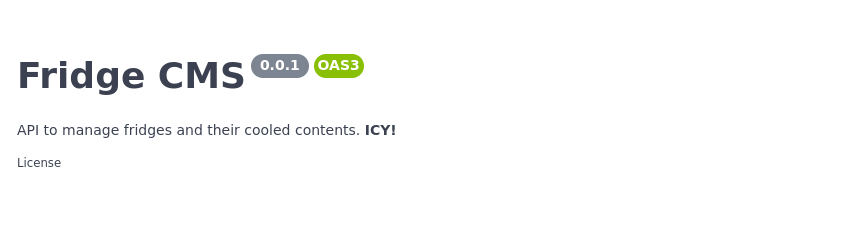
Updated API Info

更新后的 API 信息

Operation configuration

我们不想公开删除冰箱的端点(说真的,谁会想要那?)。好在 elk 允许我们配置哪些端点生成,哪些忽略。elk 的默认策略是公开所有路由。你可以将此行为改为不公开任何路由,除非你显式请求,或仅使用 elk.SchemaAnnotation 排除 Fridge 的 DELETE 操作:

ent/schema/fridge.go
// Fridge 的注解。
func (Fridge) Annotations() []schema.Annotation {
return []schema.Annotation{
elk.DeletePolicy(elk.Exclude),
}
}

效果立现!DELETE 操作消失了。

DELETE operation is gone

DELETE 操作已消失

欲了解更多关于 elk 策略如何工作以及你可以做什么的信息,请查看 godoc

Extend specification

在这个示例中,我最关心的是冰箱当前的内容。你可以通过使用 Hooks 将生成的 OAS 自定义到任意规格。然而,这超出了本文范围。如何向生成的 OAS 文件添加一个 fridges/{id}/contents 端点的示例可以在此处找到。

Generating an OAS-implementing server

我承诺在开始时会创建一个按照 OAS 描述行为的服务器。elk 让这件事变得简单,只需在配置扩展时调用 elk.GenerateHandlers()

ent/entc.go
[...]
func main() {
ex, err := elk.NewExtension(
elk.GenerateSpec(
[...]
),
+ elk.GenerateHandlers(),
)
[...]
}

接下来重新运行代码生成:

go generate ./...

你会发现生成了一个名为 ent/http 的新目录。

» tree ent/http
ent/http
├── create.go
├── delete.go
├── easyjson.go
├── handler.go
├── list.go
├── read.go
├── relations.go
├── request.go
├── response.go
└── update.go

0 directories, 10 files

你可以使用以下极简的 main.go 启动生成的服务器:

package main

import (
"context"
"log"
"net/http"

"<your-project>/ent"
elk "<your-project>/ent/http"

_ "github.com/mattn/go-sqlite3"
"go.uber.org/zap"
)

func main() {
// 创建 ent 客户端。
c, err := ent.Open("sqlite3", "file:ent?mode=memory&cache=shared&_fk=1")
if err != nil {
log.Fatalf("打开 sqlite 连接失败: %v", err)
}
defer c.Close()
// 运行自动迁移工具。
if err := c.Schema.Create(context.Background()); err != nil {
log.Fatalf("创建 schema 资源失败: %v", err)
}
// 启动监听传入请求。
if err := http.ListenAndServe(":8080", elk.NewHandler(c, zap.NewExample())); err != nil {
log.Fatal(err)
}
}
go run -mod=mod main.go

我们的 Fridge API 服务器已经启动。利用生成的 OAS 文件和 Swagger Tooling,你现在可以为任何受支持的语言生成客户端桩,并彻底抛弃手写 RESTful 客户端的需求。

Wrapping Up

本文介绍了 elk 的新功能 —— 自动 OpenAPI 规范生成。该功能将 Ent 的代码生成能力与 OpenAPI/Swagger 的丰富工具生态系统连接在一起。

有问题?需要帮助入门?欢迎加入我们的 Discord 服务器Slack 频道

为获取更多 Ent 新闻与更新:
  • 订阅我们的 Newsletter
  • Twitter 上关注我们
  • 在 Gophers Slack 的 #ent 频道加入我们
  • 加入我们的 Ent Discord 服务器

· 阅读需 8 分钟

几个月前,Ariel 对 Ent 的核心做出了一个不声不响但影响深远的贡献 — Extension API。虽然 Ent 长期以来已经具备扩展能力(如 Code‑gen HooksExternal Templates、以及 Annotations),但一直没有一种便捷的方式将这些动态组成合并成一个连贯、可自包含的组件。我们在本文中讨论的 Extension API 正是实现这一点的手段。

许多开源生态系统之所以蓬勃发展,往往是因为它们擅长为开发者提供一种简洁、结构化的方式来扩展一个小型核心系统。针对 Node.js 生态系统曾有不少批评(甚至其原创者 Ryan Dahl也曾发声),但很难否认 npm 模块的易于发布与消费正推动了其爆炸式增长。我在个人博客中讨论过 protoc 的插件系统如何工作,以及这如何让 Protobuf 生态繁荣。简言之,生态系统的形成离不开模块化设计。

今天的文章,我们将通过一个玩具示例,探索 Ent 的 Extension API。

入门

Extension API 仅适用于使用 Ent 的代码生成器以 Go 包形式工作的项目(see docs)。在初始化项目后,新增一个名为 ent/entc.go 的文件:

ent/entc.go
//+build ignore

package main

import (
"log"

"entgo.io/ent/entc"
"entgo.io/ent/entc/gen"
"entgo.io/ent/schema/field"
)

func main() {
err := entc.Generate("./schema", &gen.Config{})
if err != nil {
log.Fatal("running ent codegen:", err)
}
}

接下来修改 ent/generate.go,让它调用我们的 entc 文件:

ent/generate.go
package ent

//go:generate go run entc.go

创建我们的 Extension

所有 Extension 必须实现 Extension 接口:

type Extension interface {
// Hooks holds an optional list of Hooks to apply
// on the graph before/after the code-generation.
Hooks() []gen.Hook
// Annotations injects global annotations to the gen.Config object that
// can be accessed globally in all templates. Unlike schema annotations,
// being serializable to JSON raw value is not mandatory.
//
// {{- with $.Config.Annotations.GQL }}
// {{/* Annotation usage goes here. */}}
// {{- end }}
//
Annotations() []Annotation
// Templates specifies a list of alternative templates
// to execute or to override the default.
Templates() []*gen.Template
// Options specifies a list of entc.Options to evaluate on
// the gen.Config before executing the code generation.
Options() []Option
}

为简化新 Extension 的开发,开发者可以嵌入 entc.DefaultExtension,从而无需实现所有方法。在 entc.go 中加入:

ent/entc.go
// ...

// GreetExtension implements entc.Extension.
type GreetExtension struct {
entc.DefaultExtension
}

目前我们的 Extension 并未真正做任何事。接下来,把它连接到代码生成配置中。在 entc.go 添加:

err := entc.Generate("./schema", &gen.Config{}, entc.Extensions(&GreetExtension{}))

添加模板

外部模板可以被打包进 Extension,以增强 Ent 核心的代码生成能力。以我们的玩具示例为例,我们的目标是为每个实体添加一个名为 Greet 的生成方法,当调用时返回一个包含类型名称的问候语。期望效果类似:

func (u *User) Greet() string {
return "Greetings, User"
}

为此,先新增一个外部模板文件并放置到 ent/templates/greet.tmpl

ent/templates/greet.tmpl
{{ define "greet" }}

{{/* Add the base header for the generated file */}}
{{ $pkg := base $.Config.Package }}
{{ template "header" $ }}

{{/* Loop over all nodes and add the Greet method */}}
{{ range $n := $.Nodes }}
{{ $receiver := $n.Receiver }}
func ({{ $receiver }} *{{ $n.Name }}) Greet() string {
return "Greetings, {{ $n.Name }}"
}
{{ end }}
{{ end }}

接下来实现 Templates 方法:

ent/entc.go
func (*GreetExtension) Templates() []*gen.Template {
return []*gen.Template{
gen.MustParse(gen.NewTemplate("greet").ParseFiles("templates/greet.tmpl")),
}
}

接下来,测试我们的 Extension。新建一个 ent/schema/user.go,添加 User 类型 schema:

package schema

import (
"entgo.io/ent"
"entgo.io/ent/schema/field"
)

// User holds the schema definition for the User entity.
type User struct {
ent.Schema
}

// Fields of the User.
func (User) Fields() []ent.Field {
return []ent.Field{
field.String("email_address").
Unique(),
}
}

然后执行:

go generate ./...

你会发现新文件 ent/greet.go 已生成,内容如下:

ent/greet.go
// Code generated by ent, DO NOT EDIT.

package ent

func (u *User) Greet() string {
return "Greetings, User"
}

太好了!我们的 Extension 成功被 Ent 的代码生成器调用,并产生了我们期望的代码!

添加注解

注解(Annotation)为 Extension 的用户提供了一种 API,能够修改代码生成逻辑的行为。为了给 GreetExtension 添加注解,先实现一个 GreetingWord 注解:

// GreetingWord implements entc.Annotation
type GreetingWord string

func (GreetingWord) Name() string {
return "GreetingWord"
}

随后在 GreetExtension 结构体中添加一个 Word 字段:

type GreetExtension struct {
entc.DefaultExtension
Word GreetingWord
}

实现 Annotations 方法:

func (s *GreetExtension) Annotations() []entc.Annotation {
return []entc.Annotation{
s.Word,
}
}

现在,你可以在模板中访问 GreetingWord 注解。修改 ent/templates/greet.tmpl,使用新的注解:

func ({{ $receiver }} *{{ $n.Name }}) Greet() string {
return "{{ $.Annotations.GreetingWord }}, {{ $n.Name }}"
}

接着调整代码生成配置,以设置 GreetingWord 注解:

"ent/entc.go
err := entc.Generate("./schema",
&gen.Config{},
entc.Extensions(&GreetExtension{
Word: GreetingWord("Shalom"),
}),
)

重新运行:

go generate ./...

你会看到生成的 ent/greet.go 已更新:

func (u *User) Greet() string {
return "Shalom, User"
}

太棒了!我们已通过注解为生成的 Greet 方法添加了可配置的问候词。

更多可能性

除了模板和注解,Extension API 还允许开发者将 gen.Hookentc.Option 打包进 Extension,以进一步控制代码生成行为。本文未展开讨论这些可能性,若你对它们感兴趣,请查看文档

小结

本文通过一个玩具示例,展示了如何使用 Extension API 创建新的 Ent 代码生成 Extension。正如前面所提,允许任何人扩展软件核心功能的模块化设计对生态系统的成功至关重要。我们正看到这种理念在 Ent 社区的实现,以下列出了一些使用 Extension API 的有趣项目:

  • elk — 基于 Ent schema 生成 REST 端点的扩展。
  • entgql — 从 Ent schema 生成 GraphQL 服务器。
  • entviz — 从 Ent schema 生成 ER 图。

你呢?有没有想要实现的有用 Ent Extension?希望本文让你看到,通过新的 Extension API,实现这一目标并不繁琐。

如有任何问题或需要帮助入门,欢迎加入我们的Discord 服务器Slack 频道

::: note For more Ent news and updates:

:::

· 阅读需 3 分钟

亲爱的社区,

我非常高兴分享一件已经筹备已久的事情。

昨天(8月31日),一份新闻稿发布,宣布 Ent 加入 Linux 基金会。

Ent 在 2019 年,我与 Facebook 的同事一起工作时开源。自那时起,我们的社区不断壮大,Ent 在各类不同规模与行业的组织中被迅速采用。

我们将组织迁移到 Linux 基金会治理下的目标是提供一个企业中立的环境,让各组织更容易贡献代码,正如我们在 Kubernetes、GraphQL 等成功 OSS 项目中所见。同时,置于 Linux 基金会治理之下,使 Ent 成为我们期望的核心基础设施技术,组织可以放心使用,因为它将长期存在。

就我们的社区而言,没有任何特别变化,仓库已于几个月前迁移至 github.com/ent/ent,许可仍为 Apache 2.0,我们全体成员百分之百致力于项目成功。我们相信 Linux 基金会强大的品牌和组织能力将帮助建立更高的信任度,进一步促进 Ent 在行业中的采用。

我想向在 Facebook 与 Linux 基金会中辛勤工作、使这一变更成为可能、并对我们的社区给予信任的优秀人士致以深深的感谢,感谢他们不断推动数据访问框架的前沿技术。这对于我们的社区是一次重大成就,我想借此机会感谢大家对项目的贡献、支持和信任。

个人而言,我想分享一下,核心 Ent 贡献者 Rotem 与我共同创办了一家新公司,Ariga。我们的使命是打造一个我们称之为“运营数据图”的产品,主要使用 Ent 技术,我们将在不久后分享更多细节。你们可以期待团队为框架贡献许多激动人心的新功能。此外,Ariga 的员工将投入时间和资源来支持并培育这个优秀的社区。

如果你对这项变更有任何疑问,或对如何进一步改进有想法,请随时通过我们的 Discord 服务器Slack 频道 与我联系。

Ariel ❤️

· 阅读需 7 分钟

加入一个拥有庞大代码库的现有项目可能是一项艰巨的任务。

理解应用程序的数据模型对于开发者开始以往项目的工作至关重要。解决这一挑战并帮助开发者把握应用程序数据模型的常用工具之一是 ER(实体关系)图

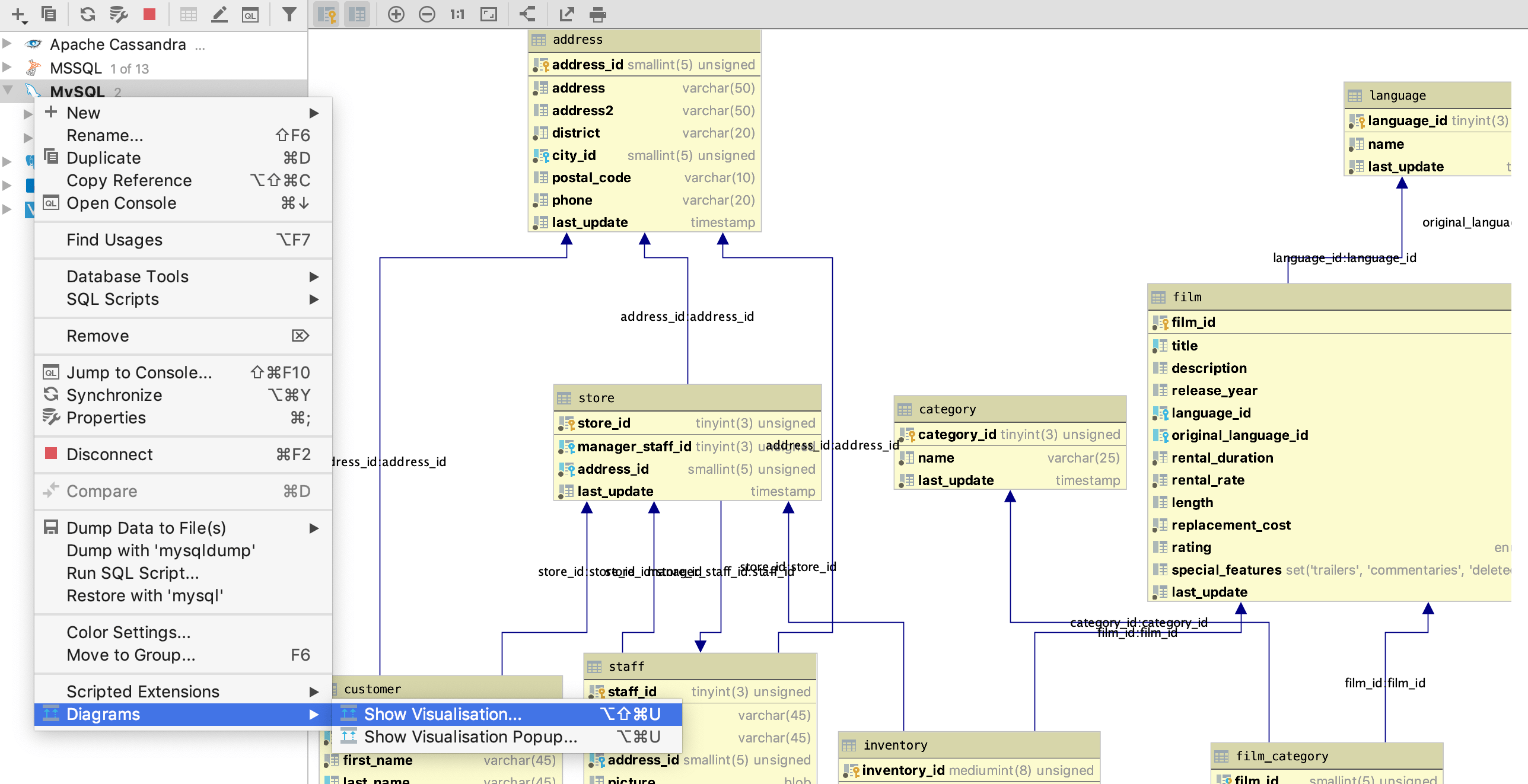
ER 图提供了你数据模型的可视化表示,细述了实体的每一个字段。许多工具可以帮助创建这些图,其中一个例子是 Jetbrains DataGrip, 它可以通过连接并检查现有数据库来生成 ER 图:

Datagrip ER 图

DataGrip ER 图示例

Ent,一款简单而强大的 Go 语言实体框架,最初是在 Facebook 内部开发,用来处理大型和复杂数据模型的项目。因此 Ent 使用代码生成——它提供类型安全和代码补全,帮助阐释数据模型并提高开发效率。再加上,自动生成保持高层视图的 ER 图并以视觉上令人愉悦的方式展示数据模型不是更好吗?(我的意思是,谁不爱可视化?)

引入 entviz

entviz 是一个 Ent 扩展,能够自动生成静态 HTML 页面来可视化你的数据图。

Entviz 示例输出

Entviz 示例输出

多数 ER 图生成工具需要连接数据库并进行探查,这使得维护一个随时更新的数据库模式图变得困难。由于 entviz 直接集成到你的 Ent 模式中,它无需连接数据库,每次修改模式时都会自动生成全新的可视化图。

如果你想了解 entviz 是如何实现的,查看 实现章节

查看实际效果

首先,让我们把 entviz 扩展添加到我们的 entc.go 文件中:

go get github.com/hedwigz/entviz
信息

如果你不熟悉 entc,欢迎阅读 entc 文档 进一步了解。

ent/entc.go
import (
"log"

"entgo.io/ent/entc"
"entgo.io/ent/entc/gen"
"github.com/hedwigz/entviz"
)

func main() {
err := entc.Generate("./schema", &gen.Config{}, entc.Extensions(entviz.Extension{}))
if err != nil {
log.Fatalf("running ent codegen: %v", err)
}
}

假设我们有一个简单的模式,其中包括一个用户实体和一些字段:

ent/schema/user.go
// Fields of the User.
func (User) Fields() []ent.Field {
return []ent.Field{
field.String("name"),
field.String("email"),
field.Time("created").
Default(time.Now),
}
}

现在,entviz 将在每次运行时自动生成图形的可视化:

go generate ./...

你现在应该能在你的 Ent 目录中看到一个名为 schema-viz.html 的新文件:

$ ll ./ent/schema-viz.html
-rw-r--r-- 1 hedwigz hedwigz 7.3K Aug 27 09:00 schema-viz.html

在你喜欢的浏览器中打开 html 文件查看可视化效果

教程图片

接下来,我们再添加一个名为 Post 的实体,并观察可视化的变化:

ent new Post
ent/schema/post.go
// Fields of the Post.
func (Post) Fields() []ent.Field {
return []ent.Field{
field.String("content"),
field.Time("created").
Default(time.Now),
}
}

现在,我们在 User 到 Post 之间添加一个(O2M)边:

ent/schema/post.go
// Edges of the User.
func (User) Edges() []ent.Edge {
return []ent.Edge{
edge.To("posts", Post.Type),
}
}

最后重新生成代码:

go generate ./...

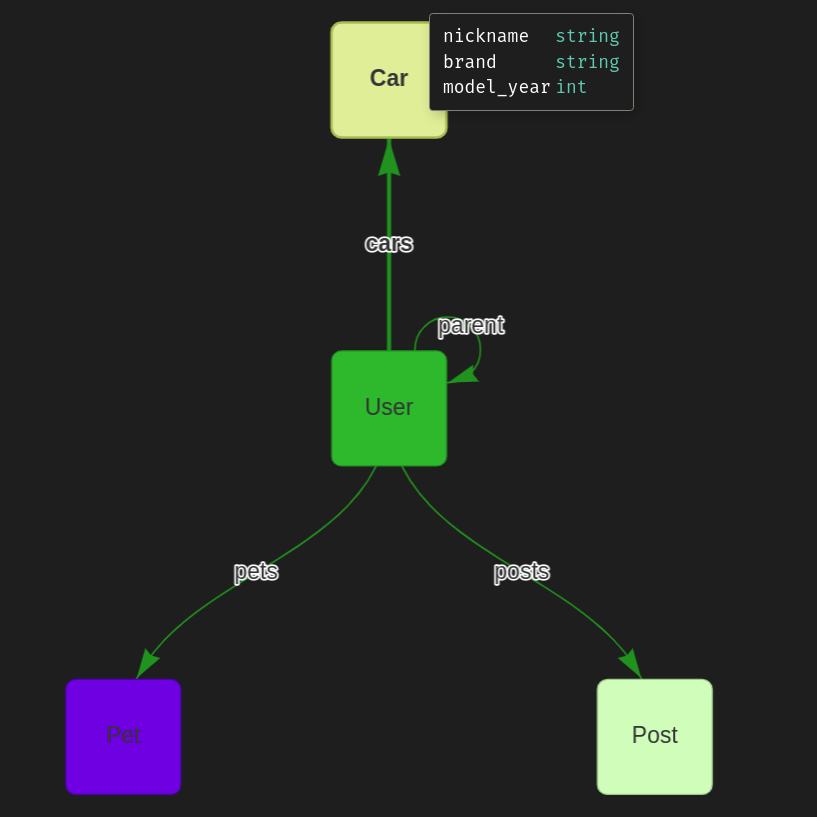
刷新你的浏览器查看更新的结果!

教程图片 2

实现

Entviz 通过扩展 Ent 的 扩展 API 实现。Ent 的扩展 API 允许你聚合多个 模板钩子选项注解。例如,entviz 使用模板添加另一个 Go 文件 entviz.go,它公开了 ServeEntviz 方法,可以作为 http 处理器使用,如下所示:

func main() {
http.ListenAndServe("localhost:3002", ent.ServeEntviz())
}

我们定义了一个嵌入默认扩展的扩展结构体,并通过 Templates 方法导出我们的模板:

//go:embed entviz.go.tmpl
var tmplfile string

type Extension struct {
entc.DefaultExtension
}

func (Extension) Templates() []*gen.Template {
return []*gen.Template{
gen.MustParse(gen.NewTemplate("entviz").Parse(tmplfile)),
}
}

模板文件是我们想生成的代码:

{{ define "entviz"}}

{{ $pkg := base $.Config.Package }}
{{ template "header" $ }}
import (
_ "embed"
"net/http"
"strings"
"time"
)

//go:embed schema-viz.html
var html string

func ServeEntviz() http.Handler {
generateTime := time.Now()
return http.HandlerFunc(func(w http.ResponseWriter, req *http.Request) {
http.ServeContent(w, req, "schema-viz.html", generateTime, strings.NewReader(html))
})
}
{{ end }}

就这样!现在我们在 ent 包中拥有了一个新方法。

总结

我们看到 ER 图如何帮助开发者跟踪他们的数据模型。随后,我们介绍了 entviz,一个自动为 Ent 模式生成 ER 图的扩展。我们了解了 entviz 如何利用 Ent 的扩展 API 对代码生成进行扩展并添加额外功能。最后,你亲眼看到了通过在自己的项目中安装和使用 entviz 的实际效果。如果你喜欢这段代码,或者想贡献代码——欢迎查看 GitHub 项目

有问题吗?需要帮助入门?随时加入我们的 Discord 服务器 或者 Slack 频道

更多 Ent 新闻与更新:

· 阅读需 12 分钟

可观测性是一个系统对其内部状态能够被外部测量的质量。
当计算机程序演变为成熟的生产系统时,这种质量变得越来越重要。
让软件系统更可观测的一种方式是导出指标,即以某种可外部可见的方式报告运行系统状态的定量描述。例如,暴露一个 HTTP 端点,以便我们可以看到自进程启动以来发生了多少错误。本文将探讨如何使用 Prometheus 构建更可观测的 Ent 应用。

What is Ent?

Ent 是一个简洁但功能强大的 Go 语言实体框架,可轻松构建和维护具有大型数据模型的应用。

What is Prometheus?

Prometheus 是由 SoundCloud 工程师于 2012 年开发的开源监控系统。它内嵌时序数据库,并与多种第三方系统集成。Prometheus 客户端通过一个 HTTP 端点(通常为 /metrics)公开进程的指标,Prometheus scrapers 定期(通常 30 秒一次)轮询该端点并将数据写入时序数据库。

Prometheus 只是 metric 收集后端的一类示例。还有许多其他的后端,例如 AWS CloudWatch、InfluxDB 等,在业界得到广泛使用。本文后期将讨论如何在任何此类后端上实现统一、基于标准的集成。

Working with Prometheus

要使用 Prometheus 暴露应用指标,需要创建一个 Prometheus Collector,Collector 从服务器收集一组指标。

在本例中,我们将使用两种可以存储在 Collector 中的指标类型:计数器(Counters)和直方图(Histograms)。计数器是单调递增的累积指标,表示某个事件已发生的次数,常用于计数服务器处理的请求数或发生的错误数。直方图将观测值划分为可配置大小的桶,常用于表示延迟分布(例如,多少请求在 5 ms、10 ms、100 ms、1 s 等之内完成)。另外,Prometheus 允许按标签拆分指标。 这在按端点名称拆分请求计数器时尤其有用。

下面演示如何使用官方 Go 客户端创建这样的 Collector。为此,我们使用客户端中的 promauto 包,简化创建 Collector 的过程。以下是一个计数器 Collector 的简单示例(用于统计总请求数或请求错误数):

package example

import (
"github.com/prometheus/client_golang/prometheus"
"github.com/prometheus/client_golang/prometheus/promauto"
)

var (
// 动态标签列表
labelNames = []string{"endpoint", "error_code"}

// 创建计数器 Collector
exampleCollector = promauto.NewCounterVec(
prometheus.CounterOpts{
Name: "endpoint_errors",
Help: "Number of errors in endpoints",
},
labelNames,
)
)

// 使用时设置动态标签的值,然后递增计数器
func incrementError() {
exampleCollector.WithLabelValues("/create-user", "400").Inc()
}

Ent Hooks

Hooks 是 Ent 的一个特性,允许在更改数据实体的操作前后添加自定义逻辑。

变更(mutation)是修改数据库中某些内容的操作。
有 5 种变更类型:

  1. Create
  2. UpdateOne
  3. Update
  4. DeleteOne
  5. Delete

Hooks 是接受 ent.Mutator 并返回 mutator 的函数。它们的工作方式类似于流行的 HTTP 中间件模式。

package example

import (
"context"

"entgo.io/ent"
)

func exampleHook() ent.Hook {
// 用于初始化 Hook
return func(next ent.Mutator) ent.Mutator {
return ent.MutateFunc(func(ctx context.Context, m ent.Mutation) (ent.Value, error) {
// 变更前执行的逻辑
v, err := next.Mutate(ctx, m)
if err != nil {
// 变更后出现错误时的逻辑
}
// 变更后执行的逻辑
return v, err
})
}
}

在 Ent 中,变更 Hook 有两种类型——schema Hook 和 runtime Hook。
schema Hook 主要用于对特定实体类型定义自定义变更逻辑,例如将实体创建同步到其他系统。
runtime Hook 则用于定义更全局的逻辑,例如日志、指标、追踪等。

对于我们的使用场景,绝对应该使用 runtime Hook,因为要真正有价值,需要在所有实体类型、所有操作上导出指标:

package example

import (
"entprom/ent"
"entprom/ent/hook"
)

func main() {
client, _ := ent.Open("sqlite3", "file:ent?mode=memory&cache=shared&_fk=1")

// 仅在用户变更上添加 Hook
client.User.Use(exampleHook())

// 仅在更新操作上添加 Hook
client.Use(hook.On(exampleHook(), ent.OpUpdate|ent.OpUpdateOne))
}

Exporting Prometheus Metrics for an Ent Application

所有前置知识已完成,下面直接演示如何将 Prometheus 与 Ent Hook 结合使用,创建可观测的应用。此示例的目标是使用 Hook 导出以下指标:

指标名称描述
ent_operation_totalent 变更操作的数量
ent_operation_error失败的 ent 变更操作的数量
ent_operation_duration_seconds每个操作的耗时(秒)

每个指标都会按标签拆分为两个维度:

  • mutation_type:正在变更的实体类型(User、BlogPost、Account 等)。
  • mutation_op:执行的操作(Create、Delete 等)。

让我们先定义 Collector:

// Ent 动态维度
const (
mutationType = "mutation_type"
mutationOp = "mutation_op"
)

var entLabels = []string{mutationType, mutationOp}

// 创建总操作计数器 Collector
func initOpsProcessedTotal() *prometheus.CounterVec {
return promauto.NewCounterVec(
prometheus.CounterOpts{
Name: "ent_operation_total",
Help: "Number of ent mutation operations",
},
entLabels,
)
}

// 创建错误计数器 Collector
func initOpsProcessedError() *prometheus.CounterVec {
return promauto.NewCounterVec(
prometheus.CounterOpts{
Name: "ent_operation_error",
Help: "Number of failed ent mutation operations",
},
entLabels,
)
}

// 创建耗时直方图 Collector
func initOpsDuration() *prometheus.HistogramVec {
return promauto.NewHistogramVec(
prometheus.HistogramOpts{
Name: "ent_operation_duration_seconds",
Help: "Time in seconds per operation",
},
entLabels,
)
}

接下来定义新的 Hook:

// Hook 初始化 Collector,开始时计数总数,变更错误时计数错误,结束时记录耗时
func Hook() ent.Hook {
opsProcessedTotal := initOpsProcessedTotal()
opsProcessedError := initOpsProcessedError()
opsDuration := initOpsDuration()
return func(next ent.Mutator) ent.Mutator {
return ent.MutateFunc(func(ctx context.Context, m ent.Mutation) (ent.Value, error) {
// 变更前开始计时
start := time.Now()
// 从变更中提取动态标签
labels := prometheus.Labels{mutationType: m.Type(), mutationOp: m.Op().String()}
// 递增总操作计数
opsProcessedTotal.With(labels).Inc()
// 执行变更
v, err := next.Mutate(ctx, m)
if err != nil {
// 出错时递增错误计数
opsProcessedError.With(labels).Inc()
}
// 停止计时
duration := time.Since(start)
// 记录耗时(秒)
opsDuration.With(labels).Observe(duration.Seconds())
return v, err
})
}
}

Connecting the Prometheus Collector to our Service

定义 Hook 后,下面演示如何将其连接到应用并使用 Prometheus 提供一个暴露指标的端点:

package main

import (
"context"
"log"
"net/http"

"entprom"
"entprom/ent"

_ "github.com/mattn/go-sqlite3"
"github.com/prometheus/client_golang/prometheus/promhttp"
)

func createClient() *ent.Client {
c, err := ent.Open("sqlite3", "file:ent?mode=memory&cache=shared&_fk=1")
if err != nil {
log.Fatalf("failed opening connection to sqlite: %v", err)
}
ctx := context.Background()
// 运行自动迁移工具
if err := c.Schema.Create(ctx); err != nil {
log.Fatalf("failed creating schema resources: %v", err)
}
return c
}

func handler(client *ent.Client) func(w http.ResponseWriter, r *http.Request) {
return func(w http.ResponseWriter, r *http.Request) {
ctx := context.Background()
// 运行操作
_, err := client.User.Create().SetName("a8m").Save(ctx)
if err != nil {
http.Error(w, err.Error(), http.StatusBadRequest)
return
}
}
}

func main() {
// 创建 Ent client 并迁移
client := createClient()
// 使用 Hook
client.Use(entprom.Hook())
// 简单处理器,执行 DB 操作
http.HandleFunc("/", handler(client))
// 该端点向 Prometheus 发送指标以供收集
http.Handle("/metrics", promhttp.Handler())
log.Println("server starting on port 8080")
// 运行服务器
log.Fatal(http.ListenAndServe(":8080", nil))
}

访问 /(使用 curl 或浏览器)若干次后,访问 /metrics,你会看到 Prometheus 客户端的输出:

# HELP ent_operation_duration_seconds Time in seconds per operation
# TYPE ent_operation_duration_seconds histogram
ent_operation_duration_seconds_bucket{mutation_op="OpCreate",mutation_type="User",le="0.005"} 2
ent_operation_duration_seconds_bucket{mutation_op="OpCreate",mutation_type="User",le="0.01"} 2
ent_operation_duration_seconds_bucket{mutation_op="OpCreate",mutation_type="User",le="0.025"} 2
ent_operation_duration_seconds_bucket{mutation_op="OpCreate",mutation_type="User",le="0.05"} 2
ent_operation_duration_seconds_bucket{mutation_op="OpCreate",mutation_type="User",le="0.1"} 2
ent_operation_duration_seconds_bucket{mutation_op="OpCreate",mutation_type="User",le="0.25"} 2
ent_operation_duration_seconds_bucket{mutation_op="OpCreate",mutation_type="User",le="0.5"} 2
ent_operation_duration_seconds_bucket{mutation_op="OpCreate",mutation_type="User",le="1"} 2
ent_operation_duration_seconds_bucket{mutation_op="OpCreate",mutation_type="User",le="2.5"} 2
ent_operation_duration_seconds_bucket{mutation_op="OpCreate",mutation_type="User",le="5"} 2
ent_operation_duration_seconds_bucket{mutation_op="OpCreate",mutation_type="User",le="10"} 2
ent_operation_duration_seconds_bucket{mutation_op="OpCreate",mutation_type="User",le="+Inf"} 2
ent_operation_duration_seconds_sum{mutation_op="OpCreate",mutation_type="User"} 0.000265669
ent_operation_duration_seconds_count{mutation_op="OpCreate",mutation_type="User"} 2
# HELP ent_operation_error Number of failed ent mutation operations
# TYPE ent_operation_error counter
ent_operation_error{mutation_op="OpCreate",mutation_type="User"} 1
# HELP ent_operation_total Number of ent mutation operations
# TYPE ent_operation_total counter
ent_operation_total{mutation_op="OpCreate",mutation_type="User"} 2

在上部可见直方图的计算结果,展示了每个“桶”中操作的数量。随后可见总操作数和错误数。每个指标后面都有描述,可在 Prometheus 仪表盘中查询时查看。

Prometheus 客户端只是 Prometheus 架构中的一部分。若要运行完整系统,包括会轮询端点的 scraper、存储指标并可回答查询的 Prometheus,以及简易 UI 与之交互,建议阅读官方文档或使用此示例仓库中的 docker-compose.yaml

Future Work on Observability in Ent

正如前面提到的,当前已有大量 metric 收集后端可用,Prometheus 只是其中一个成功项目。虽然这些解决方案在自托管 vs SaaS、不同存储引擎与查询语言等多方面存在差异——从指标报告客户端的角度来看,它们几乎是一样的。

在这种情况下,良好的软件工程原则建议通过接口将具体后端从客户端抽象出来。后端随后实现此接口,客户端即可轻松切换不同实现。近年来,这类变革在行业中已普及。以 Open Container InitiativeService Mesh Interface 为例,它们都致力于为问题空间定义标准接口。该接口旨在形成标准实现生态系统。

在可观测性领域,同样的趋势正在发生:OpenCensusOpenTracing 正在合并为 OpenTelemetry

尽管发布类似本文所示的 Ent + Prometheus 扩展听起来很诱人,我们坚信可观测性应该通过基于标准的方法来解决。我们邀请各位加入讨论,探讨 Ent 的合适实现方式。

Wrap-Up

本文从介绍 Prometheus——流行的开源监控解决方案开始。随后回顾了 Ent 的 Hook 特性,展示了如何将两者结合,构建可观测的应用。最后讨论了 Ent 可观测性的未来,并邀请大家参与讨论,一同塑造其发展。

有任何问题?需要起步帮助?随时加入我们的 Discord 服务器Slack 频道

备注

更多 Ent 新闻与更新:

  • 订阅我们的新闻通讯
  • 在 Twitter 上关注我们
  • 加入 Gophers Slack 的 #ent 频道
  • 加入我们的 Ent Discord 服务器

· 阅读需 8 分钟

已经有将近四个月时间从我们的 上一次发布 之后,原因很充分。
今天发布的版本 0.9.0 打包了许多备受期待的功能。
排名第一的功能是一个已讨论 一年半多 的功能,也是 Ent 用户调查 中最常被请求的功能之一:Upsert API

版本 0.9.0 为使用 新的功能标志 sql/upsert 的 “Upsert” 语句提供支持。Ent 有一套可开启的功能标志(Feature Flags),可以在生成的代码中添加更多功能。它既是让项目选择是否开启某些非必要功能的机制,也是未来可能成为 Ent 核心的一种实验方式。

在本文中,我们将介绍这一新功能、其实用场景,并演示如何使用它。

Upsert

“Upsert” 是数据系统中常用的术语,源自 update + insert,通常指一个尝试向表插入记录的语句;如果违反了唯一性约束(例如同 ID 的记录已存在),则该记录被更新而不是插入。虽然多数流行的关系数据库没有专门的 UPSERT 语句,但它们大多支持实现此类行为的方式。

举例,假设我们在 SQLite 数据库中有如下定义的表:

CREATE TABLE users (
id integer PRIMARY KEY AUTOINCREMENT,
email varchar(255) UNIQUE,
name varchar(255)
)

如果我们尝试两次执行同一条 INSERT

INSERT INTO users (email, name) VALUES ('rotem@entgo.io', 'Rotem Tamir');

将会得到错误:

[2021-08-05 06:49:22] UNIQUE constraint failed: users.email

在许多情况下,让写操作保持 幂等性idempotent)是非常有用的,即我们可以连续多次执行它们,系统保持相同状态。

在其他情况下,不想在创建前查询记录是否存在。针对这类情况,SQLite 在 INSERT 语句中提供了 ON CONFLICT 子句(ON CONFLICT 语法)。若想让 SQLite 用新值覆盖现有值,可以这样执行:

INSERT INTO users (email, name) values ('rotem@entgo.io', 'Tamir, Rotem')
ON CONFLICT (email) DO UPDATE SET email=excluded.email, name=excluded.name;

如果更倾向于保留现有值,可以使用 DO NOTHING 冲突处理动作:

INSERT INTO users (email, name) values ('rotem@entgo.io', 'Tamir, Rotem') 
ON CONFLICT DO NOTHING;

有时我们想以某种方式合并这两种版本,可以稍微改动 DO UPDATE 动作来实现,例如:

INSERT INTO users (email, full_name) values ('rotem@entgo.io', 'Tamir, Rotem') 
ON CONFLICT (email) DO UPDATE SET name=excluded.name || ' (formerly: ' || users.name || ')'

在此例中,在第二次 INSERT 后,name 列的值将是 Tamir, Rotem (formerly: Rotem Tamir)。虽然用途不大,但应该能让你看到可以以这种方式做出酷炫的操作。

Upsert with Ent

假设我们已有一个包含类似 users 表的 Ent 项目:

// User holds the schema definition for the User entity.
type User struct {
ent.Schema
}

// Fields of the User.
func (User) Fields() []ent.Field {
return []ent.Field{
field.String("email").
Unique(),
field.String("name"),
}
}

由于 Upsert API 是新发布的功能,请确保使用以下命令更新 ent 版本:

go get -u entgo.io/ent@v0.9.0

接下来,在 ent/generate.go 的代码生成标志中添加 sql/upsert 功能标志:

package ent

//go:generate go run -mod=mod entgo.io/ent/cmd/ent generate --feature sql/upsert ./schema

然后重新运行项目的代码生成:

go generate ./...

你会注意到在 ent/user_create.go 文件中多了一个名为 OnConflict 的新方法:

// OnConflict 允许配置 INSERT 语句的 `ON CONFLICT` / `ON DUPLICATE KEY` 子句。
// 例如:
//
// client.User.Create().
// SetEmailAddress(v).
// OnConflict(
// // 使用新值更新该行
// // 该行原本被建议插入。
// sql.ResolveWithNewValues(),
// ).
// // 用自定义更新值覆盖部分字段。
// Update(func(u *ent.UserUpsert) {
// SetEmailAddress(v+v)
// }).
// Exec(ctx)
//
func (uc *UserCreate) OnConflict(opts ...sql.ConflictOption) *UserUpsertOne {
uc.conflict = opts
return &UserUpsertOne{
create: uc,
}
}

这(连同更多新生成的代码)将帮助我们为 User 实体实现 upsert 行为。要深入探索,请先编写一个测试来复现唯一性约束错误:

func TestUniqueConstraintFails(t *testing.T) {
client := enttest.Open(t, "sqlite3", "file:ent?mode=memory&cache=shared&_fk=1")
ctx := context.TODO()

// 第一次创建用户。
client.User.
Create().
SetEmail("rotem@entgo.io").
SetName("Rotem Tamir").
SaveX(ctx)

// 第二次尝试使用相同邮箱创建用户。
_, err := client.User.
Create().
SetEmail("rotem@entgo.io").
SetName("Rotem Tamir").
Save(ctx)

if !ent.IsConstraintError(err) {
log.Fatalf("expected second created to fail with constraint error")
}
log.Printf("second query failed with: %v", err)
}

测试通过:

=== RUN   TestUniqueConstraintFails
2021/08/05 07:12:11 second query failed with: ent: constraint failed: insert node to table "users": UNIQUE constraint failed: users.email
--- PASS: TestUniqueConstraintFails (0.00s)

接下来,让我们看看如何在冲突时让 Ent 用新值覆盖旧值:

func TestUpsertReplace(t *testing.T) {
client := enttest.Open(t, "sqlite3", "file:ent?mode=memory&cache=shared&_fk=1")
ctx := context.TODO()

// 第一次创建用户。
orig := client.User.
Create().
SetEmail("rotem@entgo.io").
SetName("Rotem Tamir").
SaveX(ctx)

// 第二次尝试使用相同邮箱创建用户,并使用 `UpdateNewValues` 修饰符进行 ON CONFLICT 行为。
newID := client.User.Create().
SetEmail("rotem@entgo.io").
SetName("Tamir, Rotem").
OnConflict().
UpdateNewValues().
// 使用 IDX 方法获取创建/更新实体的 ID。
IDX(ctx)

// 期望原始创建用户的 ID 与刚刚更新的 ID 相同。
if orig.ID != newID {
log.Fatalf("expected upsert to update an existing record")
}

current := client.User.GetX(ctx, orig.ID)
if current.Name != "Tamir, Rotem" {
log.Fatalf("expected upsert to replace with the new values")
}
}

运行测试:

=== RUN   TestUpsertReplace
--- PASS: TestUpsertReplace (0.00s)

另外,我们也可以使用 Ignore 修饰符,让 Ent 在冲突时保留旧版本。下面的测试演示了这一点:

func TestUpsertIgnore(t *testing.T) {
client := enttest.Open(t, "sqlite3", "file:ent?mode=memory&cache=shared&_fk=1")
ctx := context.TODO()

// 第一次创建用户。
orig := client.User.
Create().
SetEmail("rotem@entgo.io").
SetName("Rotem Tamir").
SaveX(ctx)

// 第二次尝试使用相同邮箱创建用户,并使用 `Ignore` 修饰符进行 ON CONFLICT 行为。
client.User.
Create().
SetEmail("rotem@entgo.io").
SetName("Tamir, Rotem").
OnConflict().
Ignore().
ExecX(ctx)

current := client.User.GetX(ctx, orig.ID)
if current.FullName != orig.FullName {
log.Fatalf("expected upsert to keep the original version")
}
}

你可以在Feature FlagUpsert API 文档中阅读更多关于此功能的信息。

Wrapping Up

在本文中,我们介绍了经过长时间期待的 Upsert API,它在 Ent v0.9.0 中以功能标志的形式提供。我们讨论了 upsert 在应用程序中的常见用途以及它们在常用关系数据库中的实现方式,并展示了一个使用 Ent 进行 Upsert 的简易示例。

如有疑问?需要入门帮助?欢迎加入我们的 Discord 服务器Slack 通道

了解更多 Ent 新闻与更新:

· 阅读需 11 分钟

When we say that one of the core principles of Ent is "Schema as Code", we mean by that more than "Ent's DSL for defining entities and their edges is done using regular Go code". Ent's unique approach, compared to many other ORMs, is to express all of the logic related to an entity, as code, directly in the schema definition.

With Ent, developers can write all authorization logic (called "Privacy" within Ent), and all of the mutation side-effects (called "Hooks" within Ent) directly on the schema. Having everything in the same place can be very convenient, but its true power is revealed when paired with code generation.

If schemas are defined this way, it becomes possible to generate code for fully-working production-grade servers automatically. If we move the responsibility for authorization decisions and custom side effects from the RPC layer to the data layer, the implementation of the basic CRUD (Create, Read, Update and Delete) endpoints becomes generic to the extent that it can be machine-generated. This is exactly the idea behind the popular GraphQL and gRPC Ent extensions.

Today, we would like to present a new Ent extension named elk that can automatically generate fully-working, RESTful API endpoints from your Ent schemas. elk strives to automate all of the tedious work of setting up the basic CRUD endpoints for every entity you add to your graph, including logging, validation of the request body, eager loading relations and serializing, all while leaving reflection out of sight and maintaining type-safety.

Let’s get started!

Getting Started

The final version of the code below can be found on GitHub.

Start by creating a new Go project:

mkdir elk-example
cd elk-example
go mod init elk-example

Invoke the ent code generator and create two schemas: User, Pet:

go run -mod=mod entgo.io/ent/cmd/ent new Pet User

Your project should now look like this:

.
├── ent
│ ├── generate.go
│ └── schema
│ ├── pet.go
│ └── user.go
├── go.mod
└── go.sum

Next, add the elk package to our project:

go get -u github.com/masseelch/elk

elk uses the Ent extension API to integrate with Ent’s code-generation. This requires that we use the entc (ent codegen) package as described here. Follow the next three steps to enable it and to configure Ent to work with the elk extension:

1. Create a new Go file named ent/entc.go and paste the following content:

// +build ignore

package main

import (
"log"

"entgo.io/ent/entc"
"entgo.io/ent/entc/gen"
"github.com/masseelch/elk"
)

func main() {
ex, err := elk.NewExtension(
elk.GenerateSpec("openapi.json"),
elk.GenerateHandlers(),
)
if err != nil {
log.Fatalf("creating elk extension: %v", err)
}
err = entc.Generate("./schema", &gen.Config{}, entc.Extensions(ex))
if err != nil {
log.Fatalf("running ent codegen: %v", err)
}
}

2. Edit the ent/generate.go file to execute the ent/entc.go file:

package ent

//go:generate go run -mod=mod entc.go

3/. elk uses some external packages in its generated code. Currently, you have to get those packages manually once when setting up elk:

go get github.com/mailru/easyjson github.com/masseelch/render github.com/go-chi/chi/v5 go.uber.org/zap

With these steps complete, all is set up for using our elk-powered ent! To learn more about Ent, how to connect to different types of databases, run migrations or work with entities head over to the Setup Tutorial.

Generating HTTP CRUD Handlers with elk

To generate the fully-working HTTP handlers we need first create an Ent schema definition. Open and edit ent/schema/pet.go:

package schema

import (
"entgo.io/ent"
"entgo.io/ent/schema/field"
)

// Pet holds the schema definition for the Pet entity.
type Pet struct {
ent.Schema
}

// Fields of the Pet.
func (Pet) Fields() []ent.Field {
return []ent.Field{
field.String("name"),
field.Int("age"),
}
}

We added two fields to our Pet entity: name and age. The ent.Schema just defines the fields of our entity. To generate runnable code from our schema, run:

go generate ./...

Observe that in addition to the files Ent would normally generate, another directory named ent/http was created. These files were generated by the elk extension and contain the code for the generated HTTP handlers. For example, here is some of the generated code for a read-operation on the Pet entity:

const (
PetCreate Routes = 1 << iota
PetRead
PetUpdate
PetDelete
PetList
PetRoutes = 1<<iota - 1
)

// PetHandler handles http crud operations on ent.Pet.
type PetHandler struct {
handler

client *ent.Client
log *zap.Logger
}

func NewPetHandler(c *ent.Client, l *zap.Logger) *PetHandler {
return &PetHandler{
client: c,
log: l.With(zap.String("handler", "PetHandler")),
}
}

// Read fetches the ent.Pet identified by a given url-parameter from the
// database and renders it to the client.
func (h *PetHandler) Read(w http.ResponseWriter, r *http.Request) {
l := h.log.With(zap.String("method", "Read"))
// ID is URL parameter.
id, err := strconv.Atoi(chi.URLParam(r, "id"))
if err != nil {
l.Error("error getting id from url parameter", zap.String("id", chi.URLParam(r, "id")), zap.Error(err))
render.BadRequest(w, r, "id must be an integer greater zero")
return
}
// Create the query to fetch the Pet
q := h.client.Pet.Query().Where(pet.ID(id))
e, err := q.Only(r.Context())
if err != nil {
switch {
case ent.IsNotFound(err):
msg := stripEntError(err)
l.Info(msg, zap.Error(err), zap.Int("id", id))
render.NotFound(w, r, msg)
case ent.IsNotSingular(err):
msg := stripEntError(err)
l.Error(msg, zap.Error(err), zap.Int("id", id))
render.BadRequest(w, r, msg)
default:
l.Error("could not read pet", zap.Error(err), zap.Int("id", id))
render.InternalServerError(w, r, nil)
}
return
}
l.Info("pet rendered", zap.Int("id", id))
easyjson.MarshalToHTTPResponseWriter(NewPet2657988899View(e), w)
}

Next, let’s see how to create an actual RESTful HTTP server that can manage your Pet entities. Create a file named main.go and add the following content:

package main

import (
"context"
"fmt"
"log"
"net/http"

"elk-example/ent"
elk "elk-example/ent/http"

"github.com/go-chi/chi/v5"
_ "github.com/mattn/go-sqlite3"
"go.uber.org/zap"
)

func main() {
// Create the ent client.
c, err := ent.Open("sqlite3", "./ent.db?_fk=1")
if err != nil {
log.Fatalf("failed opening connection to sqlite: %v", err)
}
defer c.Close()
// Run the auto migration tool.
if err := c.Schema.Create(context.Background()); err != nil {
log.Fatalf("failed creating schema resources: %v", err)
}
// Router and Logger.
r, l := chi.NewRouter(), zap.NewExample()
// Create the pet handler.
r.Route("/pets", func(r chi.Router) {
elk.NewPetHandler(c, l).Mount(r, elk.PetRoutes)
})
// Start listen to incoming requests.
fmt.Println("Server running")
defer fmt.Println("Server stopped")
if err := http.ListenAndServe(":8080", r); err != nil {
log.Fatal(err)
}
}

Next, start the server:

go run -mod=mod main.go

Congratulations! We now have a running server serving the Pets API. We could ask the server for a list of all pets in the database, but there are none yet. Let’s create one first:

curl -X 'POST' -H 'Content-Type: application/json' -d '{"name":"Kuro","age":3}' 'localhost:8080/pets'

You should get this response:

{
"age": 3,
"id": 1,
"name": "Kuro"
}

If you head over to the terminal where the server is running you can also see elks built in logging:

{
"level": "info",
"msg": "pet rendered",
"handler": "PetHandler",
"method": "Create",
"id": 1
}

elk uses zap for logging. To learn more about it, have a look at its documentation.

Relations

To illustrate more of elks features, let’s extend our graph. Edit ent/schema/user.go and ent/schema/pet.go:

ent/schema/pet.go
// Edges of the Pet.
func (Pet) Edges() []ent.Edge {
return []ent.Edge{
edge.From("owner", User.Type).
Ref("pets").
Unique(),
}
}
ent/schema/user.go
package schema

import (
"entgo.io/ent"
"entgo.io/ent/schema/edge"
"entgo.io/ent/schema/field"
)

// User holds the schema definition for the User entity.
type User struct {
ent.Schema
}

// Fields of the User.
func (User) Fields() []ent.Field {
return []ent.Field{
field.String("name"),
field.Int("age"),
}
}

// Edges of the User.
func (User) Edges() []ent.Edge {
return []ent.Edge{
edge.To("pets", Pet.Type),
}
}

We have now created a One-To-Many relation between the Pet and User schemas: A pet belongs to a user, and a user can have multiple pets.

Rerun the code generator:

go generate ./...

Do not forget to register the UserHandler on our router. Just add the following lines to main.go:

[...]
r.Route("/pets", func(r chi.Router) {
elk.NewPetHandler(c, l, v).Mount(r, elk.PetRoutes)
})
+ // Create the user handler.
+ r.Route("/users", func(r chi.Router) {
+ elk.NewUserHandler(c, l, v).Mount(r, elk.UserRoutes)
+ })
// Start listen to incoming requests.
fmt.Println("Server running")
[...]

After restarting the server we can create a User that owns the previously created Pet named Kuro:

curl -X 'POST' -H 'Content-Type: application/json' -d '{"name":"Elk","age":30,"owner":1}' 'localhost:8080/users'

The server returns the following response:

{
"age": 30,
"edges": {},
"id": 1,
"name": "Elk"
}

From the output we can see that the user has been created, but the edges are empty. elk does not include edges in its output by default. You can configure elk to render edges using a feature called "serialization groups". Annotate your schemas with the elk.SchemaAnnotation and elk.Annotation structs. Edit ent/schema/user.go and add those:

// Edges of the User.
func (User) Edges() []ent.Edge {
return []ent.Edge{
edge.To("pets", Pet.Type).
Annotations(elk.Groups("user")),
}
}

// Annotations of the User.
func (User) Annotations() []schema.Annotation {
return []schema.Annotation{elk.ReadGroups("user")}
}

The elk.Annotations added to the fields and edges tell elk to eager-load them and add them to the payload if the "user" group is requested. The elk.SchemaAnnotation is used to make the read-operation of the UserHandler request "user". Note, that any fields that do not have a serialization group attached are included by default. Edges, however, are excluded, unless configured otherwise.

Next, let’s regenerate the code once again, and restart the server. You should now see the pets of a user rendered if you read a resource:

curl 'localhost:8080/users/1'
{
"age": 30,
"edges": {
"pets": [
{
"id": 1,
"name": "Kuro",
"age": 3,
"edges": {}
}
]
},
"id": 1,
"name": "Elk"
}

Request validation

Our current schemas allow to set a negative age for pets or users and we can create pets without an owner (as we did with Kuro). Ent has built-in support for basic validation. In some cases you may want to validate requests made against your API before passing their payload to Ent. elk uses this package to define validation rules and validate data. We can create separate validation rules for Create and Update operations using elk.Annotation. In our example, let’s assume that we want our Pet schema to only allow ages greater than zero and to disallow creating a pet without an owner. Edit ent/schema/pet.go:

// Fields of the Pet.
func (Pet) Fields() []ent.Field {
return []ent.Field{
field.String("name"),
field.Int("age").
Positive().
Annotations(
elk.CreateValidation("required,gt=0"),
elk.UpdateValidation("gt=0"),
),
}
}

// Edges of the Pet.
func (Pet) Edges() []ent.Edge {
return []ent.Edge{
edge.From("owner", User.Type).
Ref("pets").
Unique().
Required().
Annotations(elk.Validation("required")),
}
}

Next, regenerate the code and restart the server. To test our new validation rules, let’s try to create a pet with invalid age and without an owner:

curl -X 'POST' -H 'Content-Type: application/json' -d '{"name":"Bob","age":-2}' 'localhost:8080/pets'

elk returns a detailed response that includes information about which validations failed:

{
"code": 400,
"status": "Bad Request",
"errors": {
"Age": "This value failed validation on 'gt:0'.",
"Owner": "This value is required."
}
}

Note the uppercase field names. The validator package uses the structs field name to generate its validation errors, but you can simply override this, as stated in the example .

If you do not define any validation rules, elk will not include the validation-code in its generated output. elks` request validation is especially useful if you'd wanted to do cross-field-validation.

Upcoming Features

We hope you agree that elk has some useful features already, but there are still many exciting things to come. The next version of elk will include::

  • Fully working flutter frontend to administrate your nodes
  • Integration of Ent’s validation in the current request validator
  • More transport formats (currently only JSON)

Conclusion

This post has shown just a small part of what elk can do. To see some more examples of what you can do with it, head over to the project’s README on GitHub. I hope that with elk-powered Ent, you and your fellow developers can automate some repetitive tasks that go into building RESTful APIs and focus on more meaningful work.

elk is in an early stage of development, we welcome any suggestion or feedback and if you are willing to help we'd be very glad. The GitHub Issues is a wonderful place for you to reach out for help, feedback, suggestions and contribution.

About the Author

MasseElch is a software engineer from the windy, flat, north of Germany. When not hiking with his dog Kuro (who has his own Instagram channel 😱) or playing hide-and-seek with his son, he drinks coffee and enjoys coding.

· 阅读需 12 分钟

锁定是任何并发计算程序的基本构造块。当许多操作同时发生时,程序员会使用锁来保证对资源的互斥访问。锁(以及其他互斥原语)存在于堆栈的许多不同层级,从低级的 CPU 指令到应用层的 API(例如 Go 里的 sync.Mutex)。

在使用关系型数据库时,应用开发者常常需要能够在记录上获取锁。想象一下一个名为 inventory 的表,列出了在电商网站上可供出售的商品。该表可能有一列 state,可以设置为 availablepurchased。若想避免两个用户同时认为已经成功购买同一件库存商品,应用必须阻止两个操作将记录从 available 变为 purchased

如何让应用保证这一点?仅让服务器检查所需项目是否为 available 后再将其设置为 purchased 并不够。想象这样一个情景:两个用户同时尝试购买同一件商品。来自它们浏览器的两个请求几乎同时到达应用服务器。两者都会查询数据库获取该项目的状态,并看到它是 available。于是两者的请求处理器都会发出 UPDATE 查询,将状态设置为 purchased 并将 buyer_id 设为请求用户的 id。两个查询都会成功,但记录的最终状态将是最后发出的 UPDATE 查询的用户被视为该商品的买家。

多年来,出现了不同的技术,让开发者能够编写对用户提供这些保证的应用程序。其中一些涉及数据库提供的显式锁定机制,而另一些则利用数据库更通用的 ACID 属性来实现互斥。在本文中,我们将使用 Ent 探索这两种技术的实现。

乐观锁定

乐观锁定(有时也称为乐观并发控制)是一种可用于实现锁定行为的技术,而无需显式为任何记录获取锁。

从宏观上看,乐观锁定的工作方式如下:

  • 每条记录被分配一个数值版本号。该值必须单调递增。通常使用最新行更新的 Unix 时间戳。
  • 事务读取记录时,记下其版本号。
  • 发出 UPDATE 语句以修改记录:
    • 语句必须包含一个谓词,要求版本号自上一次读到后未发生变化。例如:WHERE id=<id> AND version=<previous version>
    • 语句必须将版本号递增。部分应用将当前值加 1,部分应用将其设为当前时间戳。
  • 数据库返回 UPDATE 语句修改的行数。如果行数为 0,说明有人在我们读取后、想更新前已经修改了记录。事务被视为失败,回滚并可重试。

乐观锁定通常用于“低争用”环境(两事务相互冲突的可能性相对低)且锁定逻辑可以信任在应用层完成的情况。如果数据库中有写入者无法保证遵守所需逻辑,则此技术就失效。

让我们看看如何使用 Ent 应用此技术。

首先为 User 定义我们的 ent.Schema。用户有一个 online 布尔字段表示其是否在线,以及一个 int64 字段存储当前版本号。

// User holds the schema definition for the User entity.
type User struct {
ent.Schema
}

// Fields of the User.
func (User) Fields() []ent.Field {
return []ent.Field{
field.Bool("online"),
field.Int64("version").
DefaultFunc(func() int64 {
return time.Now().UnixNano()
}).
Comment("Unix time of when the latest update occurred")
}
}

接下来实现一个简单的乐观锁定更新 online 字段:

func optimisticUpdate(tx *ent.Tx, prev *ent.User, online bool) error {
// The next version number for the record must monotonically increase
// using the current timestamp is a common technique to achieve this.
nextVer := time.Now().UnixNano()

// We begin the update operation:
n := tx.User.Update().

// We limit our update to only work on the correct record and version:
Where(user.ID(prev.ID), user.Version(prev.Version)).

// We set the next version:
SetVersion(nextVer).

// We set the value we were passed by the user:
SetOnline(online).
SaveX(context.Background())

// SaveX returns the number of affected records. If this value is
// different from 1 the record must have been changed by another
// process.
if n != 1 {
return fmt.Errorf("update failed: user id=%d updated by another process", prev.ID)
}
return nil
}

然后编写测试,验证如果两个进程尝试编辑同一条记录,只有一个会成功:

func TestOCC(t *testing.T) {
client := enttest.Open(t, "sqlite3", "file:ent?mode=memory&cache=shared&_fk=1")
ctx := context.Background()

// Create the user for the first time.
orig := client.User.Create().SetOnline(true).SaveX(ctx)

// Read another copy of the same user.
userCopy := client.User.GetX(ctx, orig.ID)

// Open a new transaction:
tx, err := client.Tx(ctx)
if err != nil {
log.Fatalf("failed creating transaction: %v", err)
}

// Try to update the record once. This should succeed.
if err := optimisticUpdate(tx, userCopy, false); err != nil {
tx.Rollback()
log.Fatal("unexpected failure:", err)
}

// Try to update the record a second time. This should fail.
err = optimisticUpdate(tx, orig, false)
if err == nil {
log.Fatal("expected second update to fail")
}
fmt.Println(err)
}

运行测试:

=== RUN   TestOCC
update failed: user id=1 updated by another process
--- PASS: Test (0.00s)

太好了!使用乐观锁定我们可以阻止两个进程互相踩踏!

悲观锁定

如前所述,乐观锁定并不总是适用。对于我们更愿意将维护锁完整性职责委托给数据库的用例,一些数据库引擎(如 MySQL、Postgres、MariaDB,但不包括 SQLite)提供了悲观锁定能力。这些数据库支持一个对 SELECT 语句的修饰符,叫做 SELECT ... FOR UPDATE。MySQL 文档 解释

A SELECT ... FOR UPDATE reads the latest available data, setting exclusive locks on each row it reads. Thus, it sets the same locks a searched SQL UPDATE would set on the rows.

或者,文档中解释了 SELECT ... FOR SHARE 语句:

Sets a shared mode lock on any rows that are read. Other sessions can read the rows, but cannot modify them until your transaction commits. If any of these rows were changed by another transaction that has not yet committed, your query waits until that transaction ends and then uses the latest values.

Ent 最近添加了对 FOR SHARE/FOR UPDATE 语句的支持,使用名为 sql/lock 的功能标志。要使用它,请修改 generate.go 文件,加入 --feature sql/lock

//go:generate go run -mod=mod entgo.io/ent/cmd/ent generate --feature sql/lock ./schema 

接下来实现一个使用悲观锁定以确保仅有单个进程可以更新我们的 User 对象的 online 字段的函数:

func pessimisticUpdate(tx *ent.Tx, id int, online bool) (*ent.User, error) {
ctx := context.Background()

// On our active transaction, we begin a query against the user table
u, err := tx.User.Query().

// We add a predicate limiting the lock to the user we want to update.
Where(user.ID(id)).

// We use the ForUpdate method to tell ent to ask our DB to lock
// the returned records for update.
ForUpdate(
// We specify that the query should not wait for the lock to be
// released and instead fail immediately if the record is locked.
sql.WithLockAction(sql.NoWait),
).
Only(ctx)

// If we failed to acquire the lock we do not proceed to update the record.
if err != nil {
return nil, err
}

// Finally, we set the online field to the desired value.
return u.Update().SetOnline(online).Save(ctx)
}

现在编写测试,验证如果两个进程尝试编辑同一条记录,只有一个会成功:

func TestPessimistic(t *testing.T) {
ctx := context.Background()
client := enttest.Open(t, dialect.MySQL, "root:pass@tcp(localhost:3306)/test?parseTime=True")

// Create the user for the first time.
orig := client.User.Create().SetOnline(true).SaveX(ctx)

// Open a new transaction. This transaction will acquire the lock on our user record.
tx, err := client.Tx(ctx)
if err != nil {
log.Fatalf("failed creating transaction: %v", err)
}
defer tx.Commit()

// Open a second transaction. This transaction is expected to fail at
// acquiring the lock on our user record.
tx2, err := client.Tx(ctx)
if err != nil {
log.Fatalf("failed creating transaction: %v", err)
}
defer tx.Commit()

// The first update is expected to succeed.
if _, err := pessimisticUpdate(tx, orig.ID, true); err != nil {
log.Fatalf("unexpected error: %s", err)
}

// Because we did not run tx.Commit yet, the row is still locked when
// we try to update it a second time. This operation is expected to
// fail.
_, err = pessimisticUpdate(tx2, orig.ID, true)
if err == nil {
log.Fatal("expected second update to fail")
}
fmt.Println(err)
}

示例中值得一提的几点:

  • 请注意我们使用真实的 MySQL 实例来运行此测试,因为 SQLite 不支持 SELECT .. FOR UPDATE
  • 为了示例的简化,我们使用了 sql.NoWait 选项,告诉数据库在无法获取锁时返回错误。这意味着调用应用在收到错误后需要重试写操作。若不指定此选项,我们可以创建应用在获取锁失败时阻塞直至锁释放并继续操作的流程。这不一定总是理想的,但会开启一些有趣的设计选项。
  • 我们必须始终提交事务。忘记提交可能导致严重问题。请记住,在锁保持期间,没人能读取或更新该记录。

运行测试:

=== RUN   TestPessimistic
Error 3572: Statement aborted because lock(s) could not be acquired immediately and NOWAIT is set.
--- PASS: TestPessimistic (0.08s)

太好了!我们利用 MySQL 的 “锁定读取” 能力以及 Ent 对其新支持,实现了真正的互斥保证。

结论

我们从介绍导致应用开发者在使用数据库时寻求锁定技术的业务需求开始。随后介绍了两种在更新数据库记录时实现互斥的方法,并演示了如何在 Ent 中使用这些技术。

有问题吗?需要帮助开始?欢迎加入我们的 Discord 服务器Slack 频道

关于更多 Ent 新闻与更新:

· 阅读需 9 分钟

TL;DR

我们为 Ent GraphQL 扩展新增了一个集成,可从 ent/schema 生成类型安全的 GraphQL 过滤器(即 Where 预测子),并允许用户无缝地将 GraphQL 查询映射到 Ent 查询。

例如,获取所有 COMPLETED 任务项,可以执行以下请求:

query QueryAllCompletedTodos {
todos(
where: {
status: COMPLETED,
},
) {
edges {
node {
id
}
}
}
}

生成的 GraphQL 过滤器遵循 Ent 语法。这意味着以下查询也同样有效:

query FilterTodos {
todos(
where: {
or: [
{
hasParent: false,
status: COMPLETED,
},
{
status: IN_PROGRESS,
hasParentWith: {
priorityLT: 1,
statusNEQ: COMPLETED,
},
}
]
},
) {
edges {
node {
id
}
}
}
}

背景

许多处理 Go 中数据的库倾向于传递空接口实例 (interface{}),并在运行时使用反射来确定如何将数据映射到结构体字段。除了使用反射导致的性能损失之外,团队面临的最大负面影响是失去了类型安全。

当 API 是显式并在编译时(甚至在键入时)已知时,开发者所收到的大量错误反馈几乎是即时的。许多缺陷会被提早发现,开发过程也会更有趣!

Ent 被设计为为使用大型数据模型构建应用程序的团队提供出色的开发体验。为此,我们早期就决定 Ent 的核心设计原则之一是“使用代码生成的静态类型显式 API”。这意味着,对于 ent/schema 中定义的每个实体,都会生成显式、类型安全的代码,供开发者高效地交互。例如,在 ent 存储库的 Filesystem 示例 中,你会找到名为 File 的 schema:

// File holds the schema definition for the File entity.
type File struct {
ent.Schema
}
// Fields of the File.
func (File) Fields() []ent.Field {
return []ent.Field{
field.String("name"),
field.Bool("deleted").
Default(false),
field.Int("parent_id").
Optional(),
}
}

运行 Ent 代码生成后,将生成许多谓词函数。例如,以下函数可用于根据 name 字段过滤 File

package file
// .. truncated ..

// Name applies the EQ predicate on the "name" field.
func Name(v string) predicate.File {
return predicate.File(func(s *sql.Selector) {
s.Where(sql.EQ(s.C(FieldName), v))
})
}

GraphQL 是由 Facebook 最初创建的 API 查询语言。与 Ent 类似,GraphQL 以图形概念建模数据,并支持类型安全查询。大约一年前,我们发布了 Ent 与 GraphQL 之间的集成。与 gRPC 集成 类似,该集成的目标是允许开发者轻松创建映射到 Ent 的 API 服务器,以变更和查询数据库中的数据。

自动 GraphQL 过滤器生成

在最近的一项社区调查中,Ent + GraphQL 集成被提及为 Ent 项目最受欢迎的功能之一。直到今天,该集成仅允许用户对数据执行有用但基础的查询。今天,我们宣布发布了一个功能,我们认为这将为 Ent 用户打开许多有趣的新用例:"自动 GraphQL 过滤器生成"。

正如我们之前所见,Ent 代码生成为我们维护了一套谓词函数,在我们的 Go 代码库中,它们可以轻松且显式地过滤数据库表中的数据。长期以来,这种功能(至少不是自动化的)并未为 Ent + GraphQL 集成的用户提供。通过自动 GraphQL 过滤器生成,开发者只需一次性配置,即可在他们的 GraphQL schema 中添加完整的“Filter Input Types”,可用作查询的谓词。此外,实施提供了运行时代码,用于解析这些谓词并将其映射到 Ent 查询。让我们看看它的实现:

生成 Filter Input Types

要为 ent/schema 包中的每种类型生成输入过滤器(例如 TodoWhereInput),请按如下方式编辑 ent/entc.go 配置文件:

// +build ignore

package main

import (
"log"

"entgo.io/contrib/entgql"
"entgo.io/ent/entc"
"entgo.io/ent/entc/gen"
)

func main() {
ex, err := entgql.NewExtension(
entgql.WithWhereFilters(true),
entgql.WithConfigPath("../gqlgen.yml"),
entgql.WithSchemaPath("<PATH-TO-GRAPHQL-SCHEMA>"),
)
if err != nil {
log.Fatalf("creating entgql extension: %v", err)
}
err = entc.Generate("./schema", &gen.Config{}, entc.Extensions(ex))
if err != nil {
log.Fatalf("running ent codegen: %v", err)
}
}

如果你是 Ent 和 GraphQL 新手,请参阅 快速开始教程

接下来,运行 go generate ./ent/...。你会看到 Ent 已为每个 schema 类型生成了 <T>WhereInput。Ent 还会更新 GraphQL schema,因此你无需手动 autobind 它们到 gqlgen。例如:

ent/where_input.go
// TodoWhereInput represents a where input for filtering Todo queries.
type TodoWhereInput struct {
Not *TodoWhereInput `json:"not,omitempty"`
Or []*TodoWhereInput `json:"or,omitempty"`
And []*TodoWhereInput `json:"and,omitempty"`

// "created_at" field predicates.
CreatedAt *time.Time `json:"createdAt,omitempty"`
CreatedAtNEQ *time.Time `json:"createdAtNEQ,omitempty"`
CreatedAtIn []time.Time `json:"createdAtIn,omitempty"`
CreatedAtNotIn []time.Time `json:"createdAtNotIn,omitempty"`
CreatedAtGT *time.Time `json:"createdAtGT,omitempty"`
CreatedAtGTE *time.Time `json:"createdAtGTE,omitempty"`
CreatedAtLT *time.Time `json:"createdAtLT,omitempty"`
CreatedAtLTE *time.Time `json:"createdAtLTE,omitempty"`

// "status" field predicates.
Status *todo.Status `json:"status,omitempty"`
StatusNEQ *todo.Status `json:"statusNEQ,omitempty"`
StatusIn []todo.Status `json:"statusIn,omitempty"`
StatusNotIn []todo.Status `json:"statusNotIn,omitempty"`

// .. truncated ..
}
todo.graphql
"""
TodoWhereInput is used for filtering Todo objects.
Input was generated by ent.
"""
input TodoWhereInput {
not: TodoWhereInput
and: [TodoWhereInput!]
or: [TodoWhereInput!]

"""created_at field predicates"""
createdAt: Time
createdAtNEQ: Time
createdAtIn: [Time!]
createdAtNotIn: [Time!]
createdAtGT: Time
createdAtGTE: Time
createdAtLT: Time
createdAtLTE: Time

"""status field predicates"""
status: Status
statusNEQ: Status
statusIn: [Status!]
statusNotIn: [Status!]

# .. truncated ..
}

接下来,为完成集成,需要做两件事:

1. 编辑 GraphQL schema 以接受新的过滤类型:

type Query {
todos(
after: Cursor,
first: Int,
before: Cursor,
last: Int,
orderBy: TodoOrder,
where: TodoWhereInput,
): TodoConnection!
}

2. 在 GraphQL 解析器中使用新的过滤类型:

func (r *queryResolver) Todos(ctx context.Context, after *ent.Cursor, first *int, before *ent.Cursor, last *int, orderBy *ent.TodoOrder, where *ent.TodoWhereInput) (*ent.TodoConnection, error) {
return r.client.Todo.Query().
Paginate(ctx, after, first, before, last,
ent.WithTodoOrder(orderBy),
ent.WithTodoFilter(where.Filter),
)
}

过滤规范

正如前文提到的,借助新的 GraphQL 过滤类型,你可以表达与 Go 代码中使用的相同 Ent 过滤器。

并集、交集与否定

NotAndOr 运算符可通过 notandor 字段添加。例如:

{
or: [
{
status: COMPLETED,
},
{
not: {
hasParent: true,
status: IN_PROGRESS,
}
}
]
}

当提供多个过滤字段时,Ent 会隐式添加 And 运算符。

{
status: COMPLETED,
textHasPrefix: "GraphQL",
}

上述查询将生成以下 Ent 查询:

client.Todo.
Query().
Where(
todo.And(
todo.StatusEQ(todo.StatusCompleted),
todo.TextHasPrefix("GraphQL"),
)
).
All(ctx)

边/关系过滤

边(关系)谓词可以用相同的 Ent 语法表达:

{
hasParent: true,
hasChildrenWith: {
status: IN_PROGRESS,
}
}

上述查询将生成以下 Ent 查询:

client.Todo.
Query().
Where(
todo.HasParent(),
todo.HasChildrenWith(
todo.StatusEQ(todo.StatusInProgress),
),
).
All(ctx)

实现示例

github.com/a8m/ent-graphql-example 中已有一个完整示例。

总结

正如我们之前讨论的,Ent 将“使用代码生成的静态类型显式 API”作为核心设计原则。通过自动 GraphQL 过滤器生成,我们进一步深化这一思想,提供与 RPC 层同等显式、类型安全的开发体验。

有问题吗?需要帮助入门?随时加入我们的 Discord 服务器Slack 频道

更多 Ent 新闻与更新:

· 阅读需 4 分钟

几个月前,我们宣布了对从 Ent Schema 定义生成 gRPC 服务的实验性支持。实现尚未完成,但我们希望早点发布给社区,让他们实验并反馈。

今天,在收到了大量社区反馈后,我们很高兴宣布Ent + gRPC集成已“Ready for Usage”,这意味着所有基本功能已完成,我们预计大多数 Ent 应用可以利用此集成。

自最初公告以来,我们新增了哪些功能?

  • 支持“可选字段” – Protobuf 常见的问题是 nil 值的表示方式:零值的原始字段不会被编码到二进制表示中。这意味着应用无法区分原始字段的零值和未设值。为了解决这个问题,Protobuf 项目支持一些名为"Well-Known-Types"的"wrapper types"(包装类型),它们用结构体包装原始值。之前不支持这一点,但现在 entproto 在生成 Protobuf 消息定义时会使用这些包装类型来表示 “Optional” 的 ent 字段:

    // Code generated by entproto. DO NOT EDIT.
    syntax = "proto3";

    package entpb;

    import "google/protobuf/wrappers.proto";

    message User {
    int32 id = 1;

    string name = 2;

    string email_address = 3;

    google.protobuf.StringValue alias = 4;
    }
  • 多边关系支持 – 当我们发布最初版本的 protoc-gen-entgrpc 时,只支持为 “Unique” 边(即至多引用一个实体)生成 gRPC 服务实现。自 最近一次版本 起,插件已支持生成读取和写入 O2M 与 M2M 关系实体的 gRPC 方法。

  • 部分响应 – 默认情况下,服务的 Get 方法不会返回边信息。这样做是有意的,因为与实体相关的实体数量是无界的。为让调用方能够指定是否返回边信息,生成的服务遵循 Google AIP-157(部分响应)。简而言之,Get<T>Request 消息包含一个名为 View 的枚举,调用方可以通过该枚举控制是否应从数据库检索此信息。

    message GetUserRequest {
    int32 id = 1;

    View view = 2;

    enum View {
    VIEW_UNSPECIFIED = 0;

    BASIC = 1;

    WITH_EDGE_IDS = 2;
    }
    }

开始使用

想获取更多 Ent 新闻和更新: